
ERPX CRM / CRM Reports

CRM reporting from first lead to Sales Quotation

ERPX CRM reporting covers six reports: Sales Pipeline, Lead Reports, Opportunity Reports, Lead Lifecycle, Transaction Chain and Sales Funnel. Each one reads the same leads and opportunities your team works every day.

In the CRM journey

What does CRM reporting include in ERPX?

CRM reporting turns lead and deal records into answers about pipeline value, conversion and where deals stall. In ERPX, the Sales Pipeline report shows total and weighted pipeline, win rate and average deal size, and the Sales Funnel counts Active Leads, Opportunities, Quotations and Converted.

One record set, several business questions

CRM reporting on value, movement and a traceable journey

Reports read the same Leads, Opportunities and conversion links the team works every day. Each view answers a different management question.

  1. 01

    View 01

    Lead Reports

    See the source, status, owner and follow-up behind incoming interest.

  2. 02

    View 02

    Opportunity Reports

    Review deal stage, amount, probability and expected closing.

  3. 03

    View 03

    Sales Pipeline

    Compare active value, weighted value and movement by stage.

  4. 04

    View 04

    Sales Funnel

    Locate the biggest drop from Leads through deals and conversion.

  5. 05

    View 05

    Trace the journey

    Lead Lifecycle and Transaction Chain show activity, conversion and quotations.

Total pipelineSum of active opportunity amounts
Weighted pipelineEach amount adjusted by its probability

The records behind the report

Every pipeline figure can lead back to a deal

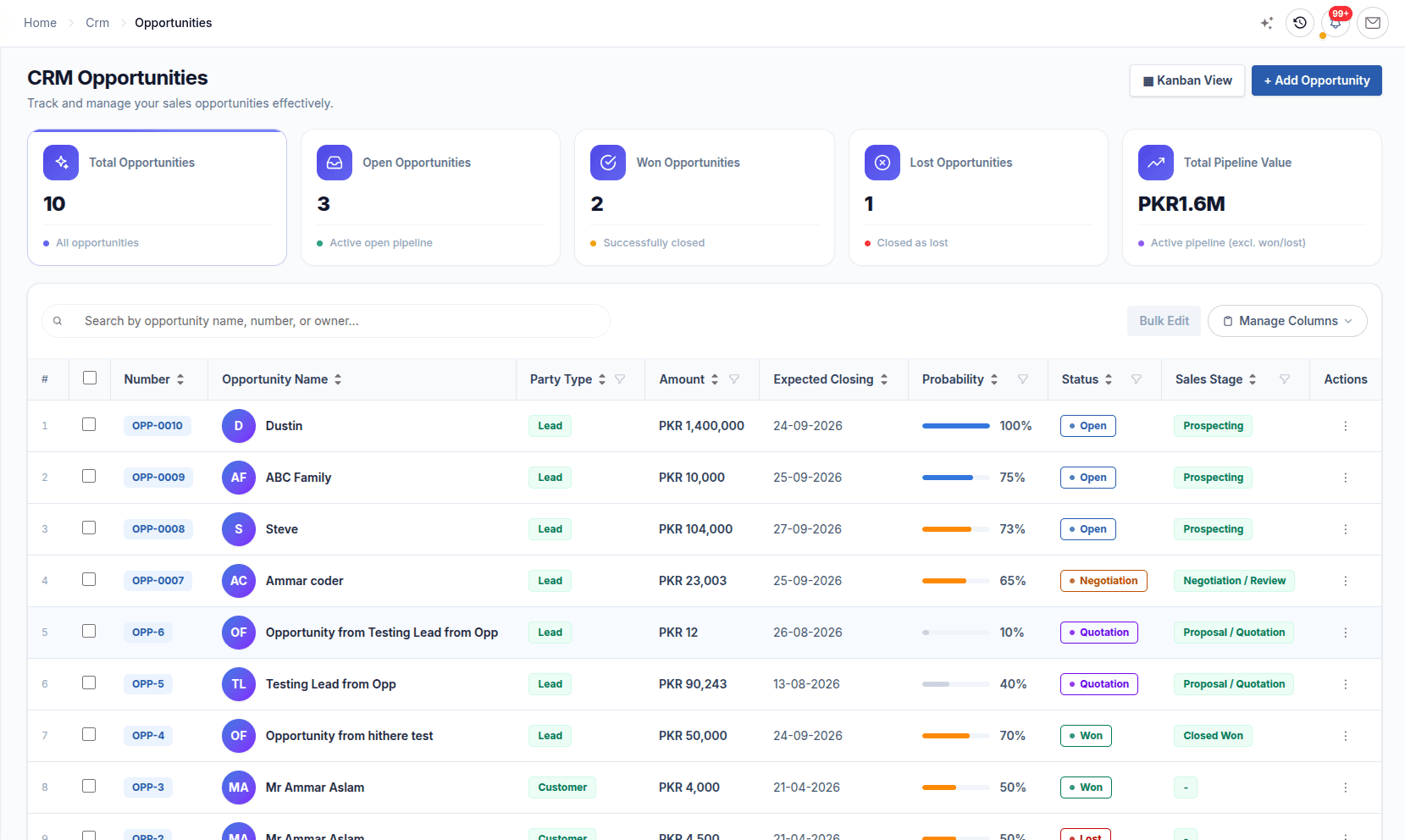
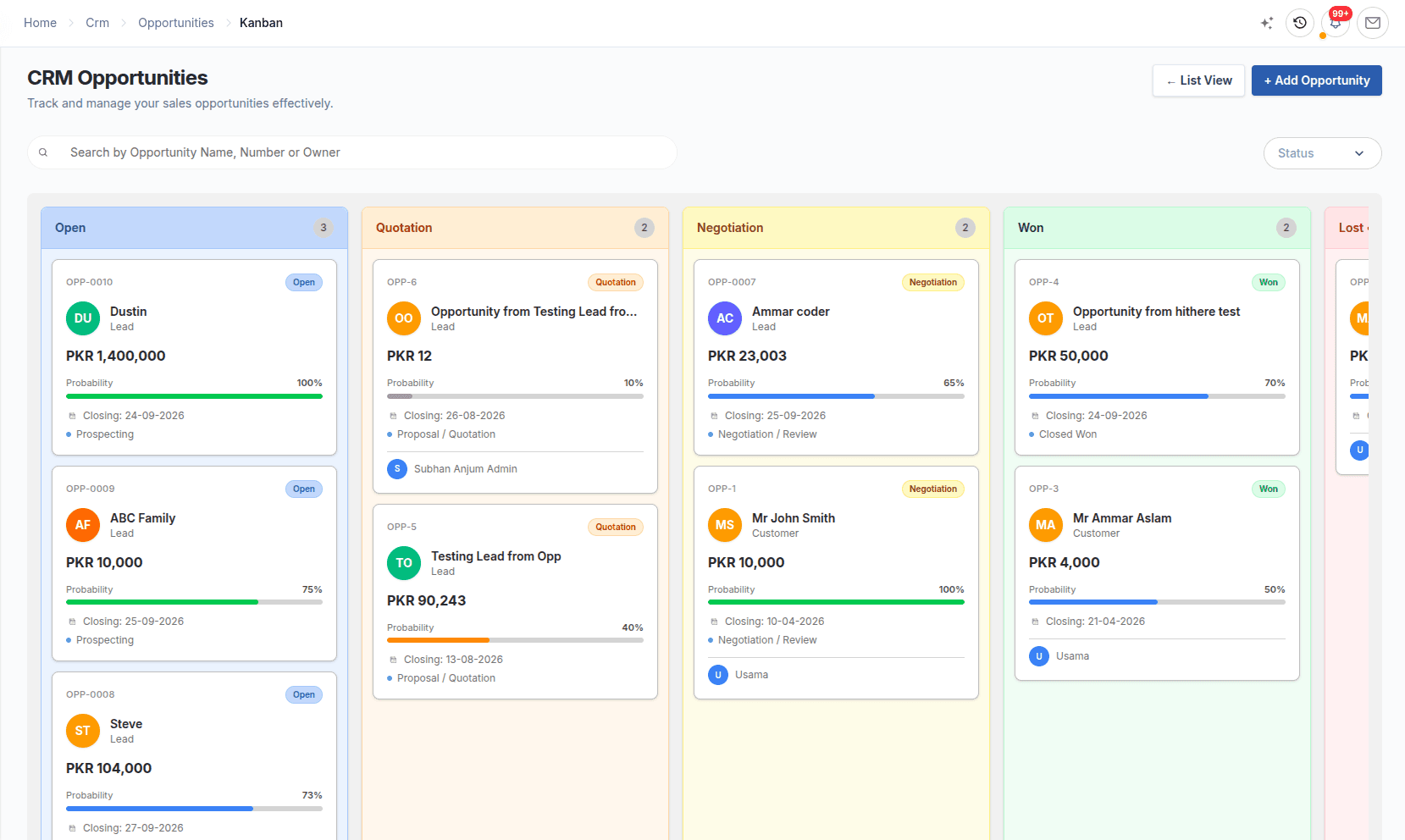
Amounts, probabilities, stages and outcomes come from the opportunity records the team already works.

  • Total and weighted pipeline
  • Lead and opportunity analysis
  • Lifecycle, funnel and transaction chain
ERPX CRM reporting: opportunity list with amount, probability and sales stage
ERPX opportunity Kanban board behind the pipeline report
CRM ReportsPipeline context and an opportunity record behind the reported value.

In detail

How CRM Reports works

Sales Pipeline report

Total and weighted pipeline, win rate and deal size.

The Sales Pipeline report shows total pipeline, weighted pipeline, total opportunities, win rate and average deal size. Below the figures sit opportunities by sales stage, pipeline value by stage, a pipeline trend and the top opportunities.

  • Weighted pipeline adjusts each deal by its probability
  • Win rate is the share of closed deals that were won
  • Export the report to PDF

Sales Funnel & Lead Lifecycle

See where leads drop out, and why one lead stalled.

The Sales Funnel counts Active Leads, Opportunities, Quotations and Converted, and can be downloaded as PNG or PDF. The Lead Lifecycle report traces one lead’s opportunities, emails, notes, calls, meetings and Sales Quotations in one place.

  • A steep drop from leads to deals points to qualification
  • A steep drop from quotations to converted points to pricing
  • Lead Lifecycle export keeps its sections in CSV

Lists & Transaction Chain

Lead and opportunity lists, and the trail into Sales.

Lead Reports and Opportunity Reports are filterable lists by status, stage, territory, owner, source and date, exportable to CSV. Transaction Chain starts from a lead, prospect or opportunity and follows it to the converted customer and its Sales Quotations.

  • Lead Reports filter by next follow-up date
  • Opportunity Reports sort by expected closing
  • Transaction Chain proves where business came from

Worked example

Example: answering a quarterly pipeline review

A sales manager prepares for the quarter review and needs each answer to trace back to records.

Example: answering a quarterly pipeline review
QuestionReportWhat it shows
How much is in play?Sales PipelineTotal and weighted pipeline from amount and probability
Are we winning?Sales PipelineWin rate, average deal size and top opportunities
Where do leads drop out?Sales FunnelActive Leads → Opportunities → Quotations → Converted
Which deals are overdue?Opportunity ReportsOpen deals sorted by expected closing date
Where did this customer come from?Transaction ChainThe lead, opportunity and Sales Quotations behind the customer

Every answer comes from the same lead and opportunity records the team works every day.

Buyer questions

Questions about CRM Reports

CRM reporting summarises leads, opportunities and conversions so managers can see pipeline value, win rate and where deals stall. ERPX CRM has six reports: Sales Pipeline, Lead Reports, Opportunity Reports, Lead Lifecycle, Transaction Chain and Sales Funnel, all built on the records the sales team already maintains.

CRM-only reports stop at the won deal. ERPX CRM reports cover the pipeline, the sales funnel and each lead’s full lifecycle, and the Transaction Chain reports follow a lead through quotations into orders, deliveries and invoices. Sales and finance read the same records, so pipeline and revenue figures do not need to be reconciled across systems.

Weighted pipeline in ERPX is the value of active opportunities adjusted by each deal’s probability. Total pipeline treats a 10% deal the same as a near-certain one; weighted pipeline does not. ERPX shows both on the Sales Pipeline report. Compare them weekly: a wide gap means much of the pipeline rests on low-probability deals.

The ERPX Sales Funnel counts how many records reach each stage: Active Leads, Opportunities, Quotations and Converted. Read it by the biggest drop. A steep fall from leads to opportunities suggests a qualification problem, while a fall from quotations to converted suggests a pricing or closing problem. It downloads as PNG or PDF.

Yes. The ERPX Lead Lifecycle report traces one lead end to end: its summary, the opportunities generated from it, the emails, notes, calls and meetings logged, and the Sales Quotations raised with the customer they went to. Filter by status, territory, owner, source or a specific lead, and export it to CSV.

Yes. ERPX exports Lead Reports, Opportunity Reports and Lead Lifecycle to CSV, the Sales Pipeline report to PDF, and the Sales Funnel to PNG or PDF. Exports keep the filters you applied, so the file answers the question you asked. Reports appear only for roles that have access to them.

Personalized ERPX demo

Bring one real workflow.See it running in ERPX.

A focused walkthrough built on how your team works today and what you want to improve next.

Pick a workflow from

  • Operations
  • Finance
  • People
  • Projects