
Ask in your own words
Type or speak a question. ERPX sends it to the right module agent and brings in a second one when the question crosses modules.
Engineering & Industrial Equipment Suppliers
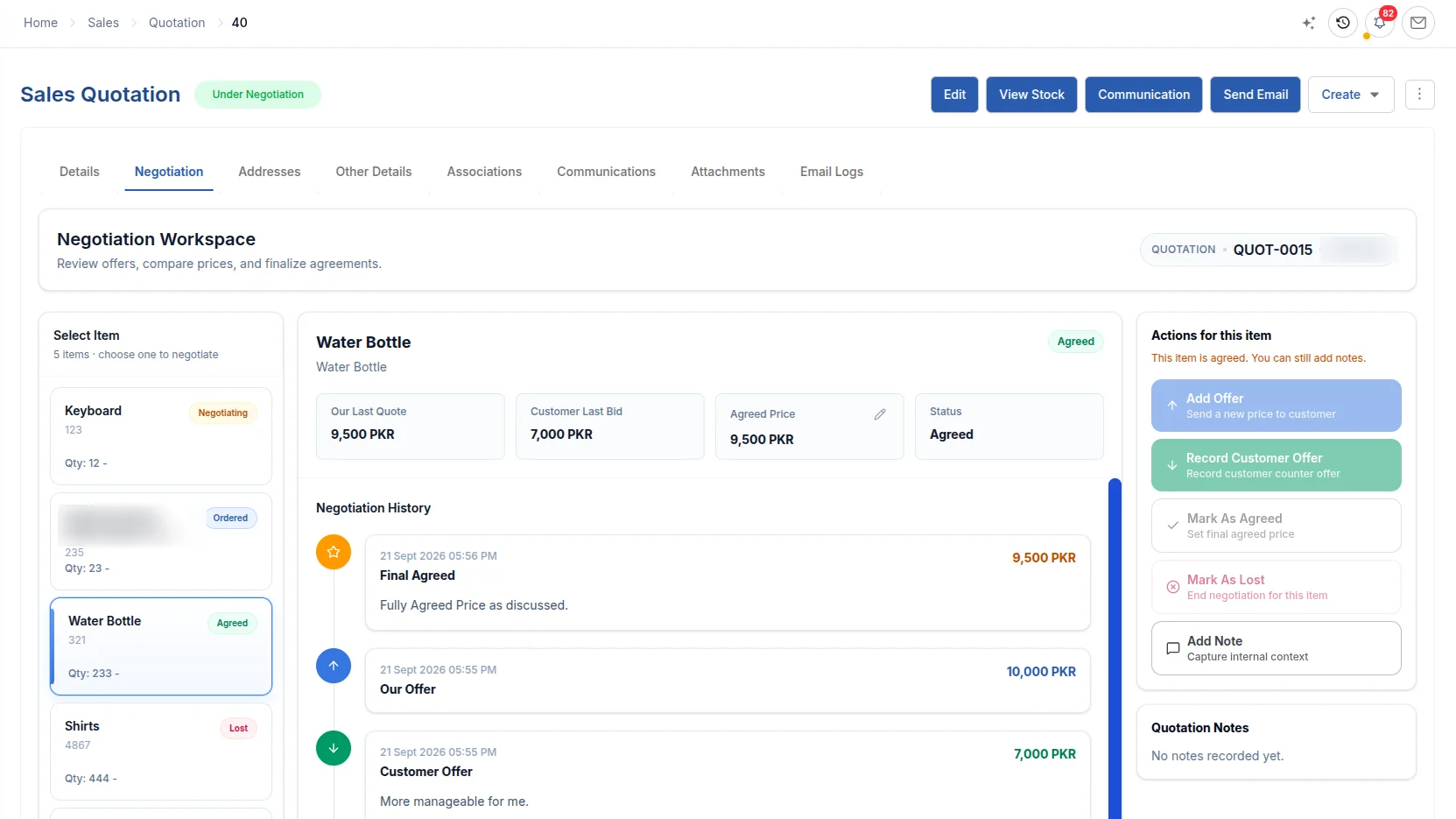
ERPX lets you negotiate each quotation line separately, cost imported parts with freight and duty, trace every serial-numbered unit from purchase to customer, and log after-sales issues.
Direct answer
ERPX for engineering and industrial equipment suppliers is a set of connected ERPX modules for businesses that quote, import, assemble and deliver high-value equipment. It negotiates quotations line by line, tracks each unit by serial number from purchase to customer, costs imported parts with landed cost and logs after-sales issues.
Who this is for
Suppliers of generators, transformers and switchgear who quote high-value systems line by line and track each unit.
Dealers who sell serial-numbered machines alongside spares and need to know which unit went to which customer.
Businesses that import components, assemble in-house and must cost each assembly with freight and duty included.
Exporters who ship machinery against a proforma invoice and letter of credit.
Problems we solve
The problem
Each quotation line has its own negotiation status. Agree one line, keep negotiating a second and mark a third as lost. Only agreed lines can become a sales order.
The problem
Serial-tracked items get one serial per unit on receipt. The Serial Wise Item Ledger and Transaction Chain show which PO bought the unit, what it cost, where it was held and which delivery note sent it to which customer.
The problem
A landed cost voucher adds freight, customs duty, clearing and insurance to the GRN rows in proportion to value, so imported parts carry their full cost into stock.
The problem
Bills of materials define single-level or multi-level assemblies with operations and planned costs, while item bundles sell a kit as one line and move stock on its parts.
The problem
Support issues record the customer, issue type, priority and assigned agent, move through Open, In Progress, Waiting, Resolved and Closed, and keep comments on the issue timeline.
End to end
An equipment deal in ERPX runs from a quotation negotiated line by line to a delivered, serial-tracked unit, with any after-sales issue logged against the customer.
Raise a quotation with priority, a Valid Till date, per-line discounts and taxes, payment term and price term. ERPX can show what this customer was quoted and ordered for the same items before.
Record our offers, customer offers and notes per line on the Negotiation tab, then mark each line agreed or lost.
Create the sales order from the agreed lines only. Lost lines close; pending lines stay open to negotiate.
Raise purchase orders in the supplier’s currency and receive parts on a GRN, entering one serial number per unit for serial-tracked items.
Spread freight, duty and clearing across the received parts with a landed cost voucher.
Build assemblies from their bill of materials on a work order before dispatch.
Select the serials leaving the warehouse on the delivery note; their status moves to Delivered on approval.
Record customer issues with priority and an assigned agent and track them to resolution.
ERPX AI for Engineering & Industrial Equipment Suppliers
Engineering suppliers use ERPX AI from negotiation to delivery. It tracks item-by-item quotation negotiation, validates BOMs and checks a project against its specification.
Access follows each user’s role. Changes wait for approval.
Where are we on the negotiation for QTN-0582?
Sales
4 of 6 items are agreed. The gearbox and control panel are still open on price.
Gap to the customer’s target price
Example questions ERPX AI can answer. The figures shown in the animation are illustrative.
Illustrative data
Type or speak a question. ERPX sends it to the right module agent and brings in a second one when the question crosses modules.
Answers come from your own ERPX data through governed queries, limited to what your role can see.
When the next step creates or changes a record, ERPX prepares it and waits for you to approve, edit or reject it.
Connected in ERPX
Explore the modules behind this workflow and open the relevant documentation.
Quotations
The quotation header status is derived from its lines: Open, Under Negotiation, Completed, Ordered, Lost or Cancelled. You never set it by hand.
Priced lines are agreed automatically when the quotation is saved; lines left at a rate of zero stay Pending until they are priced through negotiation.
| Line status | Meaning |
|---|---|
| Pending | Not yet priced or offered |
| Negotiating | An offer or counter-offer is on the table |
| Agreed | A price is settled; only agreed lines can be ordered |
| Ordered | Converted to a sales order line |
| Lost | Written off; the customer will not buy this line |
Serial numbers
A serial number identifies one physical unit. ERPX requires one serial per unit received and rejects a receipt whose serial count does not match the quantity. Approving an outward document without selecting serials is blocked.
A serial number prefix on the item, such as PUMP-A, keeps generated serials readable by product family.
| Status | Meaning |
|---|---|
| In Stock | On a draft inward document awaiting approval |
| Active | Approved and physically in the warehouse |
| Delivered | Issued out to a customer or consumed |
| Cancelled | Voided; no longer part of stock |
Imported parts
Purchase orders carry the supplier’s currency and exchange rate. After the GRN is approved, one landed cost voucher per consignment spreads the clearing agent’s charges across the received parts, and the weighted average is recalculated forward from the GRN date.
Record the purchase rate on each serial so per-unit margin can be analysed later.
Support
Each support issue records the subject, customer, issue type, priority (Low, Medium, High or Critical), description and the assigned agent, who is notified when the issue is saved. Comments log internal notes and replies to the customer on the issue timeline.
Compliance and local requirements
Export and tax fields for equipment suppliers who import parts or ship machinery abroad.
For machinery exports, the proforma invoice carries HS codes, the Incoterm and ports, and the packing list and shipment record follow it.
Each customer carries its national tax number and sales tax registration number, kept visible in the record sidebar while you work.
Sales and purchase invoices have a dedicated withholding card. Enable Include Withholding Tax, choose the configured tax type and rate, and the invoice records it separately from ordinary taxes.
Define the tax and charge rules invoices use, each with its own rate and the account it posts to.
Please note: ERPX applies the tax rates and accounts your team configures; it does not decide your legal tax treatment. Finance should verify rules against current local requirements.
FAQ
Keep exploring
See how other teams use ERPX, then go deeper in the product guides.
Proforma invoices with HS codes and Incoterms, shipment records, documents in the deal currency and landed cost that puts freight and duty into item cost.
Explore solutionProduction plans, BOMs, work orders, job cards and outside processing connected to inventory and purchasing.
Explore solutionStock per item per warehouse, reorder levels that warn, block or raise purchase requests, batches, bundles and sales-team commission for distributors.
Explore solutionProduct guides for this workflow
Equipment supplier demo
Walk through line-by-line negotiation, imported parts with landed cost and serial-number delivery in a demo.
Explore the connected flow