
Find your information
Attendance, salary details and documents in one place.
ERPX Human Resources / Employee Self-Service
Check attendance. Request time off. Follow a claim. ERPX brings the HR information employees need into one personal workspace, connected to the same records your HR team uses.
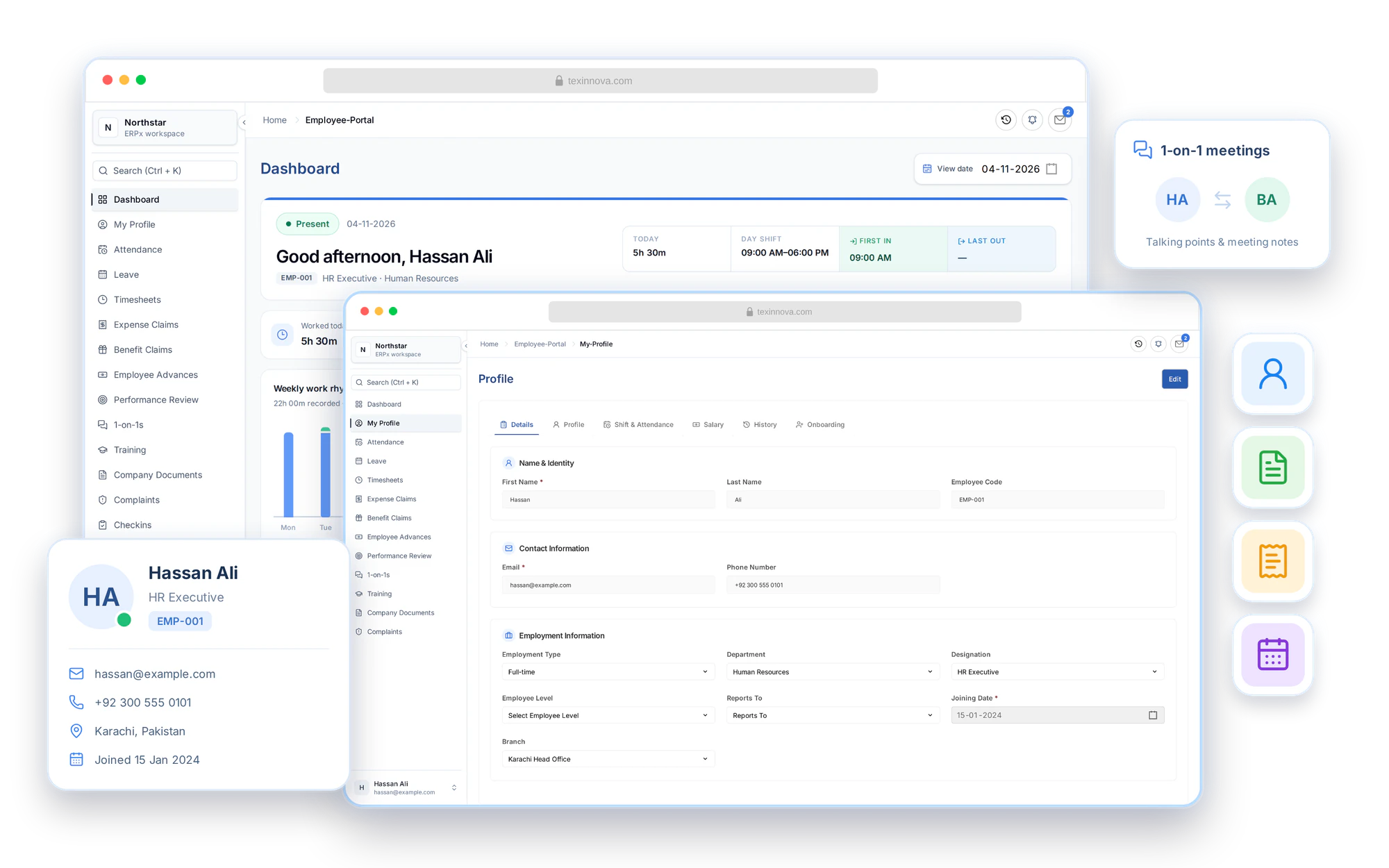
Employee self-service software
Give every employee a personal place to manage their workday, find information, submit requests and take part in their development. HR and managers keep the context because the portal works with the same connected records and approval processes.
Attendance, salary details and documents in one place.
Leave, timesheets, claims and advances with visible status.
Employee actions reach the right managers and HR records.
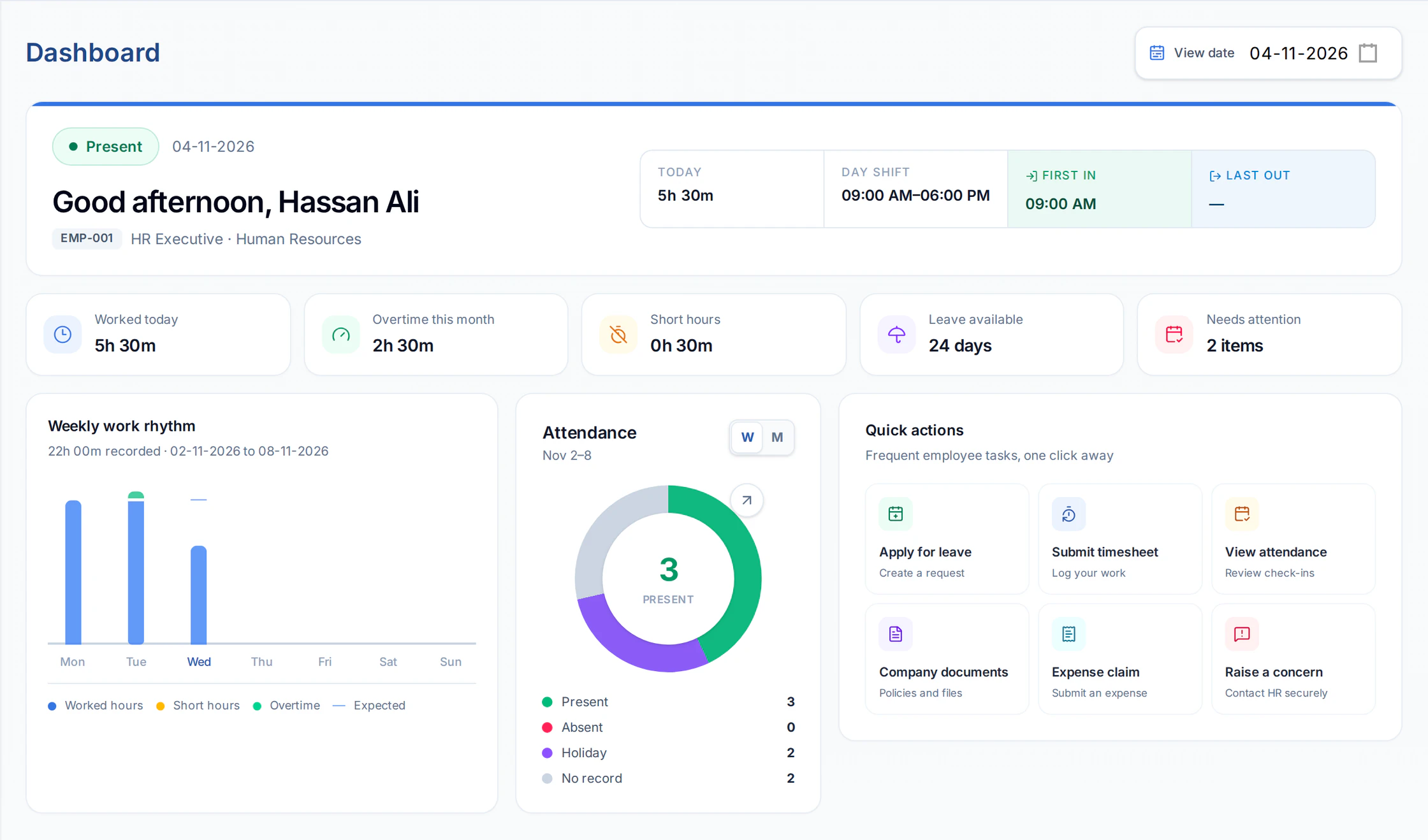
A personal workday dashboard
Start with today’s attendance, shift and weekly working hours. Open attendance summaries and monthly history, see leave availability and pending items, then use quick actions to reach your next task.
Leave requests & balances
Check your leave allocation, days used and requests awaiting approval before applying. Submit full-day or half-day leave with dates and a reason, then follow the decision from your own application list.
Your leave balance
Annual Leave
Leave application
A little time for yourself.
Expenses, benefits & advances
Submit expense claims with line items and receipts. For benefit claims, choose an eligible salary component and check its balance. Request an employee advance, then follow claim statuses, reimbursements and outstanding amounts from the portal.
Expense items and supporting receipts
The request stays with its approval
See the claim’s payment status
Employee advance
Know what is still outstanding.
Amounts in PKR
Profile, salary & company documents
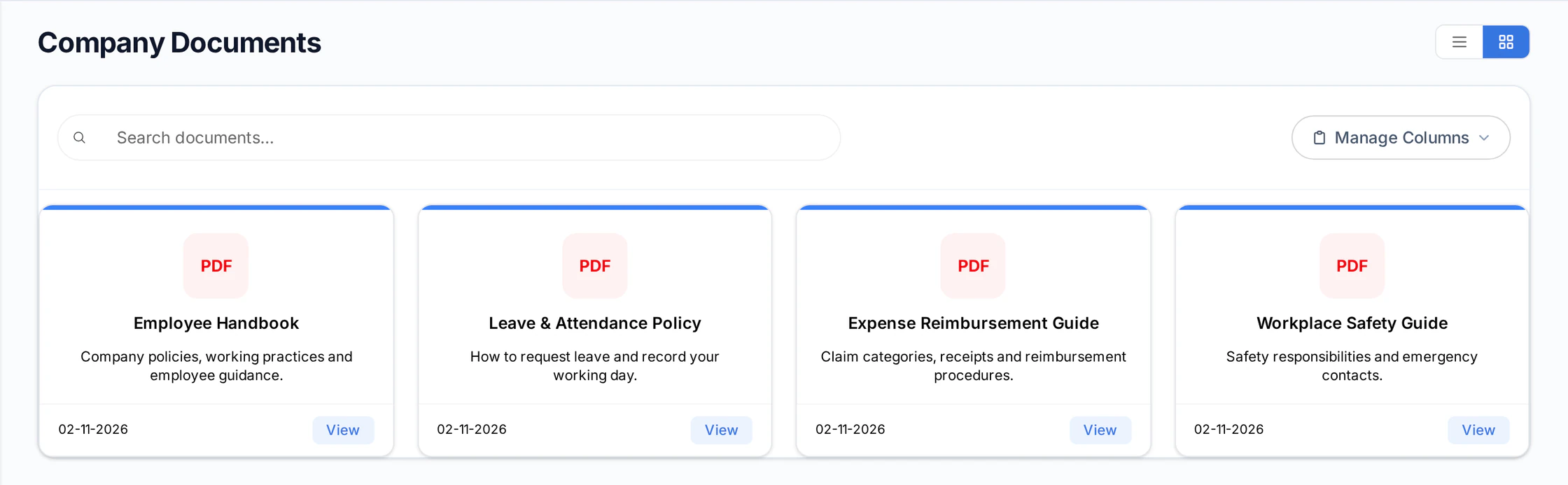
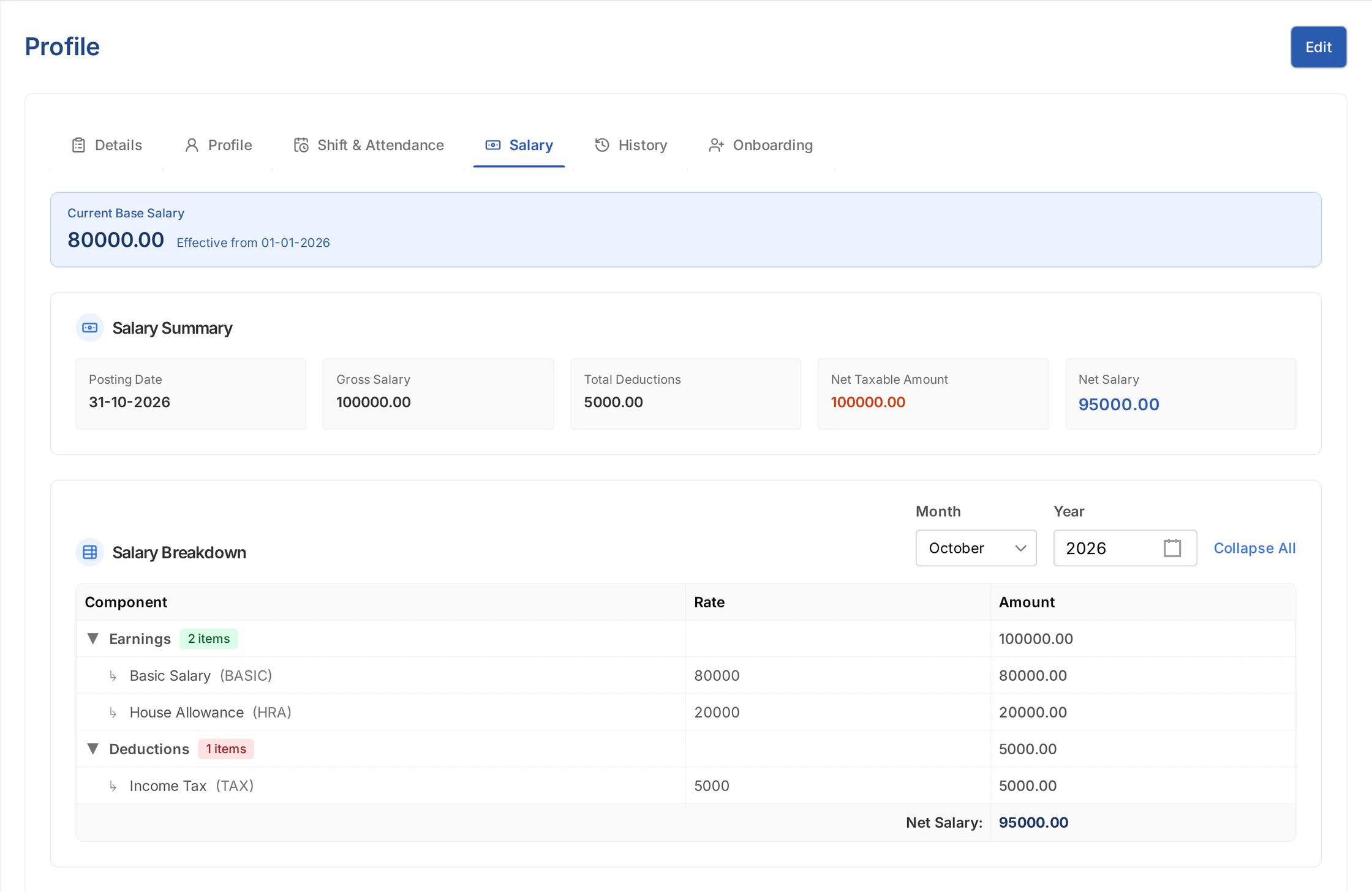
Review your employment information and make permitted updates to your personal profile. Choose a month to view generated salary details, including earnings, deductions and net pay. Find approved company documents in the same portal.
From employee action to a recorded outcome
Employees start the request. The right people review it. The outcome stays with the same record, ready for the next visit to the portal.
Leave application
Review your balance, then send dates, duration and a reason.
An authorized manager reviews the application and records a decision.
Return to the application and your leave balances for the outcome.
Project timesheet
Record project, task and activity hours, then submit for review.
A manager can approve, reject or request a revision with a note.
Check the review status or update and resubmit a requested revision.
Expense claim
Record expense items and receipts, then submit the claim.
The claim follows the relevant HR approval process.
See whether the claim is unpaid, partially paid or paid.
Each request follows its own approval process. Available actions depend on the employee’s role, permissions and reporting relationships.
1-on-1 meetings
Request a 1-on-1 with a colleague or join a scheduled conversation. Add talking points, keep shared or private notes, and follow the topics still to discuss. Managers can organize recurring meeting series within their access.
Your next 1-on-1
Weekly check-in
Friday, 6 November · 10:30 AM
Talking points
Review training progress at our next check-in.
Onboarding, learning & feedback
Follow assigned onboarding activities and update their progress. Find your training events and share event feedback. Contribute to assigned performance reviews and pulse check-ins, so feedback stays part of your working life.
A good start
Your onboarding
Your next training
Workplace safety essentials
6 November · Training Room A
ScheduledYour contribution
Make time for feedback.
Assigned reviews, event feedback and pulse check-ins.
One portal. Connected HR.
Employees take action in their own workspace. Managers and HR work with the connected records, with access and approvals defined by each process.
Find information. Send requests.
One personal HR workspace
Review, process and follow through.
The complete employee experience
Explore the full range of self-service capabilities, from the first joining activity to a regular conversation with your manager. Each employee sees the screens and actions they have access to.
Start with today’s shift, recorded hours, leave availability, pending items, upcoming activities and quick actions.
Review check-ins, working hours and monthly attendance. Follow overtime and short hours alongside your shift information.
Check allocated, used, pending and available days. Apply for full-day or half-day leave and follow the decision.
Log activity types, projects, tasks, hours and billable time. Submit your timesheet, respond to revision requests and track its review.
Review your employment details, shift information and history. Make permitted updates to your personal information.
Choose a month and year to view generated salary records, with earnings, deductions and net pay.
Find approved handbooks, policies and shared documents in a searchable list or card view.
Add expense items and supporting receipts, submit your claim and follow its reimbursement status.
Select an eligible benefit salary component, check its balance, attach supporting documents and submit the amount claimed.
Request an advance and follow paid, claimed, returned and outstanding amounts as it is settled.
Find your assigned joining activities, update task status and follow overall completion progress from My Profile.
View training events you are invited to, check their details and submit feedback after a completed event.
Complete the self, peer or manager reviews assigned to you and follow their deadlines and submission status.
Request meetings, prepare talking points and keep shared or private notes. Managers with access can organize recurring series.
Answer assigned questionnaires, see what is due and return to submitted responses. Keep active, submitted and expired check-ins in view.
Authorized managers can review subordinate leave and timesheets, request timesheet revisions, and approve or reject overtime and short hours where required.
Record a concern through the employee complaints process and follow its status from your own portal.
Part of ERPX Human Resources
Employees find their information and follow requests in the portal. HR manages the connected records behind each action.
Buyer questions
The Employee Portal is a self-service workspace connected to ERPX Human Resources. Employees can review their own HR information, submit requests and take part in assigned activities according to their permissions.
Available capabilities include profile updates, attendance, leave applications, timesheets, expense and benefit claims, employee advances, salary details, onboarding, training, performance reviews, one-on-one meetings, pulse check-ins, complaints and approved company documents. Access depends on the employee’s permissions.
Yes. Employees can review allocated and used leave, pending requests and available days by leave type for the current HR period. They can submit full-day or half-day applications and follow their request status in the portal.
Yes. The Salary tab in My Profile lets employees select a month and year to view their generated salary details, including earnings, deductions and net salary. The selected period must have a salary record and the employee must have the required access.
Yes. Employees can submit expense claims, benefit claims and employee advance requests through the portal. Their requests remain connected to the relevant HR workflows, with claim statuses and advance balances available for follow-up.
Employees can request a meeting with a colleague, view scheduled 1-on-1s, add talking points and record shared or private notes. Topics can be tracked as open, discussed or carried forward. Managers with the relevant access can also organize recurring meeting series.
Authorized managers can review subordinate leave and timesheets, request timesheet revisions, and approve or reject overtime and short hours where required. Access depends on permissions and reporting relationships. Employee submissions continue through their relevant approval process.
Yes. Employees can record activity types, projects, tasks, hours and billable time, then submit their timesheet for review. If a manager requests a revision, the employee can update and resubmit the timesheet while following its review status.
Pulse check-ins are assigned questionnaires for employee responses and feedback. Employees can see active, submitted and expired check-ins, complete available questionnaires and return to submitted responses. Attendance check-ins are shown separately in attendance.
Yes. Employees can record concerns through the Employee Portal’s complaints process and follow their status. Access to screens and actions is governed by the employee’s permissions.
Employees can find approved company documents, view training events assigned to them and submit event feedback. They can also follow their assigned onboarding activities and take part in performance reviews and one-on-one meetings.
Personalized ERPX demo
A focused walkthrough built on how your team works today and what you want to improve next.
Pick a workflow from