
ERPX Human Resources / Employee Lifecycle
Every stage. Every employee. Connected.
Welcome new people. Develop their skills. Listen and follow through. Bring onboarding, growth and the final handover into one connected employee journey.
People move forward. Keep HR connected.
Support the whole employee journey.
Coordinate onboarding and offboarding, map employee skills, organize training, and follow up on complaints and pulse check-ins. Give each stage a clear owner, with employees taking part through their own portal.
Employee onboarding
A warm welcome. A clear plan.
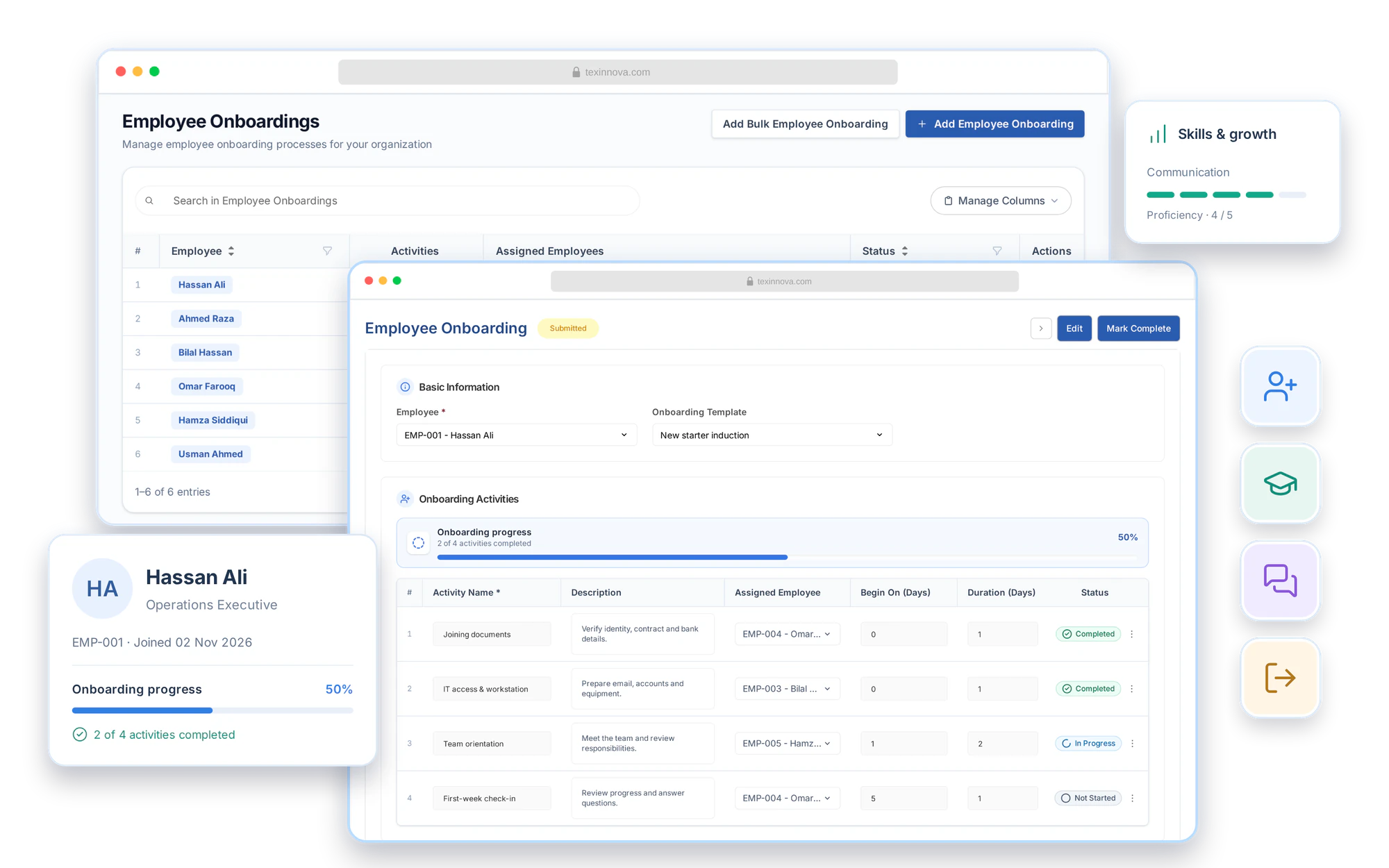
Use onboarding templates to give each new hire a consistent start. Assign activities to the people responsible, track timing and progress, and create onboarding records in bulk when a whole group joins.
- Reusable templates with activities, assignees and timing
- Project tasks created when onboarding is submitted
- Bulk onboarding and employee portal participation
Onboarding & offboarding workflow
From checklist to completed work.
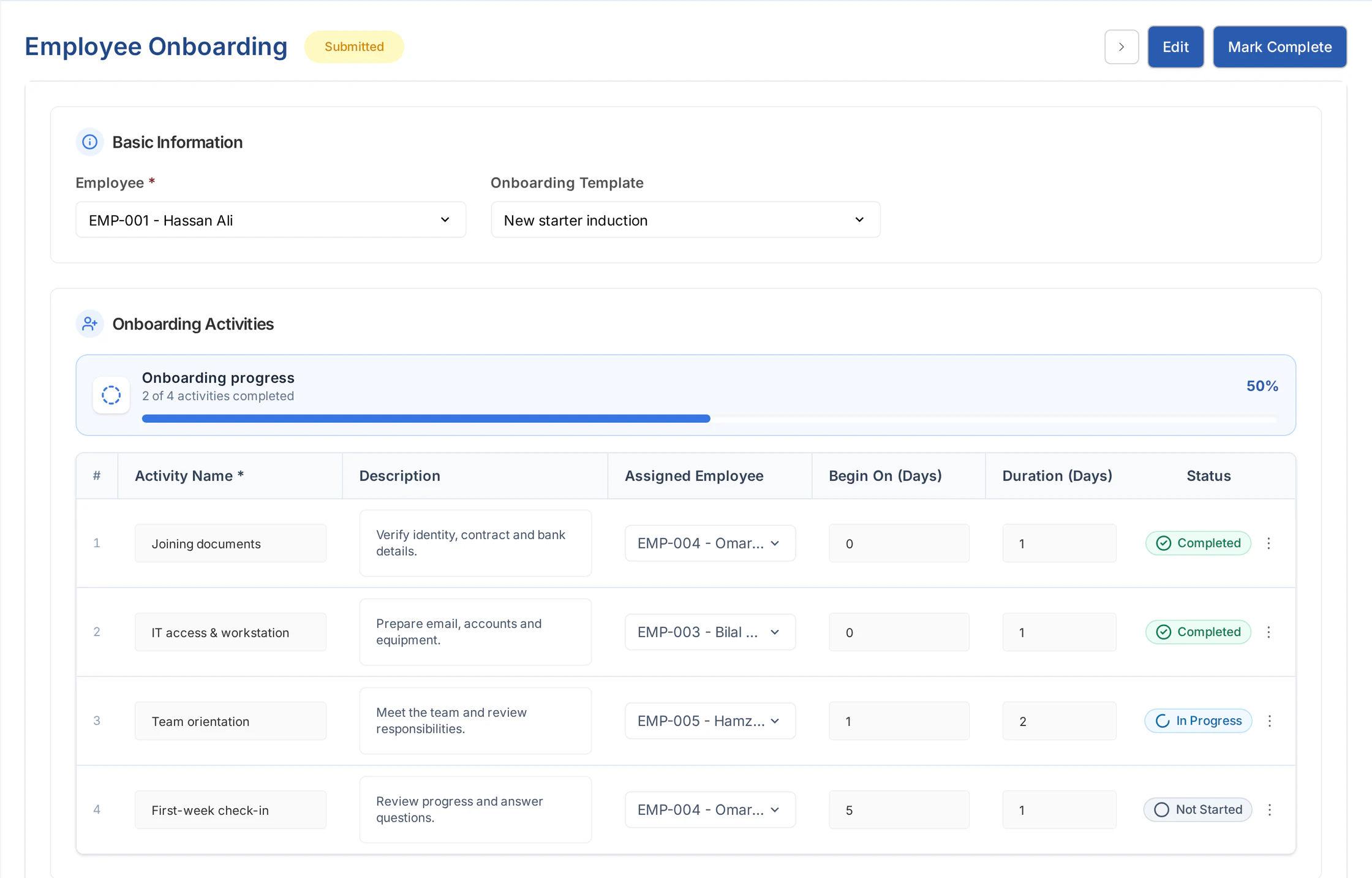
A repeatable plan for joining and leaving, with an owner at every step.
- 01
Choose a template
Start with reusable activities, timing and duration.
HR prepares - 02
Assign the owners
Give each activity a responsible person.
People take ownership - 03
Submit the plan
Create linked project tasks for the assigned work.
Tasks connect - 04
Follow completion
Review activity status and overall progress together.
HR follows through
Employee skill mapping
Know the strengths. Plan the next step.
Record an employee’s skills, allocation date and proficiency, with star ratings that make each level easy to read. Keep role-related and unrated skills visible for the next development conversation.
- Employee skills with proficiency scores and star ratings
- Allocation dates and skills linked to the employee’s designation
- Skill reports across employees, departments and roles
Skills & development
Employee skill map- Employee
- Hassan AliEMP-001
- Allocation date
- CommunicationProficiency: 4/5
- Data analysisProficiency: 3/5
- Team leadershipProficiency: Unrated
Keep unrated skills visible for the next evaluation.
Training management
Build the skills. Keep the outcome.
Organize programs and schedule events with the people who should attend. Follow participation, collect feedback and record results so the session leaves behind more than a calendar entry.
- Training programs, trainers and scheduled events
- Attendees, invitations and participation status
- Participant feedback, grades, hours and comments
Training management
From program to progress.01 / Program
Team leadership essentials
Content, objectives and trainer details
02 / Event
Turn the program into a session
12 Nov · 10:00–12:00 · 8 attendees
Attendees invited03 / Follow-up
Record results and feedback
Results & gradesParticipant feedback
Employee complaints
Hear the concern. Follow it through.
A concern needs an owner and a record of what happened next. Capture the complaint, categorize it and track investigation and resolution with the relevant people working through their assigned access.
- Grievance types, subject, description and supporting details
- Cases raised by HR or through the employee portal
- Assignment, investigation and resolution records
Employee complaint
Workplace equipment concernConcern raised
The employee records the issue and supporting details.
Investigation recorded
The assigned team documents its findings and next steps.
Resolution documented
Actions taken and the final decision stay with the case.
A named owner. A record of the follow-up.
Employee pulse check-ins
Keep listening. Between the milestones.
Create a questionnaire, assign it to employees or groups, and follow the responses in one place. Employees answer in their portal, with submission history available for follow-up. These pulse check-ins are feedback questionnaires; attendance punches live in Shift & Attendance.
- Questionnaires with the questions you want to ask
- Employee and group assignments, with response expiry
- Portal responses with submitted and unfilled status
Employee pulse check-in
A moment to check in.Weekly team check-in
Completed the handover and helped a new teammate settle in.
Space for an employee’s own words.
Assigned employees respond in their Employee Portal.
Employee offboarding
A thoughtful exit. A clear handover.
Coordinate exit activities from a template and assign each handover to the right person. Review outstanding employee dues and unused leave in the Clearance view, alongside resignation details and the final working date.
- Offboarding templates, assigned activities and progress
- Outstanding payables, receivables and unused leave balances
- Exit reasons, resignation details and separation reporting
Offboarding / Clearance
Review what remains.Final working day · 20 Nov 2026
- Outstanding payable
- PKR 18,400
- Outstanding receivable
- PKR 2,400
- Net payable to employee
- PKR 16,000
- Unused leave balance
- 6 days
- Return company equipmentIT
- Complete knowledge handoverManager
- Review outstanding duesFinance
Part of ERPX Human Resources
One employee journey.
Connected to the rest of HR.
Keep the person at the center. Employee records, performance conversations and self-service give each lifecycle activity its context.
Buyer questions
Your employee lifecycle questions, answered.
What does employee lifecycle management include in ERPX?
It includes onboarding, offboarding, employee skill mapping, complaints, training programs and events, training feedback and results, and questionnaire-based employee check-ins.
Can onboarding work be assigned to different people?
Yes. Templates contain activities with assignees and timing. Submitting onboarding creates project tasks so responsible people can track the work through completion.
Does training include feedback and results?
Yes. ERPX supports programs, scheduled training events and attendees, participant feedback, and training results with grades, hours and comments.
Can HR onboard a group of employees at once?
Yes. Bulk onboarding lets HR use a template and activities for multiple selected employees. Each employee gets an onboarding record with its own assigned work and progress.
How does employee skill mapping support development?
Skill maps record the employee, skill, proficiency and allocation date. Designations provide role-related skill context, and employee skill reports help HR review the records across people and teams. Unrated skills remain visible for evaluation.
Can employees raise complaints through self-service?
Yes. Employees can raise concerns through the Employee Portal. HR can categorize and assign complaints, record investigation details and document the resolution through the access available to the relevant users.
What can HR review before an employee leaves?
Offboarding brings exit activities, responsible people, resignation details and progress together. Its Clearance view shows outstanding employee payables and receivables, the net balance and unused leave so HR and Finance can review what remains.
Are pulse check-ins attendance records?
No. Lifecycle check-ins are employee questionnaires with assignments and responses. IN/OUT time punches belong to Shift & Attendance.
Personalized ERPX demo
Bring one real workflow.See it running in ERPX.
A focused walkthrough built on how your team works today and what you want to improve next.
Pick a workflow from
- Operations
- Finance
- People
- Projects