
ERPX Export Documentation
From proforma to shipment, on one document chain
A letter of credit record with real SWIFT-style fields, AI-Powered Autofill to draft it from an uploaded document, and the same order carrying through to delivery, packing, and shipment.
Direct answer
What is ERPX Export Documentation?
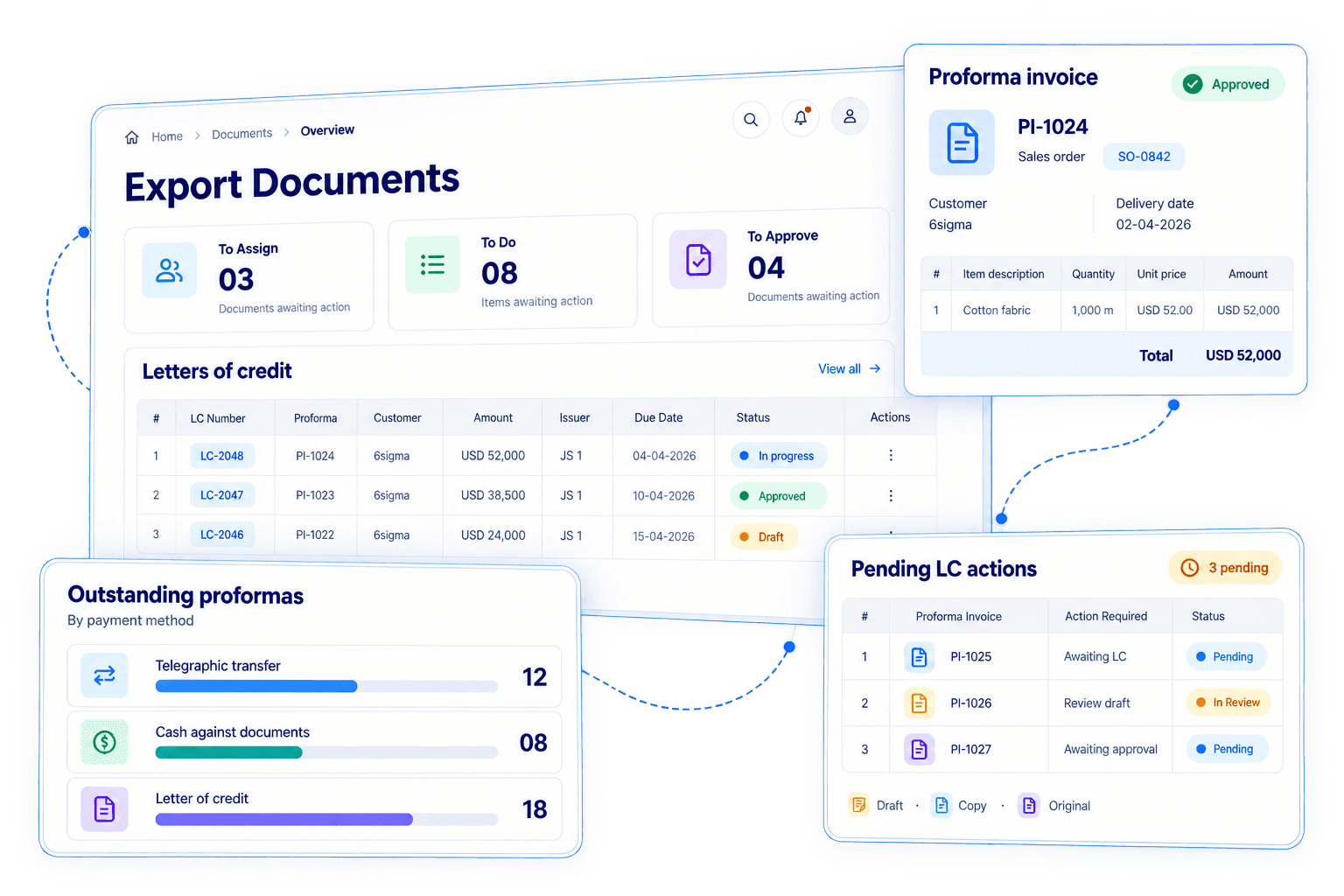
ERPX Export Documentation carries an export order through proforma invoice, a letter of credit with SWIFT-style clauses, delivery, packing, and shipment, so exporters stop re-typing the same order details into separate files.
The document chain
One order, five connected steps
Each stage draws on the record before it, so the details behind an export order stay in one chain instead of separate files.
- 01
Proforma Invoice
Created from a Sales Order, with currency, items, payment terms, and Incoterm.
- 02
Letter of Credit
SWIFT-style fields, AI-Powered Autofill, and 46A/47A compliance tracking.
- 03
Delivery Note
Created directly from the LC or its source Sales Order.
- 04
Packing List
Package type, count, net/gross weight, and dimensions.
- 05
Shipment
Vessel, voyage, ports, container numbers, and B/L or AWB number.
AI-Powered Autofill
Draft the LC record, then review every field
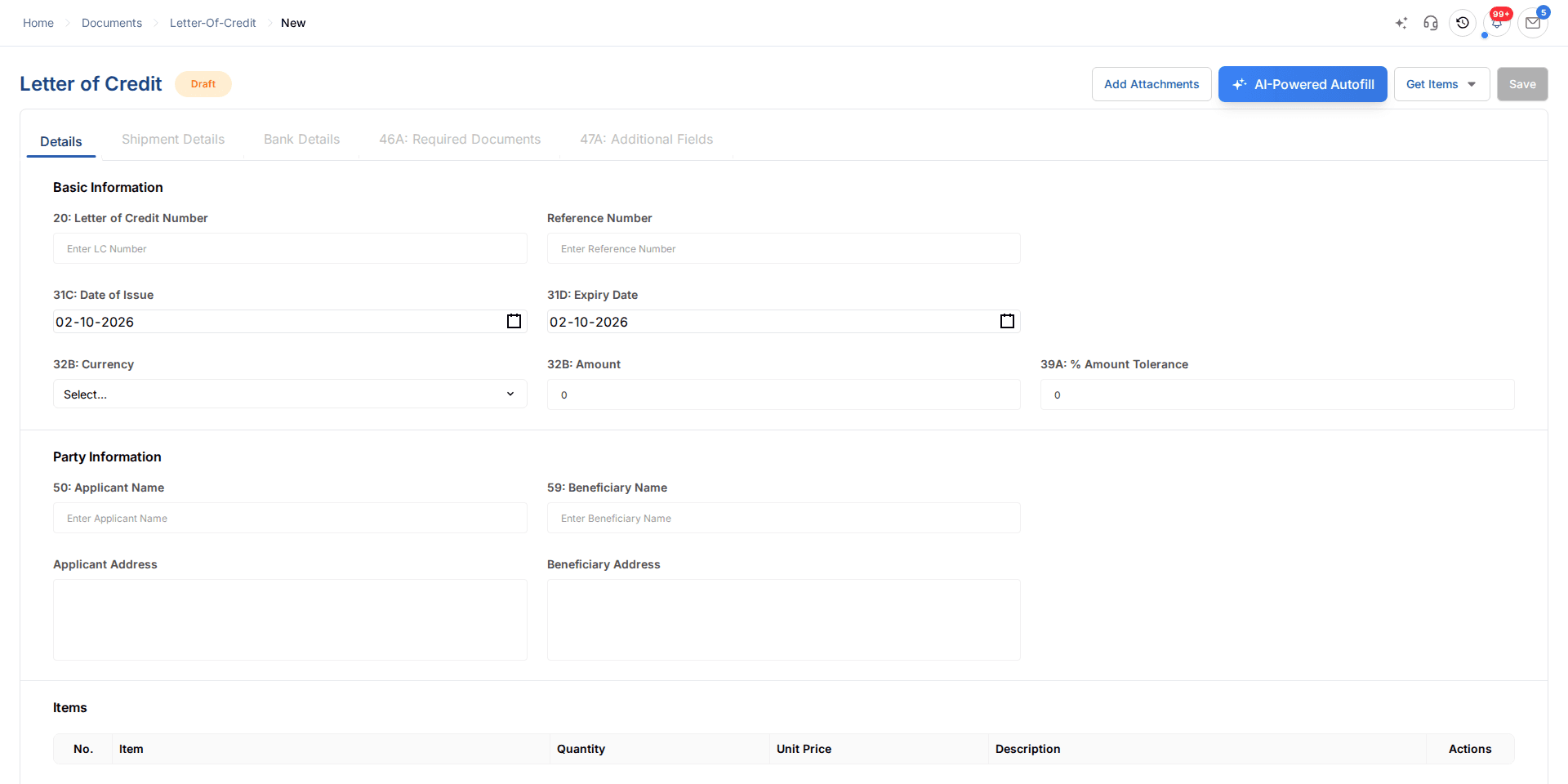
The Letter of Credit form includes a real SWIFT-style layout: LC number, dates of issue and expiry, currency and amount, applicant and beneficiary, and banking details. AI-Powered Autofill drafts these fields from an uploaded document so you start with a filled form. Review and correct the details before saving.
Compliance fields, not a side note
Required documents and conditions live on the LC itself
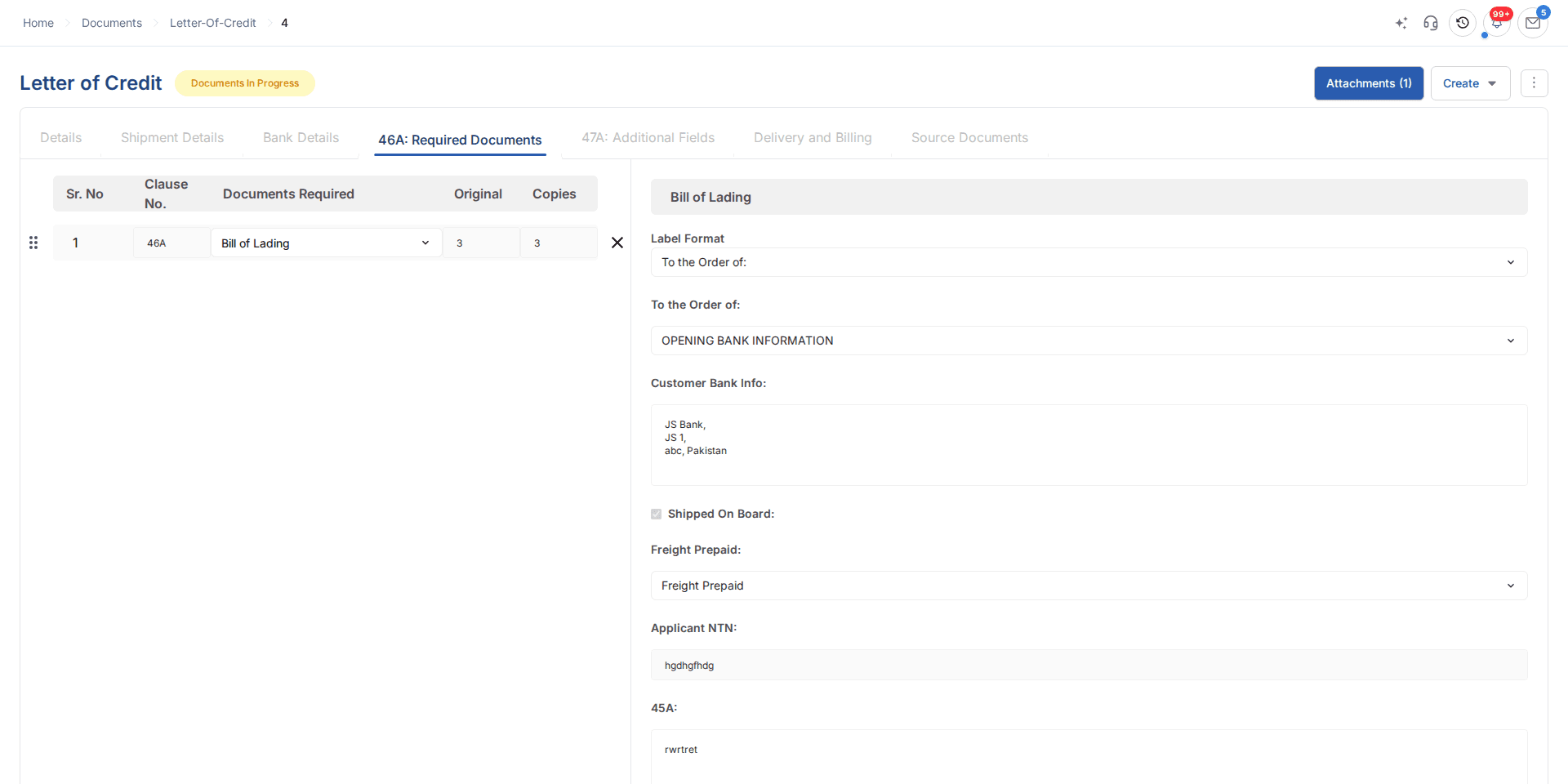
The 46A tab lists required documents by clause, with original and copy counts per document. The 47A tab holds the LC’s additional conditions and an additional-documents checklist. Both are structured fields on the record, not free text in an email.
Packing List
Package-level weight and dimensions
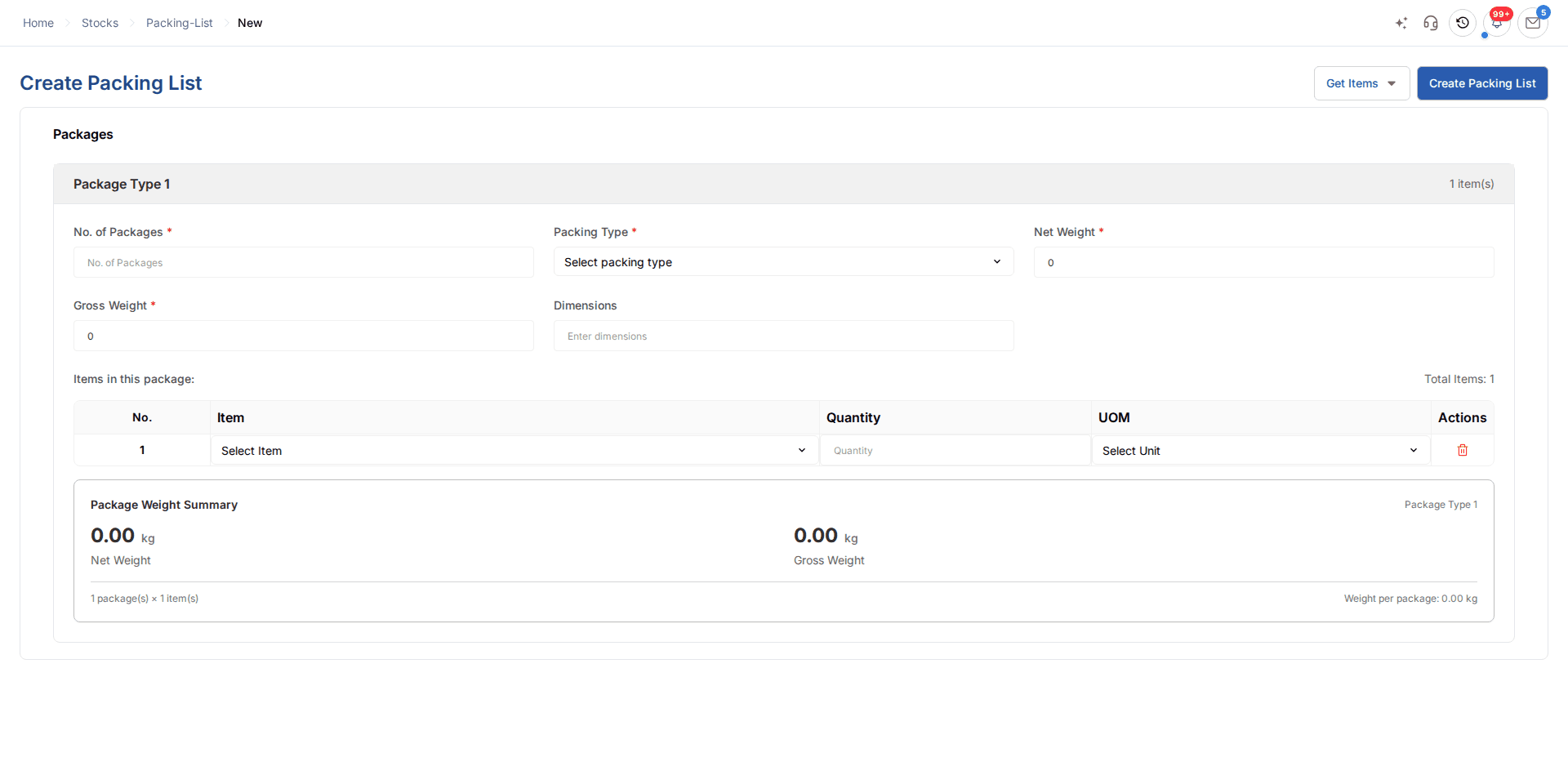
A Packing List records package type, number of packages, net and gross weight, and dimensions for the items in a delivery, so the fulfillment detail travels with the shipment rather than living in a separate spreadsheet.
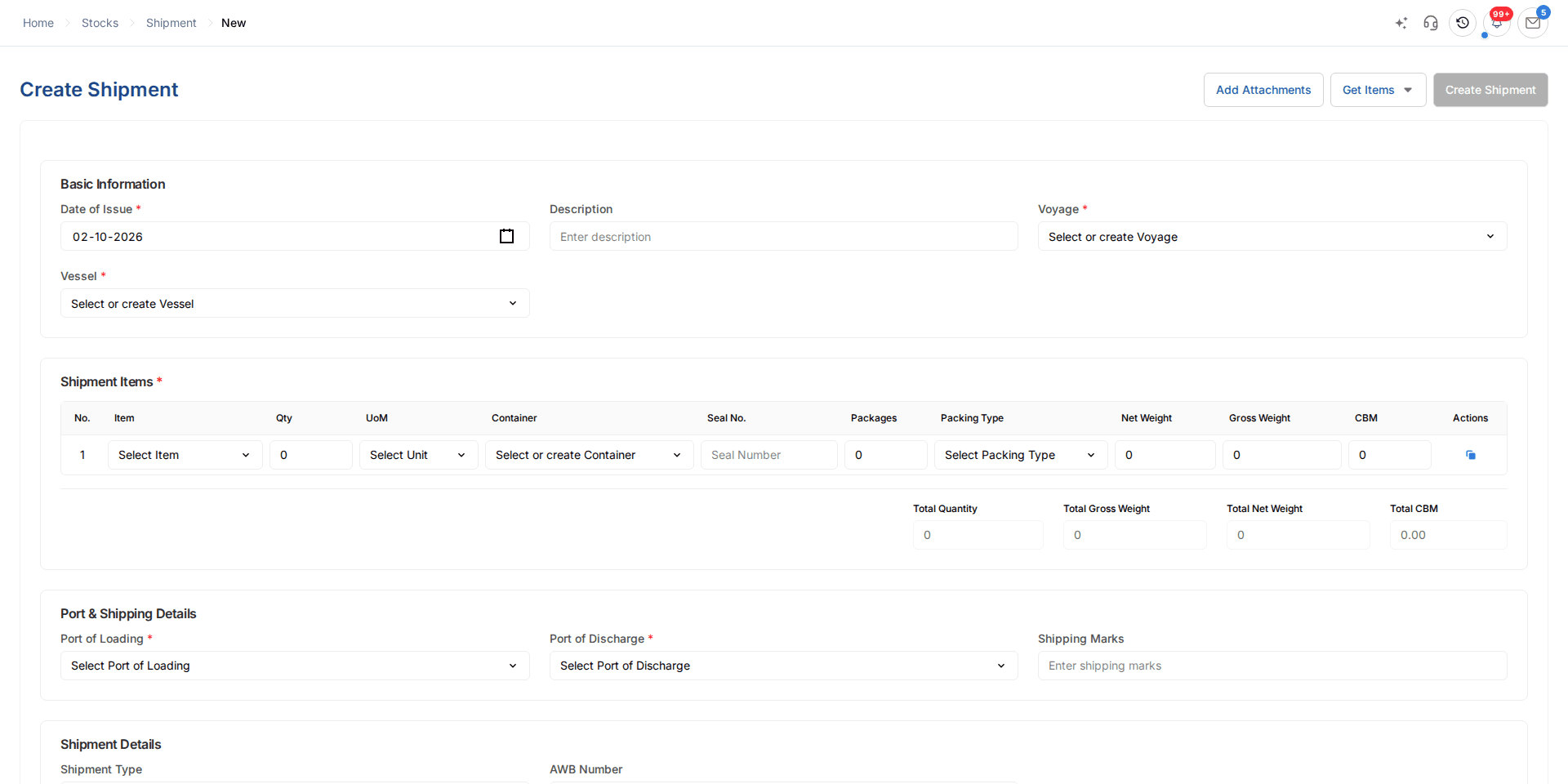
Shipment
Vessel, ports, and container detail
A Shipment record carries the voyage and vessel (or flight), port of loading and discharge, shipping marks, container and seal numbers, and the shipment type (air or sea), with its B/L or AWB number.
Stay on top of expiring LCs
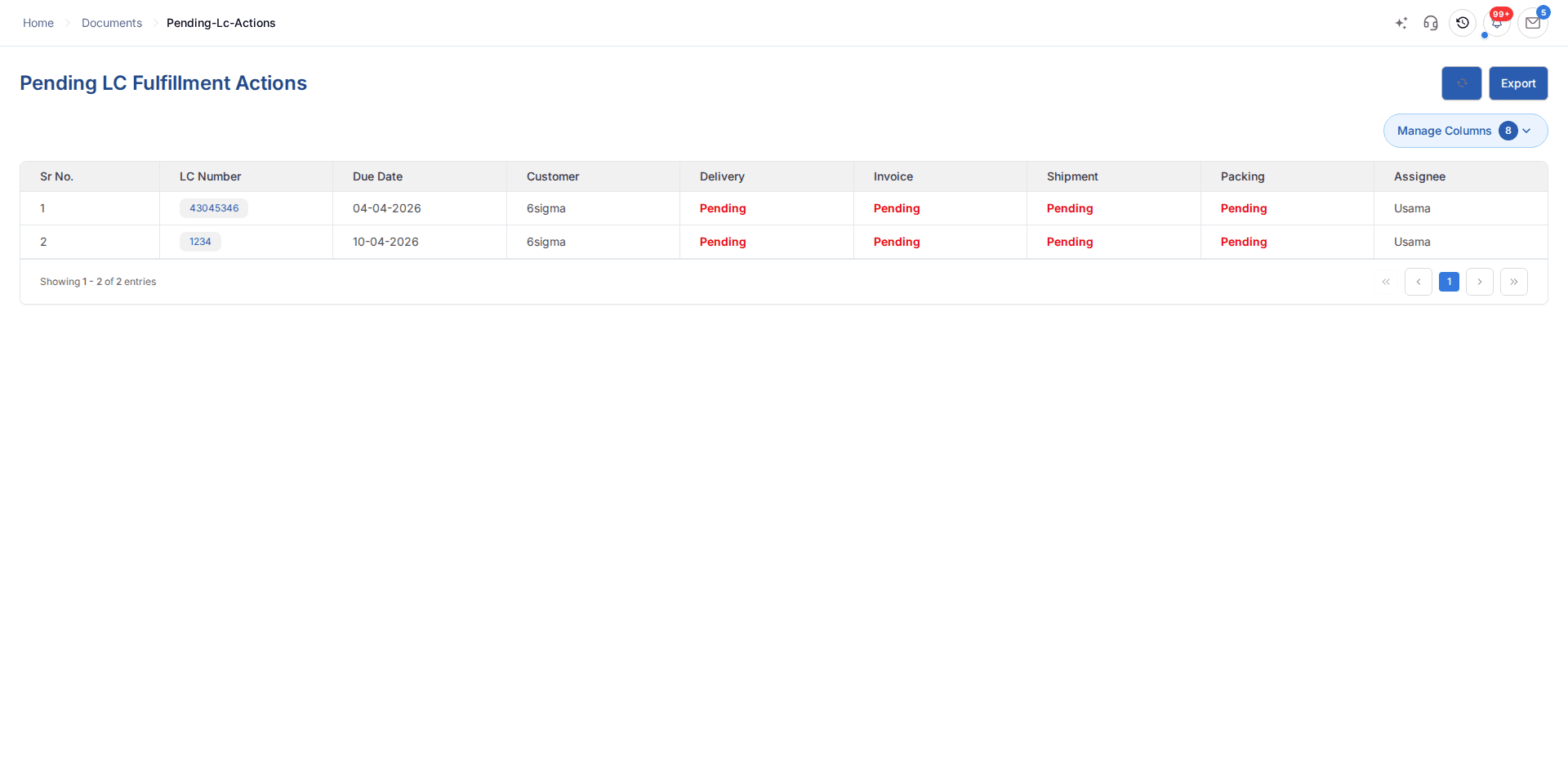
Pending LC Actions keeps the fulfillment steps visible
For each LC, the report shows its due date and whether delivery, invoice, shipment, and packing are still pending, with an assignee. See what remains before each LC can close.
Operational fit
Built for teams ready to run exports from one system
Where ERPX Export Documentation adds value
- Exporters who currently track LC clauses and required documents in a spreadsheet instead of the order record
- Teams that want an uploaded LC to pre-fill a record they still review line by line
- Exporters who want delivery, packing, and shipment to trace back to the same proforma and LC
What helps teams get the most from it
- Export teams ready to record LC terms in ERPX rather than a bank correspondence folder
- Teams prepared to review AI-autofilled LC fields before saving, rather than trusting them unchecked
- Exporters who want a Pending LC Actions habit as part of their weekly shipment review
Connected to the rest of ERPX
The proforma starts in Sales, fulfillment runs through Inventory
Originates in Sales
A Proforma Invoice can be created directly from a Sales Order, keeping the export order and the commercial order in step.
Explore ERPX SalesFulfilled through Inventory
Delivery, packing, and shipment are part of ERPX Inventory, linked back to the Sales Order and LC they fulfill.
Explore ERPX InventoryProduct documentation
Continue from the buying case to task-level guidance
These guides explain configuration, fields, transactions, and reports in the live ERPX product.
Buyer questions
Export documentation questions from ERP buyers
What is export documentation software?
Export documentation software prepares and tracks the commercial and shipping documents an export order needs, such as the proforma invoice, letter of credit, packing list and shipment record. ERPX Export Documentation does this inside the ERP, so the documents use the same customer, item, order and delivery records as Sales and Inventory.
How is this different from export software that connects to an ERP?
Standalone export documentation tools import order and shipment data from an ERP, then hold the documents in a separate system. In ERPX, the Proforma Invoice, Sales Order, Letter of Credit, Delivery Note, Packing List and Shipment are linked records in one place, so a change to the order does not need to be re-keyed into a second tool.
Which export documents can ERPX create?
ERPX covers the Proforma Invoice, the Letter of Credit record with its required documents and conditions, the Delivery Note, the Packing List with package weights and dimensions, and the Shipment record with vessel, ports and container details. The Sales Invoice for the export order is raised in ERPX Sales and posts to Financials.
How does AI letter of credit parsing work in ERPX?
From the Letter of Credit form, AI-Powered Autofill reads an uploaded LC document and fills the SWIFT-style fields for you. Review every field before saving: autofill drafts the record, it doesn’t replace the check.
Can ERPX track required documents and LC conditions?
Yes. The 46A tab records required documents with originals and copies per clause, and the 47A tab holds the LC’s additional conditions and documents, both as structured fields on the LC record.
Can I create a proforma invoice from a sales order?
Yes. A Proforma Invoice can be created directly from a Sales Order, carrying over currency, items, and payment terms before you add the Incoterm.
What happens after a letter of credit is in progress?
A Delivery Note can be created directly from the LC or its source Sales Order, keeping the fulfillment linked back to the LC and proforma it came from.
Does the packing list track package-level weight and dimensions?
Yes. A Packing List records package type, package count, net and gross weight, and dimensions, linked to the delivery it covers.
How do I track LCs nearing expiry or missing documents?
The Pending LC Actions report lists each LC against its due date and shows whether the delivery, invoice, shipment, and packing steps behind it are still pending.
Can I record vessels, voyages, and container numbers?
Yes. A Shipment record holds the vessel and voyage, port of loading and discharge, shipping marks, container and seal numbers per item, and the shipment type with its AWB number for air freight.
Are Incoterms and ports kept on the documents?
Yes. The Proforma Invoice records the Incoterm and the ports of loading and discharge, and the Shipment record holds its own port fields. Customer records can hold preferred ports and bank branches, so export documents and payments offer the options that apply to that buyer.
Does ERPX replace the bank’s or customs agent’s review?
No. ERPX keeps the LC terms, required documents and shipment data consistent across the order, which reduces discrepancies. Your bank still examines documents presented under the LC, and your customs agent or freight forwarder remains responsible for filings in each country.
See ERPX Export Documentation
Bring one of your own letters of credit.See the LC-to-shipment workflow in ERPX.
Walk through AI-Powered Autofill, 46A and 47A compliance fields, and fulfillment through packing and shipment together.
Pick a workflow from
- Export documents
- Sales
- Inventory
- Finance