
Textile & Apparel Export
ERP for textile and apparel exporters, from buyer order to documented shipment
ERPX runs a textile export order in one system: size and colour variants, fabric sent to job workers, then the proforma invoice, packing list and shipment record.
Direct answer
What is ERPX for textile and apparel exporters?
ERPX for textile and apparel exporters is a set of connected ERPX modules for garment, towel and home textile businesses. It stocks each size and colour as its own variant, tracks fabric at job workers through subcontracting, and creates proforma invoices, packing lists and shipment records from the buyer’s order.
Who this is for
Built for textile & apparel export businesses
Garment exporters
Knitwear, denim and woven garment makers who sell each style in several sizes and colours and ship against buyer orders.
Terry towel makers
Towel producers who pack by carton and container and need packing lists that show carton weights, dimensions and shipping marks.
Home textile exporters
Bed linen and made-up exporters who send fabric out for stitching or finishing and must know what stock sits with each processor.
Units that outsource stitching or finishing
Factories that cut in-house but send stitching, embroidery or washing to job workers and receive the pieces back in parts.
Problems we solve
Where the work usually breaks, and how ERPX handles it
The problem
One style turns into dozens of SKUs.
Define Colour and Size attributes once, mark a template item as Has Variants and generate each combination as its own item, such as TSHIRT-001-RED-S. Variants can also be created in bulk by CSV import.
The problem
Nobody knows how much fabric is at the stitching unit.
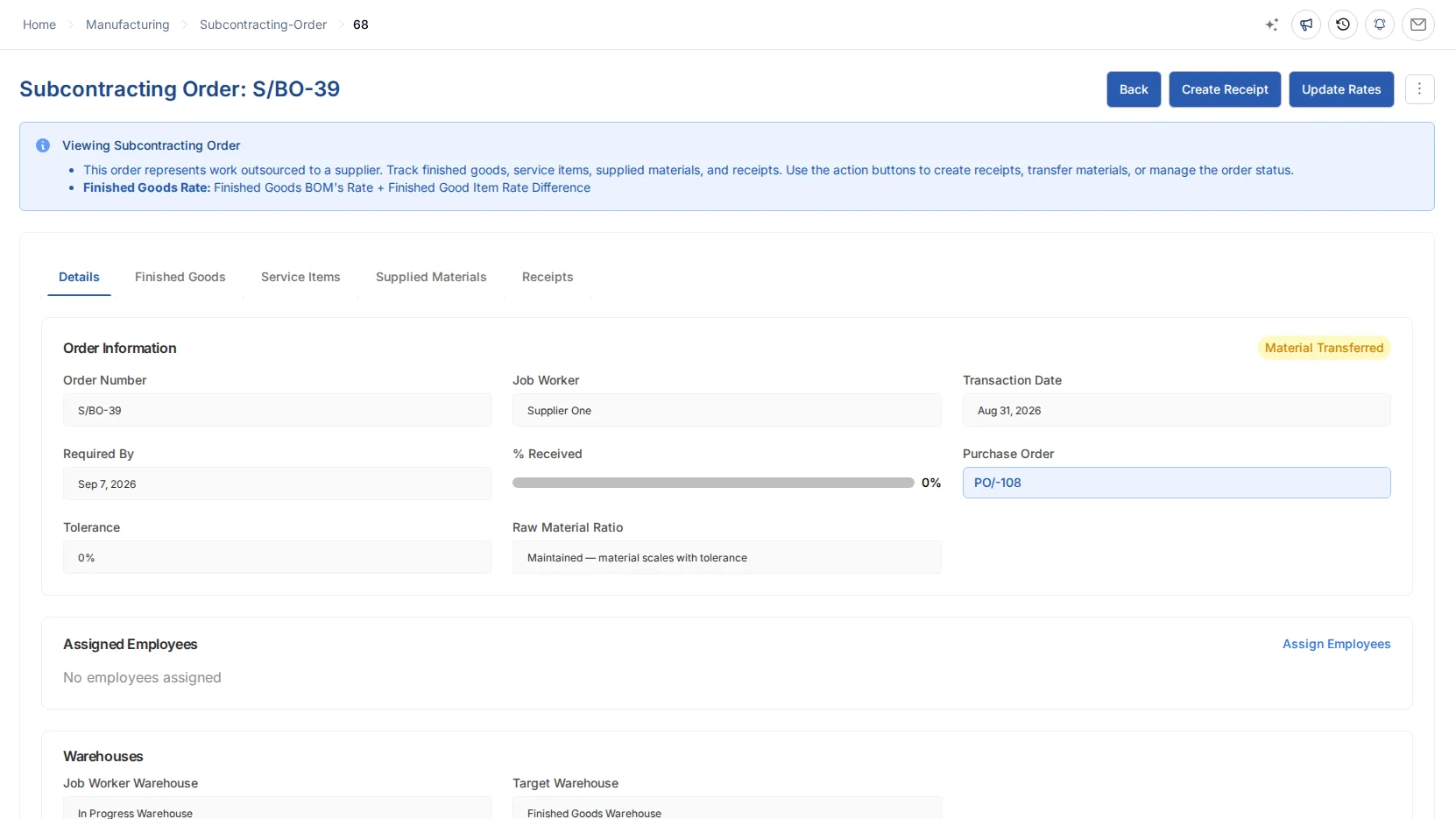
A subcontracting order moves material to a warehouse that represents the job worker. It stays in your stock valuation until a subcontracting receipt consumes it, and partial transfers and receipts each keep their own status.
The problem
The proforma invoice is retyped from the sales order.
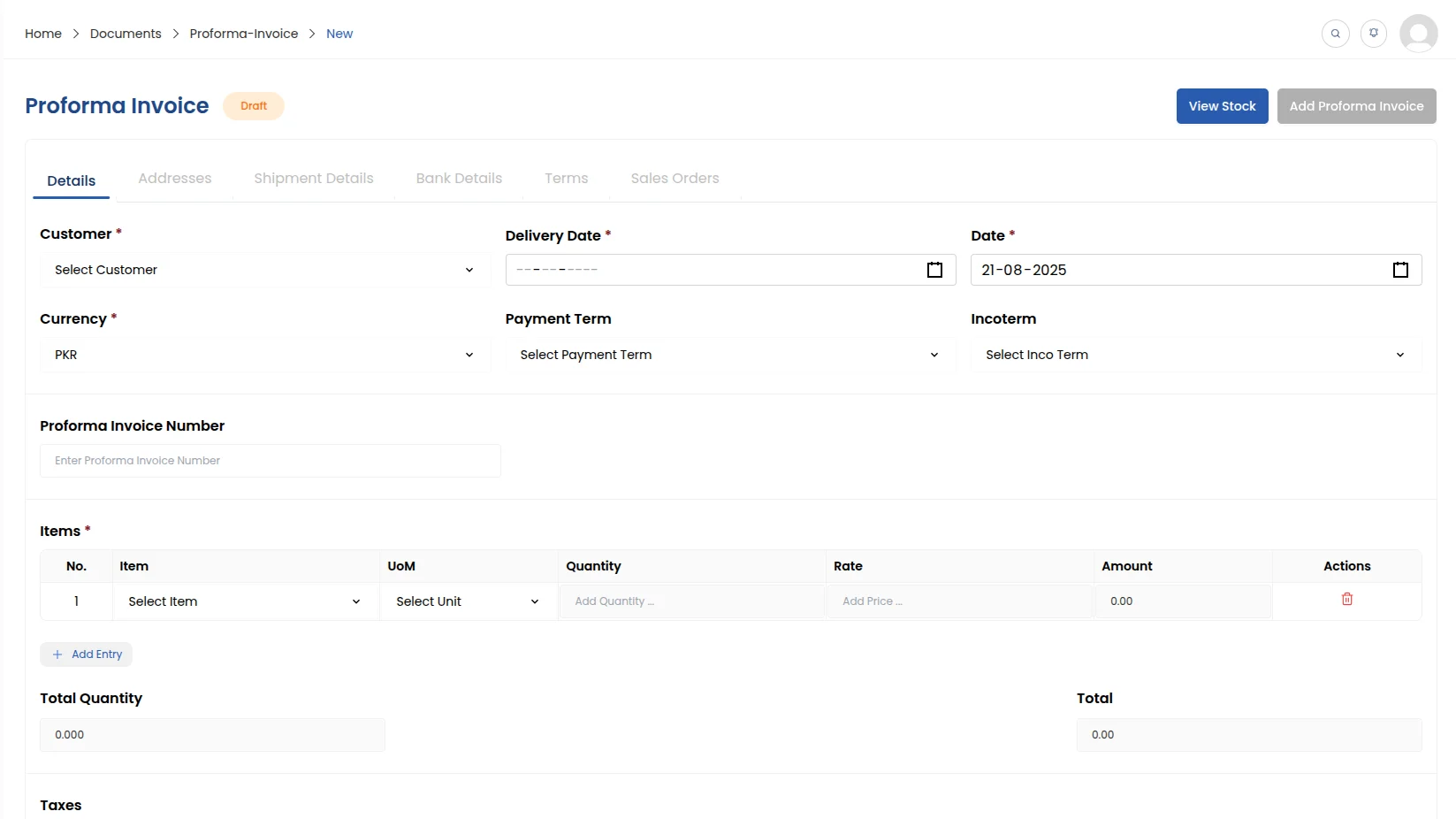
Create the proforma from the sales order with Make → Proforma Invoice. It carries currency, items with HS codes, payment terms, Incoterm and the ports of loading and discharge.
The problem
Carton details for the packing list live in a spreadsheet.
The packing list records each carton’s number, contents, quantity, net and gross weight, dimensions and shipping marks, and downloads as a PDF to go with the shipment.
End to end
The textile export workflow, end to end
A textile export order in ERPX runs from the buyer’s order through production and job work to a documented shipment, and each document is created from the one before it.
- 1
Book the order on variants
Record the buyer’s order as a sales order on the style’s size and colour variants. Orders use variants, never the template, so each size and colour carries its own quantity.
- 2
Plan production
Bring sales-order demand into a production plan to see what to make, which materials to buy and which work orders to raise.
- 3
Send work to job workers
Transfer fabric and trims to the job worker’s warehouse under a subcontracting order, then receive the finished pieces back in part or in full.
- 4
Issue the proforma invoice
Make the proforma from the sales order with currency, HS codes, payment terms, Incoterm and ports.
- 5
Link the letter of credit
Where the buyer pays by letter of credit, link it to the proforma invoice. Upload the LC PDF and review the fields extracted by AI before creating documents.
- 6
Pack and ship
Record cartons and weights on the packing list, book space with a booking order and record the shipment with vessel, containers and ETA.
Connected in ERPX
Modules used
Explore the modules behind this workflow and open the relevant documentation.
Variants
A size and colour matrix without SKU sprawl
A template item defines the product family and the attributes that vary. Each generated variant is a real item with its own code, stock, valuation, prices, batches and serials, while reports can still roll up to the family.
Attribute values carry short abbreviations, and those abbreviations build readable variant codes.
- Purchase orders, GRNs, sales orders and stock entries always use the variant.
- Numeric attributes cover measured values, such as a weight range stepped by an increment.
- Decide the attribute set before generating variants; adding one later means regenerating the matrix.
| Item code | Role | Colour | Size |
|---|---|---|---|
| TSHIRT-001 | Template (Has Variants) | — | — |
| TSHIRT-001-RED-S | Variant | Red | S |
| TSHIRT-001-RED-M | Variant | Red | M |
| TSHIRT-001-BLUE-S | Variant | Blue | S |
Subcontracting
Stitching, dyeing and finishing at job workers
A subcontracting BOM lists what you send and what comes back. The order moves that material to the job worker’s warehouse, so it stays in your stock and valuation while the work is done.
Transfers and receipts can both be partial. An order in Partial Material Transferred is waiting on you; one in Partially Received is waiting on the job worker.
| Status | What it tells you |
|---|---|
| Approved | The order is agreed; nothing has moved yet |
| Material Transferred | Fabric and trims are at the job worker |
| Partially Received | Some finished pieces are back |
| Completed | The full quantity has been received |
Export documents
From buyer order to a documented shipment
Each export document links back to the one before it, from the sales order through to the shipment.
| Document | Linked to | What it carries |
|---|---|---|
| Proforma invoice | Sales order | Currency, items with HS codes, payment terms, Incoterm, ports |
| Packing list | Proforma invoice or delivery note | Cartons, net and gross weight, dimensions, marks and numbers |
| Shipment | Proforma invoice | Carrier, mode, vessel or flight, containers, ETA |
Compliance and local requirements
Documents and tax fields ERPX covers
ERPX covers the document and tax fields a textile exporter works with. It does not replace your bank’s or customs agent’s review.
Packing lists for customs clearance
The packing list records carton, weight, dimension and shipping-mark details and prints as a PDF for customs clearance.
HS codes on items
Items carry a Harmonized System code that the proforma invoice uses on its lines.
Tax registration numbers on the customer record
Each customer carries its national tax number and sales tax registration number, kept visible in the record sidebar while you work.
Withholding tax (WHT/TDS/PAYE)
Sales and purchase invoices have a dedicated withholding card. Enable Include Withholding Tax, choose the configured tax type and rate, and the invoice records it separately from ordinary taxes.
Tax and charge rules you configure
Define the tax and charge rules invoices use, each with its own rate and the account it posts to.
Please note: ERPX applies the tax rates and accounts your team configures; it does not decide your legal tax treatment. Finance should verify rules against current local requirements.
FAQ
Textile & Apparel Export: questions buyers ask
- How are size and colour variants stocked?
- Stock sits on each variant, never on the template. You create Colour and Size attributes with short abbreviations, mark a template item as Has Variants and generate variants such as TSHIRT-001-RED-S. Each variant has its own item code, stock, valuation and prices. Purchase orders, sales orders and stock entries use the variant, while reports can roll up to the template.
- Can I track fabric sent to a stitching unit?
- Yes. A subcontracting order transfers fabric and trims to a supplier warehouse that represents the job worker’s premises. The material stays in your stock valuation until a subcontracting receipt consumes it and records the finished pieces. Transfers and receipts can both be partial, and the order status shows whether the next step is waiting on you or on the job worker.
- Does the proforma invoice carry HS codes and Incoterms?
- Yes. Proforma invoice lines carry HS codes with quantity and rate, and the header records the currency, payment terms, Incoterm (for example FOB, CIF or EXW) and the ports of loading and discharge. You can create the proforma directly from the sales order, so the buyer, items and quantities are not retyped.
- What does the packing list record?
- For each carton or package, the packing list records the carton number, the item it contains, quantity, net and gross weight and dimensions. It also holds the shipping marks and carton numbering. You can create it from a proforma invoice or delivery note, and download it as a PDF to print and send with the shipment.
- Does ERPX fit textile exporters in any country?
- Yes. Export documents can be issued in the buyer’s currency while the books are kept in your company currency. Customer records hold tax registration numbers, and invoices record withholding tax separately where it applies. Your team configures the tax rates and accounts; ERPX applies them but does not decide your legal tax treatment, so confirm it with your tax adviser.
- Can I manage cartons and packing for each export order?
- Yes. Packing structures define reusable templates, such as 24 pieces per carton and cartons per pallet. Packing details track the real cartons, which can be split, converted and nested, and the packing list travels with the delivery and shipment, so the carton count on the documents matches what was packed.
Keep exploring
Related solutions and resources
See how other teams use ERPX, then go deeper in the product guides.
- Industry solution
Import/Export & Trading
Proforma invoices with HS codes and Incoterms, shipment records, documents in the deal currency and landed cost that puts freight and duty into item cost.
Explore solution - Industry solution
Manufacturing
Production plans, BOMs, work orders, job cards and outside processing connected to inventory and purchasing.
Explore solution - Industry solution
Wholesale & Distribution
Stock per item per warehouse, reorder levels that warn, block or raise purchase requests, batches, bundles and sales-team commission for distributors.
Explore solution
Documentation
Product guides for this workflow
Textile export demo
Bring one buyer order.Follow it through to shipment.
Book a demo to walk through variants, job work, the proforma invoice and the packing list in ERPX.
Explore the connected flow
- Sales
- Manufacturing
- Inventory
- Export documents