
Services Industry
ERP for service businesses: projects, timesheets and support in one system
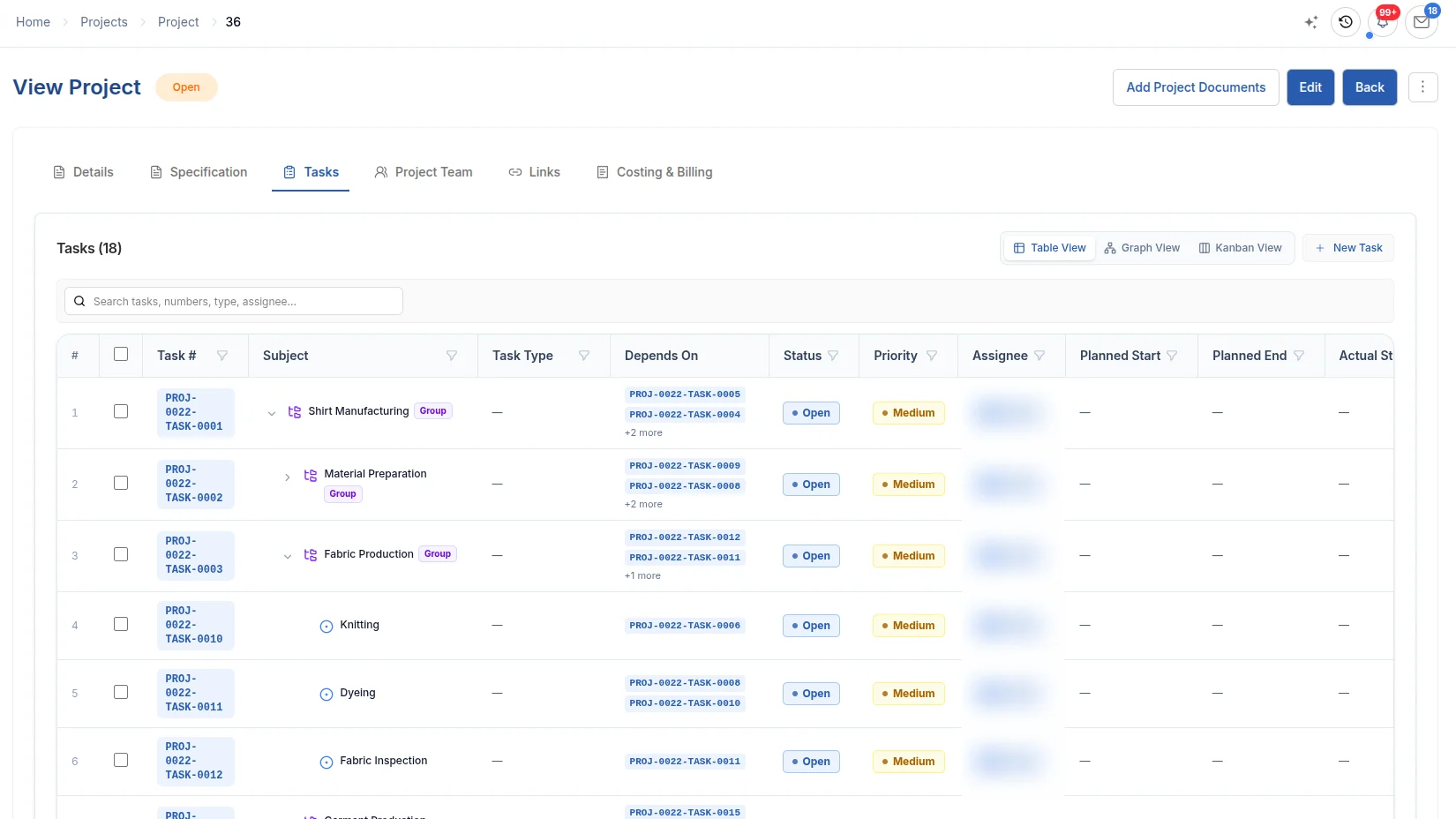
ERPX runs service work as projects: tasks with dependencies and Gantt views, daily timesheets marked billable and approved, and margin from invoiced revenue against actual cost.
Direct answer
What is ERPX for service businesses?
ERPX for service businesses is a set of connected ERPX modules for firms that deliver client work as projects. It plans tasks with dependencies and Gantt views, records billable timesheets with an approval trail, invoices the customer and shows each project’s cost, revenue and margin, with a support desk for client issues.
Who this is for
Built for services industry businesses
Consulting and engineering services
Firms that deliver fixed-scope engagements and need to see hours, cost and invoiced revenue against each project.
IT and software services
Teams that plan work as dependent tasks and record billable time against the task it belongs to.
Installation and fit-out contractors
Contractors whose projects consume purchased materials and stock as well as labour, all counted against one project.
Agencies
Creative and marketing agencies that repeat similar projects and want a reusable task structure.
Problems we solve
Where the work usually breaks, and how ERPX handles it
The problem
Hours are logged but not tied to the work.
Each timesheet row records an activity type, hours, project, task and a Billable flag. Activity types carry default hourly rates, and the timesheet totals hours and billable hours.
The problem
Timesheets are approved over chat.
A timesheet moves from Draft to Submitted, then Approved, Rejected with a note, or sent back for Revision with a required note.
The problem
Nobody knows whether a project made money.
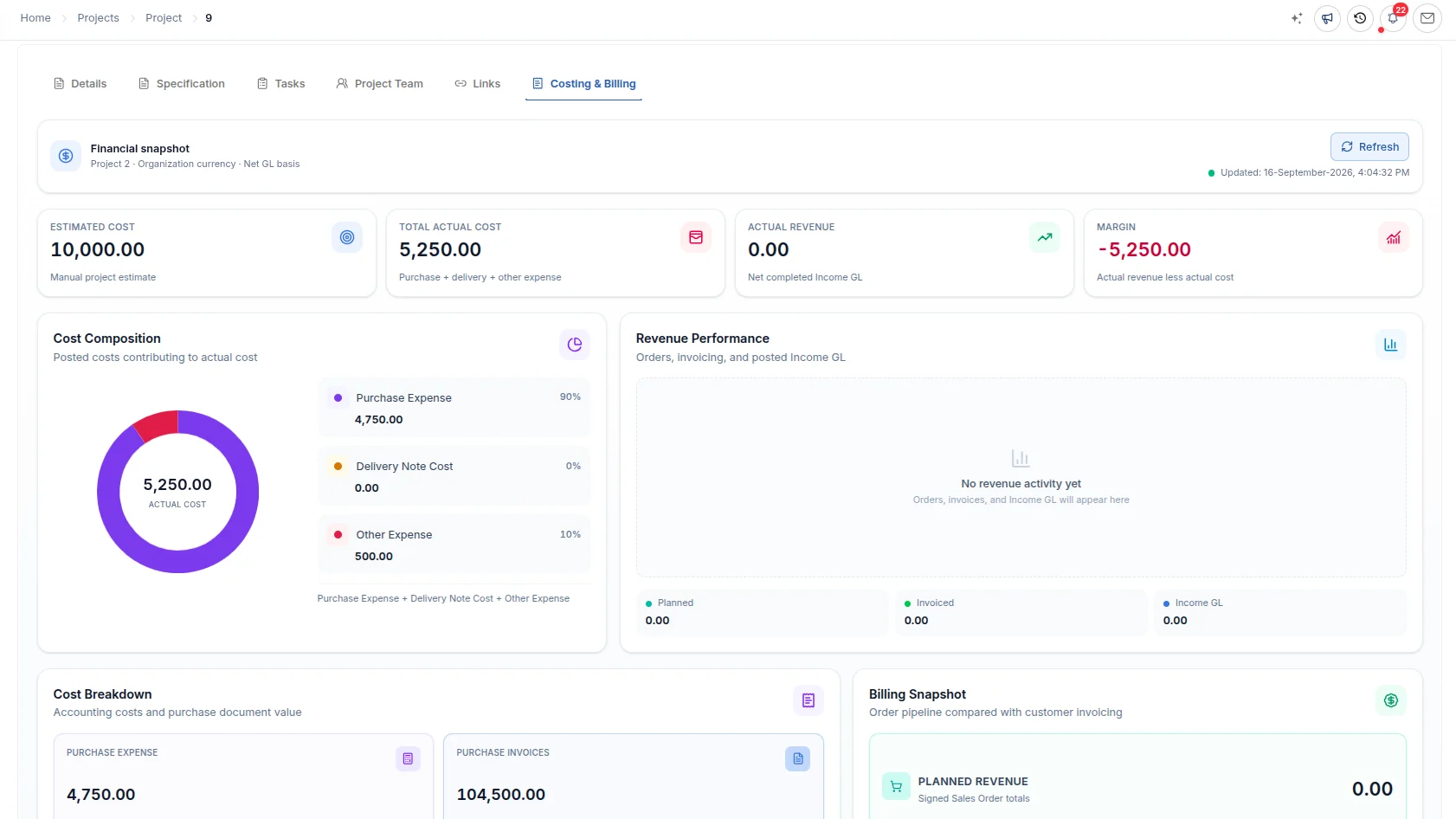
The Costing & Billing tab shows estimated cost, actual cost from expenses, purchase invoices and material consumption, actual revenue from sales invoices, and margin.
The problem
The plan and what happened drift apart.
Tasks carry planned and actual dates and dependencies, and Gantt views show planned dates, actual execution and the variance between them.
The problem
Client issues get lost between projects.
Support issues record the customer, priority and assigned agent, and track each issue from Open to Closed with comments on its timeline.
End to end
The service delivery workflow, end to end
A service engagement in ERPX runs as a project: sold on a sales order, planned as tasks, recorded in approved timesheets, invoiced and then reviewed for margin.
- 1
Sell the engagement
A sales order linked to the project provides its planned revenue.
- 2
Set up the project
Create the project with dates, owner, customer and classification, and assign the project team.
- 3
Plan the tasks
Break the work into tasks with types, assignees, dates and dependencies. Group tasks hold related work, and task templates make repeat work reusable.
- 4
Record daily timesheets
Each person records a daily timesheet with activity rows against the project and task, marking billable time.
- 5
Approve the time
Reviewers approve, reject with a reason or request a revision before time is finalised.
- 6
Invoice the customer
Raise the sales invoice with the project as its accounting dimension so it counts as actual revenue.
- 7
Review schedule and margin
Compare planned and actual dates on the Gantt views, and check actual cost, actual revenue and margin on the project.
Connected in ERPX
Modules used
Explore the modules behind this workflow and open the relevant documentation.
Timesheets
Billable time with an approval trail
A timesheet belongs to one employee and one date. Activity rows record the activity type, start time, hours, project, task and whether the time is billable. A task can only be chosen if it is assigned to that employee.
- Timesheets are daily; record one per date.
- Timesheet Summary and Employee Activity reports review time across people, projects and tasks.
| Status | What happens |
|---|---|
| Draft | The creator can keep editing |
| Submitted | Waiting for an authorised reviewer |
| Approved | Review complete and time finalised |
| Rejected | Rejected, with a rejection note |
| Revision | Sent back with a required revision note |
Costing
Project margin from real documents
A document counts towards a project only when it is linked through its Project accounting dimension; a matching customer name is not enough. Draft and cancelled documents are excluded, and amounts are in organisation currency.
Timesheets appear in the project’s Links tab and in time reports. Costing follows the financial sources listed below.
| Measure | Where it comes from |
|---|---|
| Estimated Cost | The estimate entered on the project |
| Total Actual Cost | Expenses, purchase invoices and material consumption |
| Planned Revenue | Linked sales orders |
| Actual Revenue | Linked sales invoices |
| Margin | Actual revenue minus total actual cost |
Support
Client issues in the same system
Support issues record the customer, issue type, priority from Low to Critical and the assigned agent, and move through Open, In Progress, Waiting, Resolved and Closed. Comments keep internal notes and customer replies on the issue timeline.
Issue status, from first report to close
- 01OpenCustomer issue recorded
- 02In ProgressAssigned agent works the issue
- 03WaitingWork is awaiting input
- 04ResolvedA resolution is recorded
- 05ClosedIssue is complete
Compliance and local requirements
Documents and tax fields ERPX covers
Tax registration and withholding fields apply to service invoices as well as goods.
Tax registration numbers on the customer record
Each customer carries its national tax number and sales tax registration number, kept visible in the record sidebar while you work.
Withholding tax (WHT/TDS/PAYE)
Sales and purchase invoices have a dedicated withholding card. Enable Include Withholding Tax, choose the configured tax type and rate, and the invoice records it separately from ordinary taxes.
Tax and charge rules you configure
Define the tax and charge rules invoices use, each with its own rate and the account it posts to.
Please note: ERPX applies the tax rates and accounts your team configures; it does not decide your legal tax treatment. Finance should verify rules against current local requirements.
FAQ
Services Industry: questions buyers ask
- Can employees mark time as billable?
- Yes. Each activity row on a timesheet has a Billable flag alongside the activity type, start time, hours, project and task. The timesheet calculates total hours and total billable hours. Activity types, with their default hourly rates, are maintained in Projects setup, and employees can also record timesheets from the employee portal.
- How are timesheets approved?
- A timesheet starts as Draft and is submitted when the day is ready for review. An authorised reviewer can approve it, reject it with a reason or request a revision with a note. When a revision is requested, the employee corrects the timesheet and submits it again. Approved time is finalised.
- How is project margin calculated?
- Margin is actual revenue minus total actual cost. Actual revenue comes from sales invoices linked to the project, and actual cost from linked expenses, purchase invoices and material consumption. A document counts only when it carries the project as its accounting dimension, and draft or cancelled documents are excluded.
- Do timesheet hours flow into project cost?
- Timesheets appear in the project’s Links tab and in the Timesheet Summary and Employee Activity reports. The Costing & Billing tab follows financial sources: expenses, purchase invoices and material consumption for cost, and sales invoices for revenue. Use the time reports to review hours and the costing tab to review money.
- Can one timesheet cover a whole week?
- No. Timesheets are daily records: one timesheet per employee per date, with as many activity rows as needed. To record work on several days, create one timesheet for each date. A timesheet can optionally be restricted to one project so that every row stays on that project.
- Can we reuse the task structure of past projects?
- Yes. Mark a task as a Task Template to make it reusable rather than live project work, and use group tasks as containers for related work. Tasks carry types, assignees, dates and dependencies, and the Gantt views compare planned dates with actual execution.
- Does ERPX suit service businesses in any country?
- Yes. Sales invoices record withholding tax separately from ordinary taxes where it applies, tax rates come from rules your finance team configures per company and country, and invoices post to ERPX Financials, where the ledger is kept in your company currency alongside any foreign-currency amounts. ERPX does not decide your legal tax treatment, so confirm it with your tax adviser.
- Do I need separate time-tracking and invoicing tools?
- No. Timesheets, projects, sales invoices and the ledger are all part of ERPX. Hours are recorded against projects and tasks, billable time is marked on the timesheet, and the sales invoice posts revenue to the project and to Financials. There is no export from a time tracker into accounting software.
Keep exploring
Related solutions and resources
See how other teams use ERPX, then go deeper in the product guides.
- Industry solution
Engineering & Industrial Equipment Suppliers
Quotations negotiated line by line, imported parts costed with freight and duty, serial-number traceability and after-sales issue tracking.
Explore solution - Industry solution
Import/Export & Trading
Proforma invoices with HS codes and Incoterms, shipment records, documents in the deal currency and landed cost that puts freight and duty into item cost.
Explore solution - Industry solution
Wholesale & Distribution
Stock per item per warehouse, reorder levels that warn, block or raise purchase requests, batches, bundles and sales-team commission for distributors.
Explore solution
Documentation
Product guides for this workflow
Service delivery demo
Bring one client project.See its work and costs in ERPX.
Walk through tasks, billable timesheets and approval, and a project’s cost, revenue and margin in a demo.
Explore the connected flow
- Projects
- People
- Finance
- Support