
ERPX People / Shift & Attendance
Plan the shift. Know the working day.
Give every team a clear schedule and every working day a reliable record. ERPX connects shift assignments, employee check-ins and attendance so HR can resolve exceptions before they reach payroll.
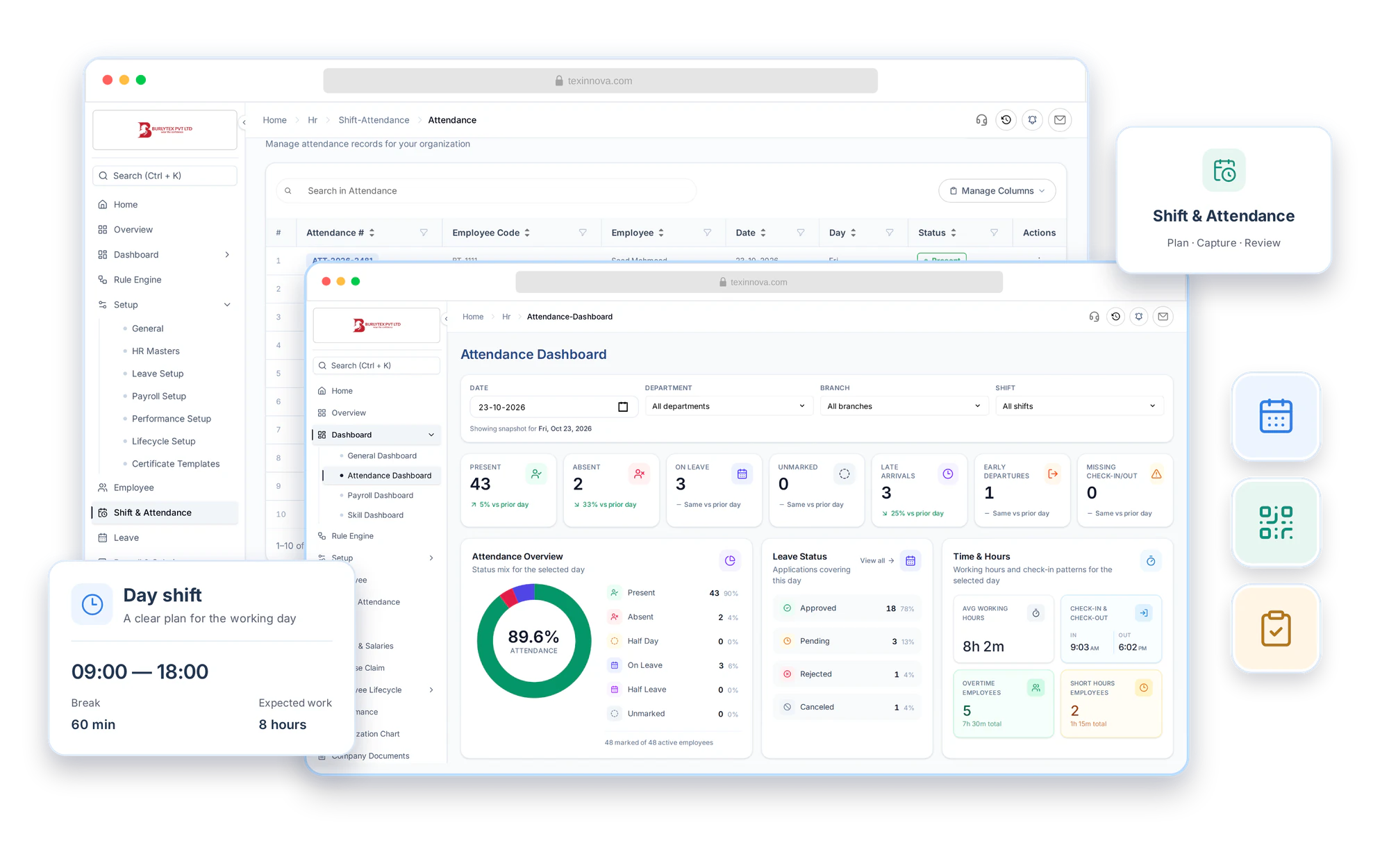
The schedule. The punches. The working day.
From the planned shift to the hours that count.
Start with the schedule and holiday calendar. Bring IN/OUT punches into daily attendance, review exceptions and understand the overtime and short hours behind your payroll figures.
Shift planning
Set the hours. Assign the right people.
Configure shift timings, working hours, breaks and tolerances. Assign the shift to one employee or a group for the dates that apply. Shift-level payroll working-day settings provide a basis for per-hour salary calculations.
- Shift start and end times, working hours and breaks
- Late-arrival and overtime tolerances with check-in windows
- Dated shift assignments and bulk assignment
Shift assignment
Day shift
- Shift span
- 9 hours
- Break
- 60 min
- Expected work
- 8 hours
- MonDay
- TueDay
- WedDay
- ThuDay
- FriDay
- SatDay
- SunOff
Assigned 2–30 Nov 2026
Holidays & weekly offs
Plan the working days. Account for days off.
Keep weekly offs and company holidays in dated holiday lists. Add the days your organization observes, or import national holidays for a selected country and date range. Assign the relevant holiday list to each employee alongside their shift details.
- Holiday lists with effective dates and weekly offs
- National holiday imports by country and date range
- Employee holiday-list assignments alongside shift settings
Holiday list
Company calendar
- Working day
- Weekly off
- Company holiday
9 Nov · Company holiday
Employee check-ins
Capture the punch. Keep the context.
Record IN/OUT times with their employee and source. Review daily summaries, then process entries for selected dates and employees into attendance using the shift rules. Configured automatic checkout helps handle the end of the shift.
- IN/OUT punches with employee, time and source
- Manual entries and supported QR or barcode scanning workflows
- Daily summaries and attendance processing by date and employee
Employee check-ins
Omar Farooq
- IN · 09:00QR
Start the working day
- OUT · 18:00Manual
Close the working day
Working time 60 min break Working time
- Time span
- 9 hours
- Break
- 1 hour
- Working time
- 8 hours
Process recorded times against the assigned shift rules.
The working-day workflow
A clear path from shift to attendance.
Keep the employee, date and assigned shift connected at each step.
- 01
Plan
Define the shift and assign employees for the right dates.
- 02
Capture
Record IN/OUT punches and their source.
- 03
Process
Build attendance using the assigned shift rules.
- 04
Review
Resolve exceptions and check the hours used by payroll.
Attendance review
See the exception. Review the day.
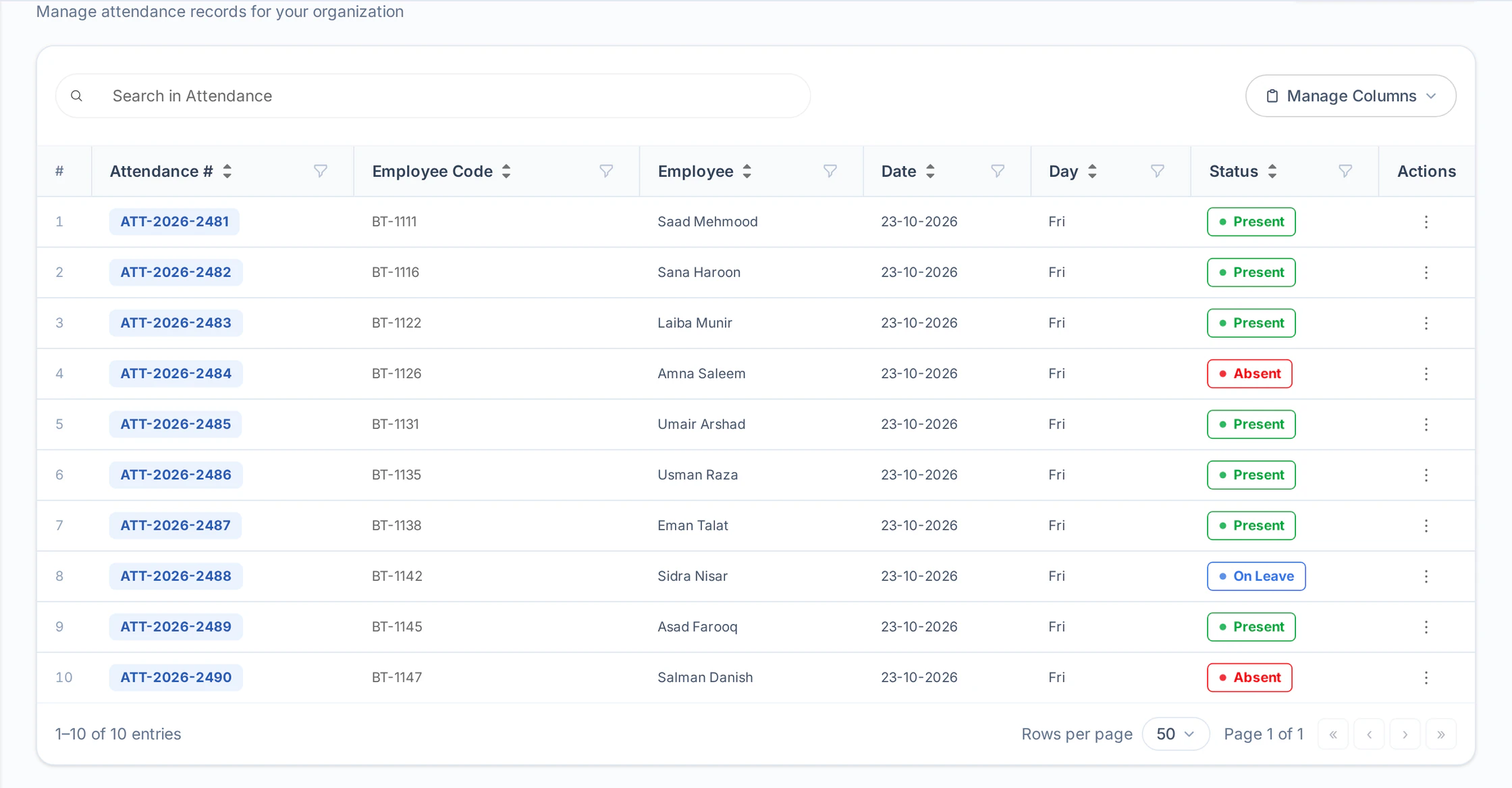
Review attendance by employee and date, with present, absent, half-day and leave statuses. Bulk-mark records when needed, check late-entry and early-exit indicators, and review system-calculated or overridden overtime and short hours before payroll.
- Present, absent, half-day and on-leave records
- Late and early indicators with overtime and short hours
- Bulk attendance marking and overtime or short-hour overrides
Reports & payroll connection
See the extra hours. Review the shortfall.
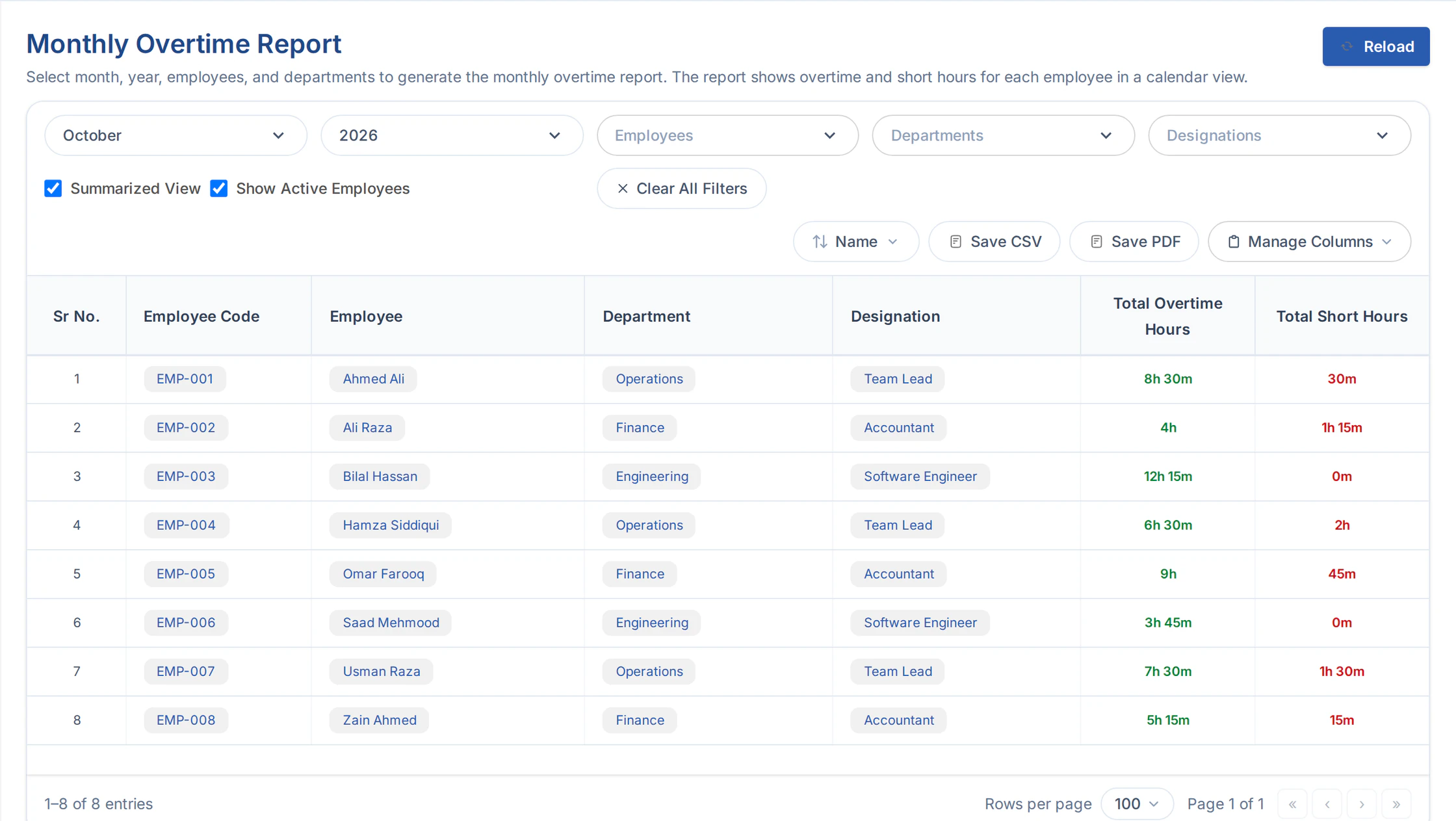
Review monthly overtime and short hours by employee before payroll. Switch between employee totals and a daily calendar, narrow the report by team, and use Explain with AI to explore the figures.
- Monthly overtime and short-hour totals for each employee
- Summary and calendar views, with employee and team filters
- CSV and PDF exports, with connected payroll review
Part of ERPX People
The working day, connected to the rest of HR.
Use attendance alongside payroll, employee self-service and project time. Each keeps its purpose, with the employee record connecting the work.
ERPX AI
Attendance answers without building a report
- Create shift types and assignments, and approve assignments in bulk
- Mark attendance one by one or in bulk
- Summarise attendance and calculated metrics such as late arrivals
Who arrived late most often on the morning shift last month?
Late arrivals by employee, with an on-time vs late chart.
Illustrative exampleBuyer questions
Your shift and attendance questions, answered.
Can shifts be assigned to several employees at once?
Yes. Bulk shift assignment lets HR apply shift assignments to multiple employees, with the relevant dates and shift type.
Can attendance be created from check-ins?
Yes. Use Process Entries to create or update attendance from check-ins for selected employees and dates. Shift timings, breaks and tolerances provide the calculation context, and processing results help HR identify records that need attention.
Can we manage weekly offs and company holidays?
Yes. Create dated holiday lists, add weekly offs and company holidays, or import national holidays for a selected country and period. Assign the appropriate holiday list in the employee’s Shift & Attendance settings.
Can HR correct overtime or short hours?
The attendance record shows system-calculated overtime and short hours, with fields for overrides. HR can review these alongside late-entry and early-exit details before the relevant figures are used by payroll.
How are attendance and timesheets connected?
Attendance records the working day and its status. Timesheets add project and activity detail, with total and billable hours. ERPX provides both so HR can review presence while teams track the work completed.
Does ERPX support attendance devices?
ERPX supports manual check-ins and QR or barcode scanning workflows, including the ERPX desktop kiosk. For an existing attendance device, bring its model and connection details to the demo so the team can confirm the setup.
Are attendance check-ins the same as employee pulse check-ins?
No. Attendance check-ins record IN/OUT times. Lifecycle check-ins are questionnaires employees answer to share feedback.
Personalized ERPX demo
Bring one real workflow.See it running in ERPX.
A focused walkthrough built on how your team works today and what you want to improve next.
Pick a workflow from
- Operations
- Finance
- People
- Projects