
Commercial progression
ERPX CRM / Leads
Lead management software that gives every enquiry an owner
ERPX CRM is lead management software for B2B sales teams. Each lead gets an owner, territory, source and next follow-up date, moves through clear qualification statuses, and becomes an opportunity only once it is Qualified.
In the CRM journey
What is lead management software in ERPX?
Lead management software records each enquiry, assigns it to a person and tracks it until it becomes a deal or is closed. In ERPX, a lead is a person with a status, Lead Owner, Territory, Lead Source, Lead Score (0–100), Lead Rating (0–5) and Next Follow Up date. Saving a lead creates its Contact automatically.
A visible path for every enquiry
Sales lead management from first interest to customer
A Lead represents the interested person. Ownership, follow-up and qualification determine whether that interest becomes a deal.
Interest enters CRM
One record for every new person
Manual enquiry
A person met by the team
CRM Form
A protected public submission
CSV import
A prepared list brought into CRM
Connected Lead record
Person, owner and next action in one place
Saving a Lead creates its linked Contact. The source and follow-up remain visible as the relationship moves forward.- Source
- Owner
- Linked Contact
- Next Follow Up
Contacted or Follow Up
Qualified
Ready for a deal
Customer conversion
Customer created → Lead Converted
Customer creation is a separate decision and can also happen directly from a Lead when no deal is needed.The working record
The lead list and the detail behind the next action
Teams can see which enquiries need attention, then open the person’s record for status, source, contact context and follow-up.
- List, Kanban and calendar views
- Owner, source, territory and status
- Linked Contact and communication history
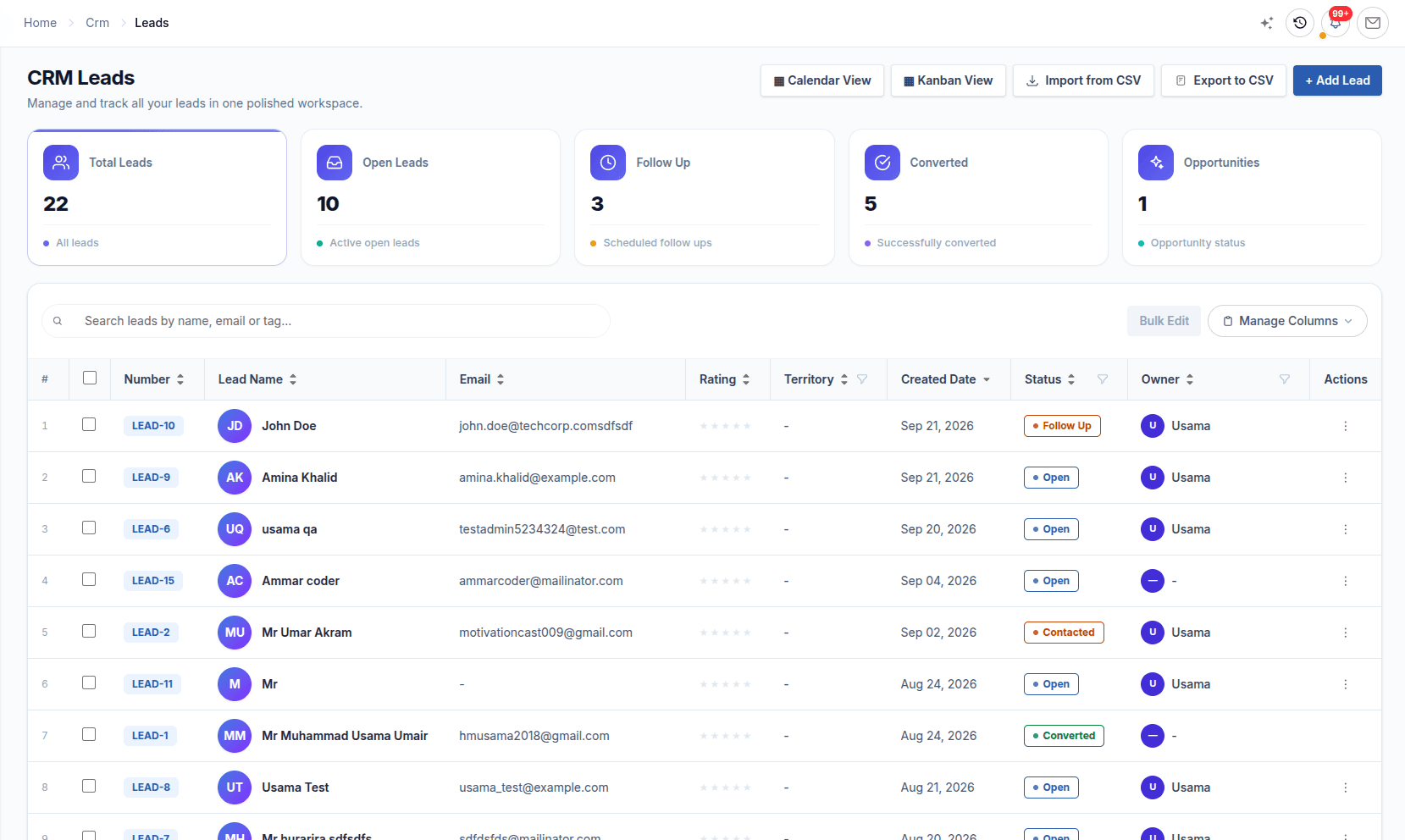
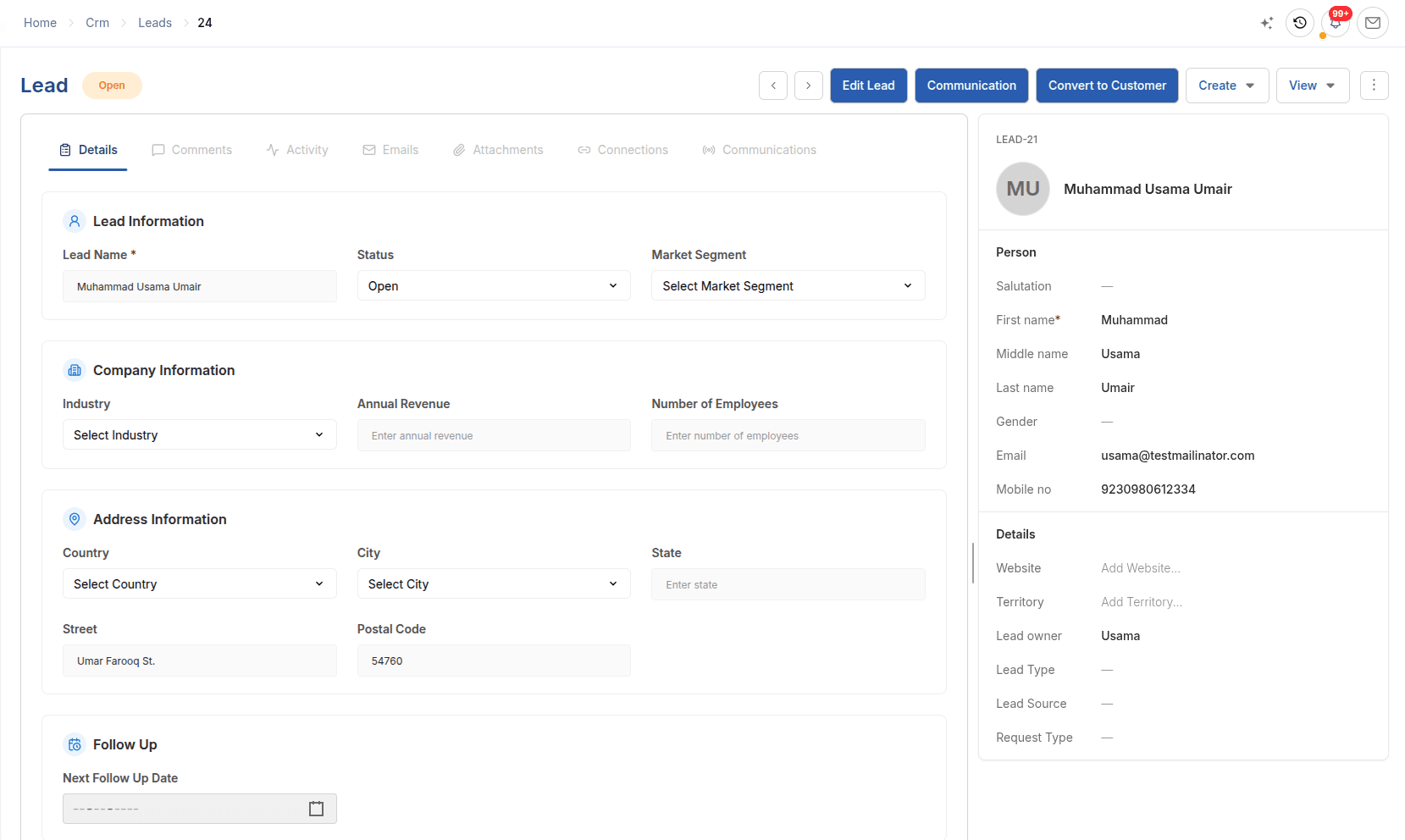
LeadsA lead list and an individual Lead record in ERPX CRM.
In detail
How Leads works
Lead tracking
Lead tracking that starts with one clean record per person.
Create leads by hand, import them from CSV or receive them from CRM Forms. An email address can belong to only one lead, prospect or contact, so the same buyer is never entered twice.
- Lead Owner, Territory, Lead Source and Lead Type on every lead
- Bulk edit owner, source, territory, status and follow-up date
- Spam-protected web forms with a default owner and source
Lead qualification
Lead qualification as a gate, not a formality.
Leads move through Open, Contacted, Follow Up, Qualified, Unqualified, Opportunity, Converted and Lost. Setting a Next Follow Up date moves the lead to Follow Up and sets its reminders.
- Kanban board by status, and a calendar of follow-up dates
- Lead Score and Lead Rating set by your team
- Unqualified and Lost leads can be reopened later
Communication timeline
Every email, call and meeting on the lead.
Send email from the lead’s Emails tab and see its delivery status. Log calls, notes, SMS and meetings on the Communications tab, with the date and direction of each.
- Emails sent from ERPX with delivery status
- Calls with duration, meetings with agenda and participants
- Attachments logged to the timeline automatically
Lead conversion
Convert to opportunity, then to customer, without duplicates.
Convert to Opportunity creates the deal and moves the lead to Opportunity. Winning the deal does not create a customer on its own: Convert to Customer is a separate step, and converting again returns the existing customer.
- Territory, market segment, currency and contact carry across
- The lead becomes Converted only when a customer exists
- The lead’s contacts are converted with it
Worked example
Example: a trade-fair contact list becomes qualified work
A textile exporter returns from a trade fair with a list of buyer contacts. This is how one of them moves through ERPX lead management.
| Step | What the team does | What ERPX records |
|---|---|---|
| Capture | Imports the contact list from CSV | A lead for each buyer, with the fair as the source, status Open and a linked Contact |
| Assign | Sets an owner and a follow-up date for next week | The lead moves to Follow Up and appears on that date in the calendar view |
| Follow up | Calls the buyer, logs the call and marks the lead Contacted | A Call entry on the communication timeline, and status Contacted |
| Qualify | Confirms the product, volume and currency | Status Qualified, which makes Convert to Opportunity available |
| Convert | Creates the opportunity | A linked opportunity with territory, market segment, currency and contact; the lead moves to Opportunity |
The lead is marked Converted only later, when a customer is created from it.
Connected work
Where this record connects
Each part of ERPX CRM keeps its own purpose while preserving the relationships needed by the rest of the journey.
Opportunities
Sales pipeline software that tracks each deal’s amount, probability, close date and stage, then continues into Sales Quotations and Sales Orders.
ExploreCommunications
CRM activity tracking that logs emails, calls, notes, SMS, meetings and attachments on each lead, prospect and customer in one timeline.
ExploreCRM Forms
Lead capture forms, shared by link or embedded on your site, that turn genuine submissions into owned leads with spam and duplicate checks.
ExploreBuyer questions
Questions about Leads
What is lead management software?
Lead management software captures enquiries, assigns each one to a salesperson and tracks it until it becomes a deal or is closed. ERPX CRM does this inside the ERP: each lead has an owner, source, territory, status and follow-up date, and a Qualified lead can become an opportunity and, later, a quotation and Sales Order.
How is lead management in an ERP different from a standalone CRM?
In a standalone CRM, a converted lead becomes a customer that must then be created again in the ERP, usually through a sync. In ERPX, converting a lead creates the customer in the same customer master that Sales, Inventory and Financials use, and the lead’s contacts carry over. There is no second customer list to keep in step.
Can a lead receive a quotation before it becomes a customer?
Yes. A Sales Quotation in ERPX can be addressed to a Lead, a Prospect or a Customer, so sales can price an enquiry as soon as it is real. Once the lead is converted, ERPX links the quotation to the new customer record, and the agreed lines can then become a Sales Order.
Can ERPX import leads from a spreadsheet or a website form?
Yes. ERPX imports leads from CSV and also creates them from public CRM Forms that you share by link or embed on your website. Imported and form leads keep their lead source. Forms can set a default owner and status, so each web lead is assigned the moment it arrives.
Which lead statuses does ERPX use?
ERPX uses eight lead statuses: Open, Contacted, Follow Up, Qualified, Unqualified, Opportunity, Converted and Lost. Setting a follow-up date moves the lead to Follow Up. Only a Qualified lead can be converted to an opportunity. Converted is final, while Unqualified and Lost leads can be reopened if circumstances change.
Does ERPX score leads automatically?
No. In ERPX, Lead Score (0–100) and Lead Rating (0–5) are fields that your sales team sets and can bulk-edit. They help sort and filter leads, but ERPX does not calculate them automatically. Qualification is a deliberate status change made by the lead owner, not a predicted score.
How does ERPX prevent duplicate leads?
ERPX requires every email address to be unique across leads, prospects and contacts, so a save is rejected if the person already exists. CRM Forms also check each submission by email, or phone if configured, and record repeat submissions as duplicates linked to the existing lead instead of creating a new one.
When does a lead become a customer in ERPX?
Only when someone uses Convert to Customer in ERPX, from the lead or from an opportunity linked to it. Winning an opportunity does not create a customer by itself. Conversion marks the lead Converted, converts its contacts, and is duplicate-safe: converting the same lead again returns the existing customer.