
ERPX CRM / Communications

CRM activity tracking for every email, call and meeting

ERPX CRM activity tracking keeps one timeline of emails, calls, notes, SMS, meetings and attachments on each Lead, Prospect and Customer, so the next person on the account starts from the record, not from memory.

In the CRM journey

What does CRM activity tracking cover in ERPX?

ERPX records six interaction types: Email, Note, Call (with duration and direction), SMS, Meeting (with agenda and participants) and Attachment. Calls, SMS and meetings are logged records; ERPX does not place calls or send SMS. Email can be sent from a lead’s Emails tab, which shows its delivery status.

Relationship memory

Every interaction in one CRM activity timeline

Emails, calls, notes, SMS, meetings and attachment events stay connected to the Lead, Prospect or Customer they concern.

Time, performer and inbound or outbound direction turn activity into context a new owner can trust at the next handoff.

  • Email

    Inbound and outbound messages

  • Calls

    Direction, duration and outcome

  • Notes & SMS

    Context worth retaining

  • Meetings

    Agenda, people and time

  • Attachments

    File events logged automatically

  • One relationship trail

    Lead · Prospect · Customer

    Every entry keeps its subject, performer, time and direction close to the party it concerns.

The conversation trail

Read what happened before the next conversation

A party-level trail places recorded interactions beside the Lead, Prospect or Customer whose relationship the team is working.

  • Email, call, note, SMS and meeting activity
  • Performed time, performer and direction
  • Automatic attachment events
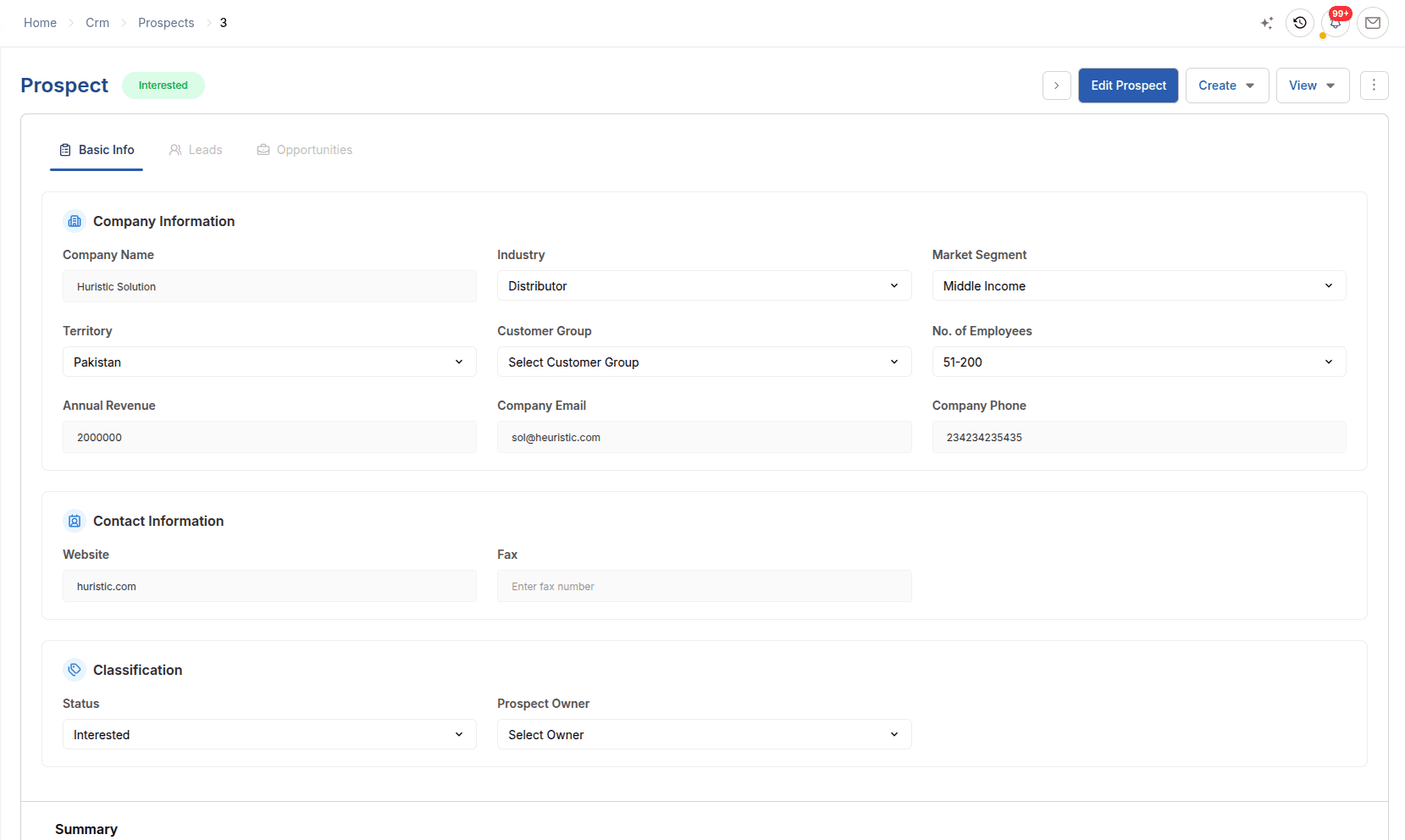
ERPX Prospect record providing account context for the communication log
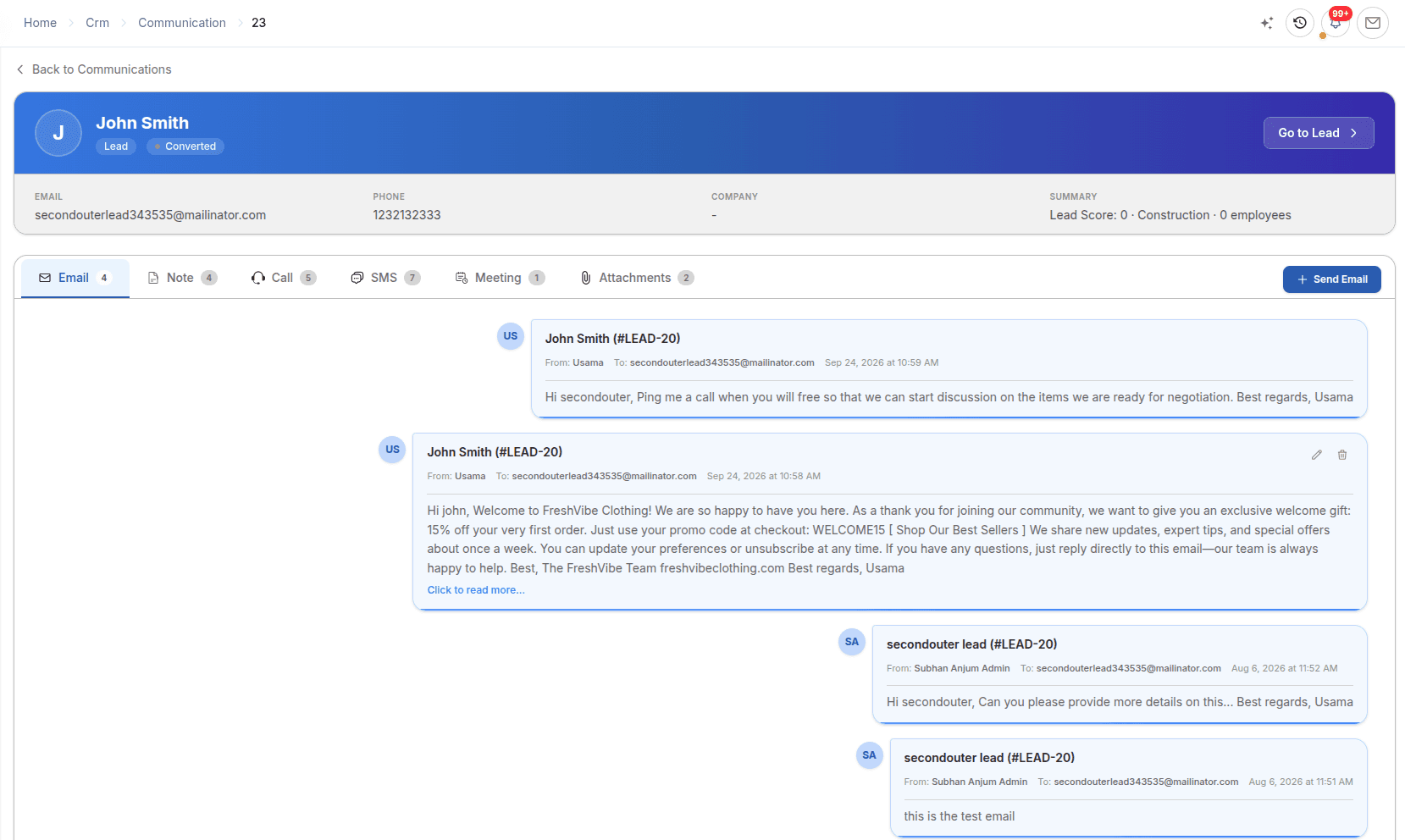
ERPX CRM activity tracking: communication timeline with emails sent to a lead
CommunicationsCommunication history beside the CRM party it describes.

In detail

How Communications works

Activity timeline

Read the relationship in the order it happened.

Each entry records when it happened, who did it and whether it was inbound or outbound. The timeline is ordered newest first and can be filtered by record type, interaction type, user, direction and date.

  • Performed At can be back-dated to when it happened
  • Performed By is recorded automatically
  • Deleted entries are hidden, not erased

Interaction types

Six interaction types, logged as they happened.

Choose the type that matches the work. Calls take a call type, duration and status; meetings take an agenda, participants, date and time; SMS takes a phone number; emails take recipients from the record’s contacts.

  • Email, Note, Call, SMS, Meeting and Attachment
  • Attachments add a timeline entry automatically
  • Logged on Leads, Prospects and Customers

CRM email tracking

Send from the lead and see delivery status.

The lead’s Emails tab sends email from ERPX with a pre-filled subject and greeting, and keeps every send with its delivery status. In ERPX Sales, each quotation has its own Email Logs tab for the quotations you send.

  • Outbound email history on every lead
  • Delivery status for each email sent
  • Bulk sends tracked separately in Campaigns

Worked example

Example: handing an account to a new owner

A sales executive takes over an account. Before the next follow-up, they read the communication history in order.

Example: handing an account to a new owner
TypeDirectionWhat the new owner learns
EmailInboundThe buyer asked for the latest price list
CallOutboundVolumes and delivery month were discussed
MeetingInboundThe buyer visited the factory with two colleagues
AttachmentLogged automaticallyThe product specification sheet that was shared
NoteInternalPayment terms still need approval

Each entry keeps its performer and time, so the handover starts from the record rather than from memory.

Buyer questions

Questions about Communications

CRM activity tracking is recording every interaction with a lead or customer in one place. ERPX CRM logs emails, notes, calls, SMS, meetings and attachments against Leads, Prospects and Customers, with the date, the user and the direction of each, so anyone taking over the account can read what happened in order.

Yes. Communication trails attach to leads, prospects and customers in ERPX, and attachments added to those records log themselves. Because the customer record is the same one used by Sales and Financials, the history of calls, emails and meetings stays next to the quotations, orders and invoices for that customer.

No. ERPX logs calls and SMS as records of what happened, including call duration and direction, but it does not place calls or send text messages. Meetings are also logged records with an agenda and participants, not calendar invitations. Email is different: ERPX can send email from a lead and show its delivery status.

Yes. The Emails tab on an ERPX lead sends email directly, with the subject and greeting pre-filled from the lead’s details. Every send is logged with its delivery status, so the tab doubles as the lead’s outbound email history. For sending one message to many leads, ERPX uses Campaigns.

ERPX keeps communication timelines on three kinds of record: Leads, Prospects and Customers. Each record has its own Communications tab, and CRM → Communication shows every timeline across the organisation, filterable by record type, communication type, user, direction and date range.

Yes. Attaching a file to an ERPX lead, prospect or customer adds an Attachment entry to that record’s communication timeline automatically, using the file name as the subject. Removing the file removes the entry, so the timeline always matches the documents actually on the record.

Personalized ERPX demo

Bring one real workflow.See it running in ERPX.

A focused walkthrough built on how your team works today and what you want to improve next.

Pick a workflow from

  • Operations
  • Finance
  • People
  • Projects