
ERPX CRM / Campaigns

CRM email campaigns with delivery tracking

ERPX CRM email campaigns send one bulk message to leads, customers and email groups through your SendGrid account, then track each recipient as Sent, Failed, Bounced, Unsubscribed or Opened.

In the CRM journey

What are CRM email campaigns in ERPX?

An ERPX campaign is one bulk email send: one template, one sender, one recipient list. Sending runs as a background task, and analytics show delivery, open, click, bounce and unsubscribe rates. It is not a marketing automation suite: there are no drip sequences, A/B tests or revenue attribution.

Known audiences, measurable reach

A bulk campaign stays connected to the CRM audience behind it

ERPX combines an active template and configured sender with recipients from existing CRM records, then tracks the send to each address.

  1. 01

    Phase 01

    Select audience

    Bring in email groups, filtered Leads or filtered Customers. Duplicate addresses are skipped.

  2. 02

    Phase 02

    Prepare message

    Pair an active template with a configured SendGrid sender while the campaign is in Draft.

  3. 03

    Phase 03

    Schedule or start

    Choose a future time or queue the Bulk send for background dispatch.

  4. 04

    Phase 04

    Monitor delivery

    Follow recipient progress; pause a queued or running send, then resume what remains.

  5. 05

    Phase 05

    Review response

    See sent, opened, clicked, bounced and unsubscribed outcomes by recipient.

One Bulk run, an outcome for every addressDraft → Scheduled or Queued → Running → Completed, Partially Completed or Failed

A controlled send

From prepared audience to recipient-level outcomes

The campaign record keeps sender, template, audience, run state and engagement results together.

  • Email groups and filtered CRM audiences
  • Configured sender and scheduled or queued send
  • Sent, opened, clicked, bounced and unsubscribed results
ERPX CRM email campaigns list
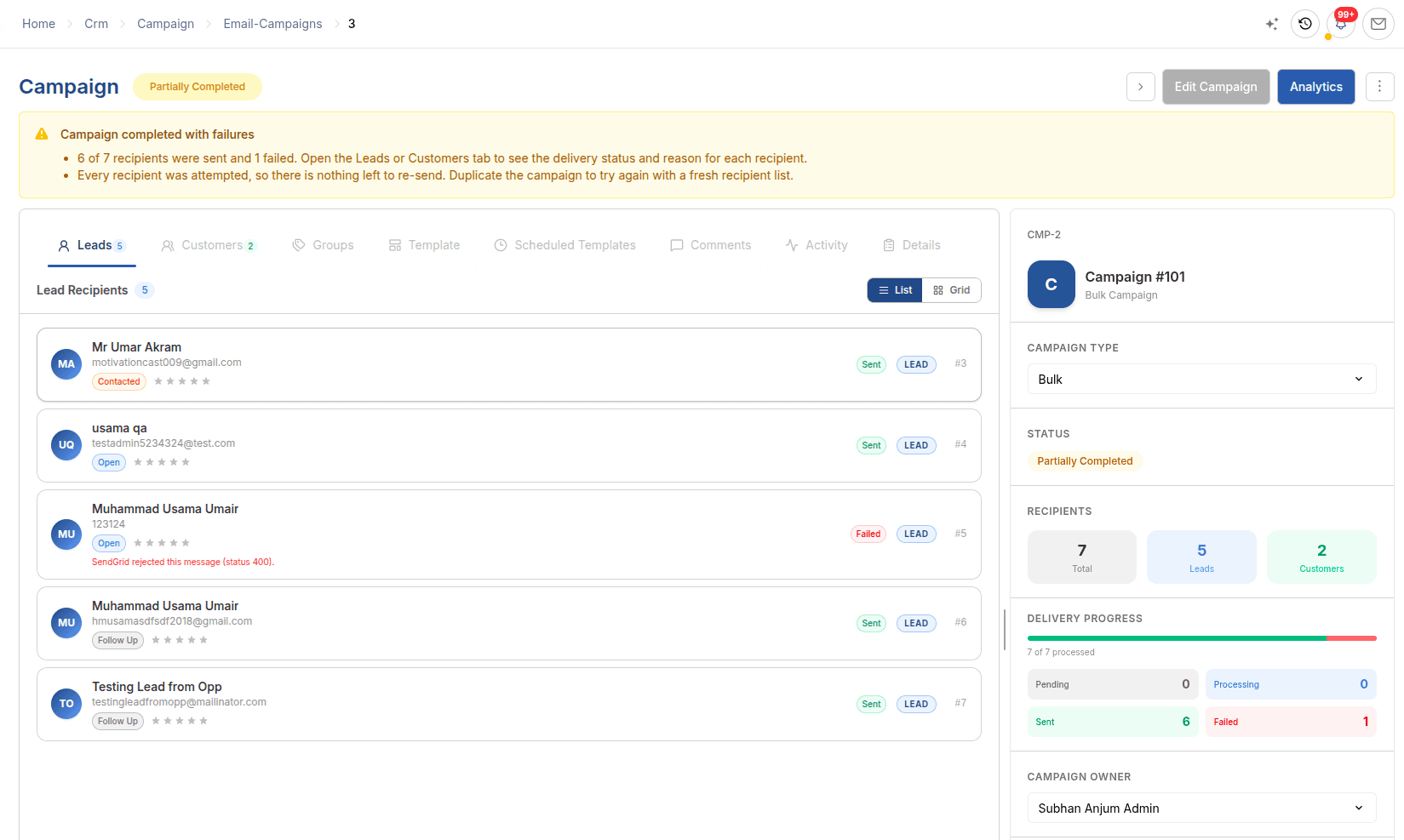
ERPX bulk email campaign with per-recipient Sent and Failed delivery status
CampaignsCampaign setup and measurable delivery in ERPX CRM.

In detail

How Campaigns works

Campaign setup

Template, sender and timing, checked before anything sends.

Every campaign starts in Draft. Pick an active email template, choose the SendGrid account to send through, then schedule a time or start now. ERPX checks the template, sender and recipients before the campaign is queued.

  • Merge placeholders such as {FirstName} and {CompanyName}
  • An {UnsubscribeURL} placeholder for each recipient
  • Editable only while the campaign is in Draft

Recipient selection

Build the list from records you already know.

Add every member of an email group, import leads by status, territory, industry or owner, and import customers by territory or industry. A campaign can mix all three, and duplicate addresses are skipped.

  • Email groups, filtered leads and filtered customers
  • The same person is mailed only once
  • Placeholders fill from the linked lead or customer

Delivery tracking

See what happened to every recipient.

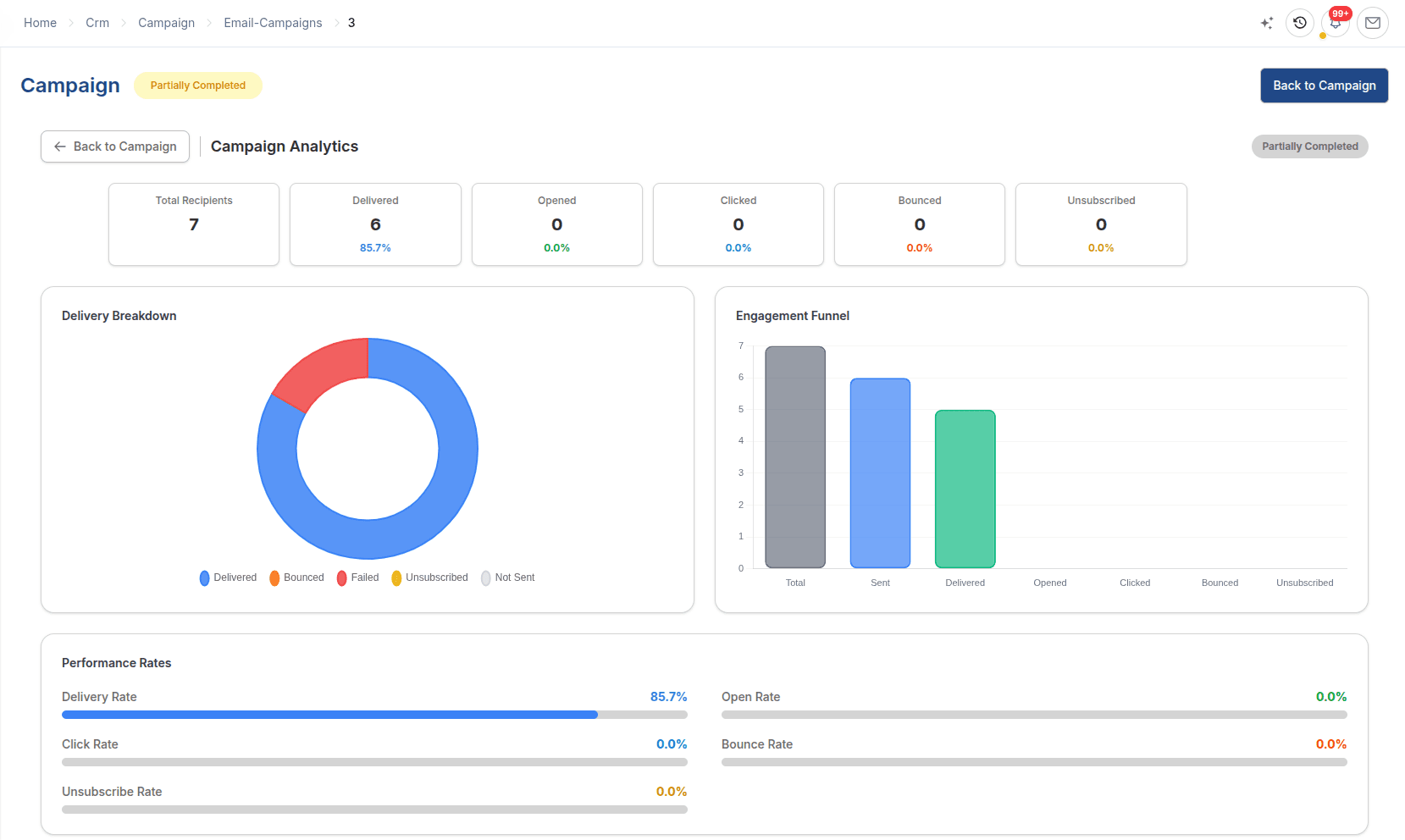
Sending runs as a background task. Each recipient moves from Pending to Sent, Failed, Bounced or Unsubscribed, and Opened is recorded when they read it. Analytics show delivery, open, click, bounce and unsubscribe rates.

  • Pause, resume and cancel a live send
  • Re-launch sends only to recipients still Pending
  • Completed, Partially Completed, Failed or Cancelled

Worked example

Example: a re-order campaign to existing customers

Before the new season, a manufacturer emails existing customers in one territory about re-ordering.

Example: a re-order campaign to existing customers
StepSettingWhat happens
AudienceCustomer filter by territoryRecipients come from known customer records
MessageActive template and SendGrid senderThe campaign is saved as a Draft
ScheduleSend date and timeThe campaign moves through Scheduled, Queued and Running
ReviewRecipient results and analyticsSent, Failed, Bounced, Unsubscribed and Opened, plus open and click rates
RecoverRe-launch a Partially Completed campaignOnly recipients still Pending are sent; no one is mailed twice

Campaigns reach existing CRM audiences. New leads come from CRM Forms.

Buyer questions

Questions about Campaigns

No. ERPX Campaigns sends bulk email: one message to one recipient list, with delivery and engagement tracking. There are no drip sequences, A/B tests, landing pages or revenue attribution. A Drip campaign type exists in ERPX but is not available yet. Campaigns suit teams that want good-enough outreach inside their ERP.

No. An ERPX campaign builds its recipient list from email groups, from leads filtered by status, territory, industry or owner, and from customers filtered by territory or industry. Recipients come straight from the CRM and customer records, and duplicate addresses are skipped, so there is no export to a separate email tool.

An ERPX campaign can combine email groups, leads imported by status, territory, industry or lead owner, and customers imported by territory or industry. Duplicate addresses are skipped, so a person on two lists is mailed once. Recipients can only be added while the campaign is in Draft.

ERPX campaigns send through a SendGrid email account configured for your organisation. You choose the account under Sender Configuration, and the sender name fills in from it. A Reply-To address can be set if replies should go to a different inbox, such as a shared sales mailbox.

ERPX campaign analytics show sent and delivery rate, opened and open rate, clicks and click rate, bounced and bounce rate, and unsubscribed and unsubscribe rate. Each recipient also has its own status: Sent, Failed, Bounced, Unsubscribed or Opened, with the failure reason shown where a send did not go out.

No. An ERPX campaign can be edited only in Draft, so a send in progress cannot change underneath itself. A running campaign can be paused, resumed or cancelled. To send a similar message again, duplicate the campaign; the copy starts as a new Draft without recipients.

Personalized ERPX demo

Bring one real workflow.See it running in ERPX.

A focused walkthrough built on how your team works today and what you want to improve next.

Pick a workflow from

  • Operations
  • Finance
  • People
  • Projects