
Won
A won outcome is recorded; creating a Customer remains a separate handoff.
ERPX CRM / Opportunities
ERPX CRM is sales pipeline software for B2B teams. Each opportunity carries an amount, probability, expected closing date and sales stage, and the pipeline continues into ERPX Sales quotations and orders instead of stopping at a won deal.
In the CRM journey
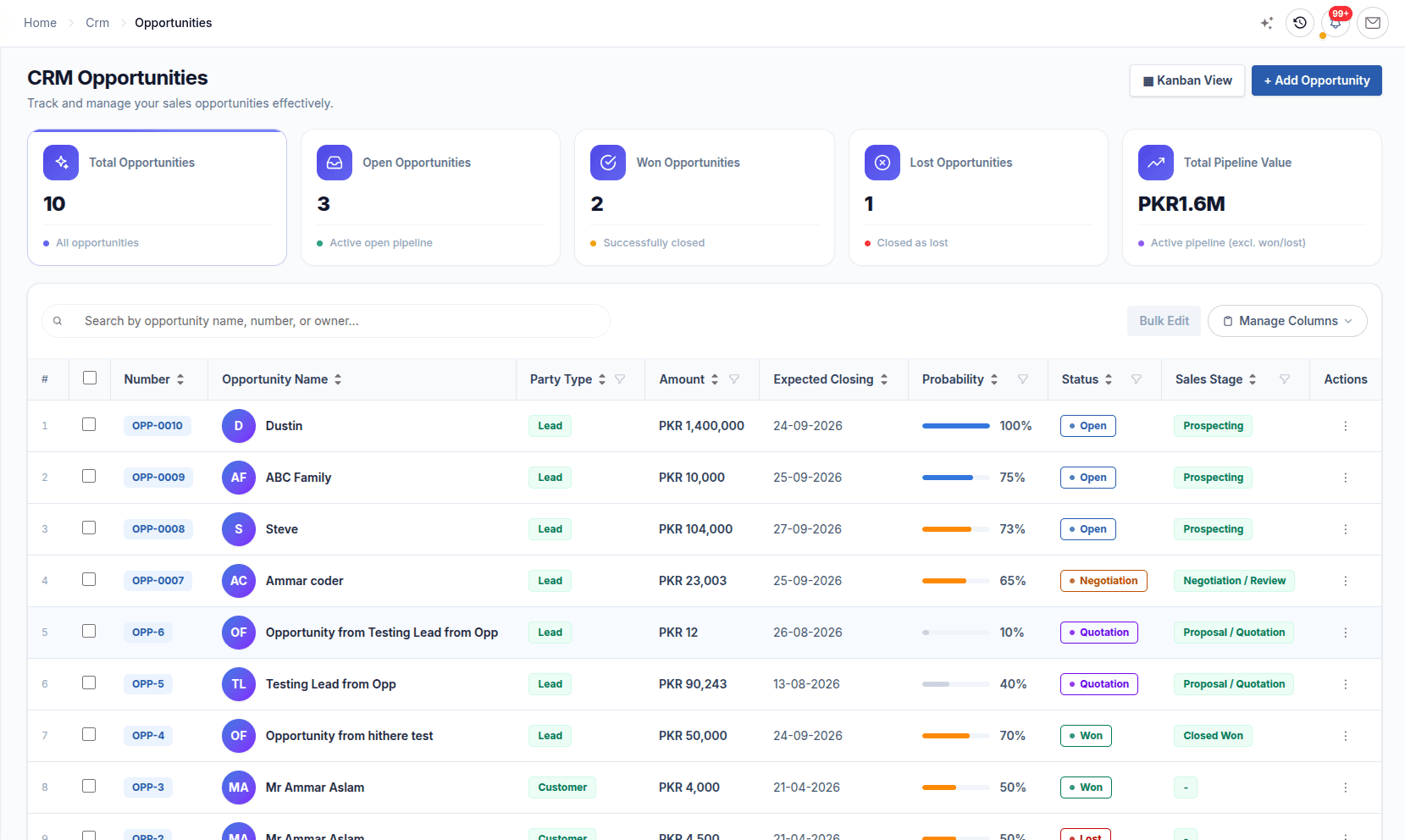
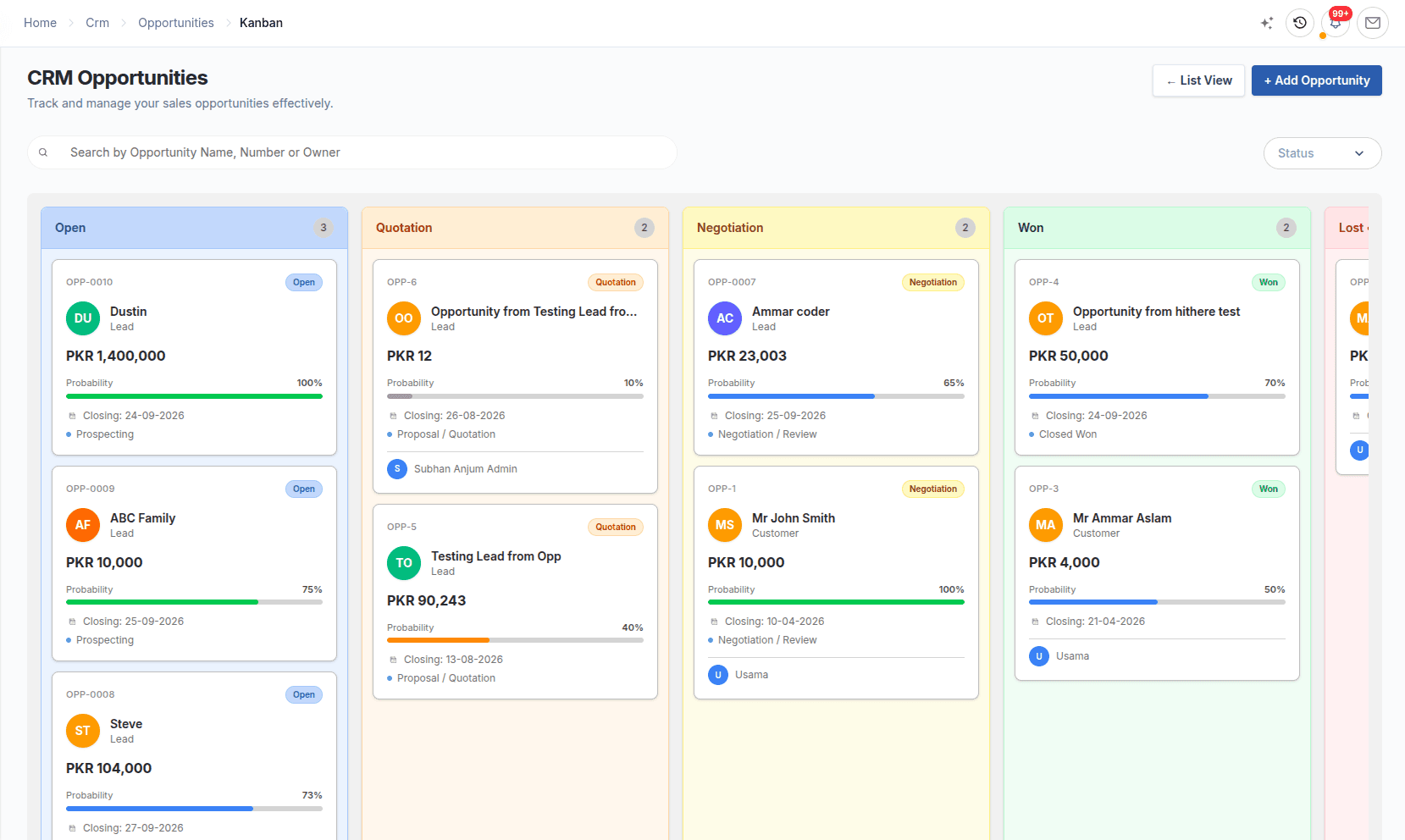
Opportunity management is tracking each potential deal from first interest until it is won or lost. In ERPX, an opportunity is a deal with a Lead, Prospect or Customer. Its Sales Stage sets its status, and every stage change is recorded with the time spent in the previous stage.
Deal discipline
Opportunities belong to a Lead, Prospect or Customer. The stage, expected closing date and amount make each deal useful to the seller and the pipeline report.
Sales stage and outcome
Prospecting and qualification
Proposal and commercial offer
Terms under review
Commercial decision reached
Deal record
A won outcome is recorded; creating a Customer remains a separate handoff.
Reason and competitors give the outcome meaning in pipeline analysis.
The deal workspace
A seller sees the stage and owner in the pipeline, then opens the linked party, amount, probability, timing and item context.
In detail
Opportunity management
Create an opportunity from a Qualified lead, or directly for a Prospect or Customer. Set the amount, probability (0–100), currency and expected closing date, and add item lines with quantity, UOM and rate.
CRM pipeline management
Prospecting sets Open, Proposal/Quotation sets Quotation, Negotiation/Review sets Negotiation, Closed Won sets Won and Closed Lost sets Lost. Qualification and Needs Analysis are also in the standard set, and you can add your own stages.
Pipeline reporting
The Sales Pipeline report shows total and weighted pipeline, total opportunities, win rate and average deal size, with value by stage, a trend and top opportunities. The Sales Funnel counts Active Leads, Opportunities, Quotations and Converted.
Pipeline to order
Winning a deal does not create a customer by itself. Convert to Customer is a separate, duplicate-safe step. The team then raises a Sales Quotation in ERPX Sales, negotiates it line by line, and converts the Agreed lines into a Sales Order.
Worked example
A buyer asks for a USD 40,000 order. The owner updates the stage and probability as the deal moves. Figures are illustrative.
| Sales stage | Probability set by the owner | Weighted pipeline value |
|---|---|---|
| Qualification | 30% | USD 12,000 |
| Proposal/Quotation | 60% | USD 24,000 |
| Negotiation/Review | 80% | USD 32,000 |
| Closed Won | Outcome recorded | Leaves the open pipeline; the team converts the customer and raises a Sales Quotation |
Each stage change is kept in the history, so time in stage and win rate come from recorded movement.
Connected work
Each part of ERPX CRM keeps its own purpose while preserving the relationships needed by the rest of the journey.
Lead management software that gives every enquiry an owner, territory, source and follow-up date, and converts only Qualified leads into opportunities.
ExploreContact management with one record per person, contacts created from leads automatically, and prospects that group the people and deals at one company.
ExploreCRM reporting on total and weighted pipeline, win rate, the sales funnel and each lead’s lifecycle from first enquiry to Sales Quotation.
ExploreBuyer questions
Sales pipeline software tracks open deals by stage so a team can see what is likely to close and when. ERPX CRM tracks each opportunity’s amount, probability, expected closing date and sales stage, then reports total and weighted pipeline. Won deals continue into ERPX Sales quotations and Sales Orders in the same system.
A CRM-only pipeline ends when a deal is marked won, and the order is created somewhere else. In ERPX, an opportunity moves into a negotiated Sales Quotation in the same system, and the agreed lines become a Sales Order that drives delivery, invoicing and, where needed, production or a letter of credit.
Yes. The CRM Transaction Chain report starts from a lead, prospect or opportunity and follows the related CRM records, the converted customer and the Sales Quotations it produced. From there, the Sales Transaction Chain continues to the orders, deliveries and invoices, so you can prove where a piece of business came from.
ERPX adjusts each active opportunity’s amount by its probability and adds the results. A USD 10,000 deal at 40% contributes USD 4,000. The Sales Pipeline report shows weighted pipeline beside the raw total, so a large gap between the two tells you the pipeline is thinner than it looks.
Yes. An ERPX opportunity can be created directly for an existing Customer or Prospect. For a deal that arrives with no lead, such as a phone call to a manager, Create Lead and Link creates the lead and its contact at the same time. The guarded route from a lead requires the Qualified status.
No. Mark as Won closes the deal and moves the stage to Closed Won, but the customer is created separately with Convert to Customer. That step is duplicate-safe: converting a lead that already has a customer returns the existing one. Once the customer exists, ERPX Sales can raise the quotation and Sales Order.
Yes. Mark as Lost in ERPX asks for a lost reason from your Lost Reasons list and lets you record competitors. Both feed win and loss analysis in the Sales Pipeline report. Reopening a lost opportunity clears these fields, so log a note first if you need to keep that history.
Yes. Each ERPX opportunity holds its own currency alongside amount and probability. Export deals in USD or EUR and domestic deals in your company currency can be tracked in the same sales pipeline, and the currency carries over when a Qualified lead is converted to an opportunity.
Personalized ERPX demo
A focused walkthrough built on how your team works today and what you want to improve next.
Pick a workflow from