
Operational extension
Manufacturing context
Supported production activity can retain project context when delivery includes manufactured work.
ERPX Projects
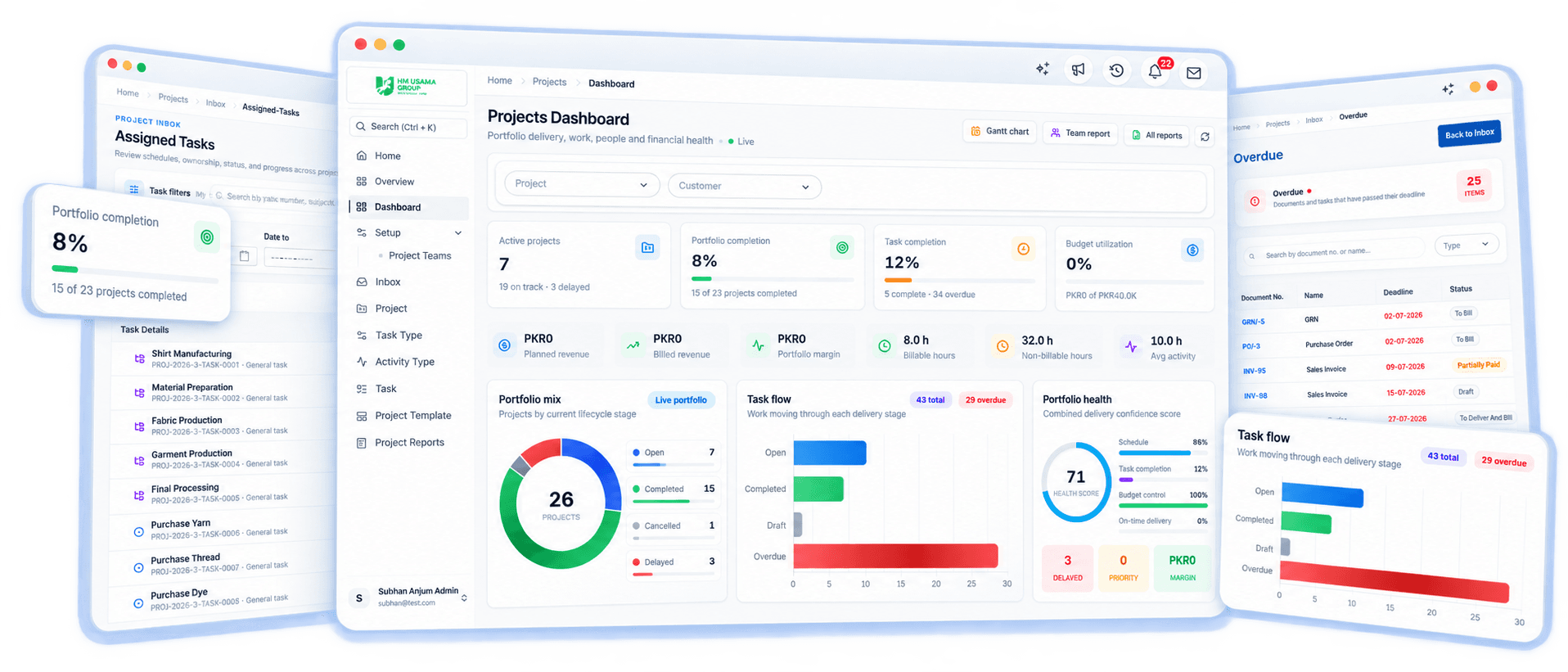
Plan work with tasks, dependencies and Gantt charts, record time with timesheets, and see cost, revenue and margin from the purchases, sales orders and invoices booked to each project.
Direct answer
ERPX Projects is the project management and project costing module of the ERPX cloud ERP. It plans work with tasks, dependencies, teams and Gantt charts, and records time with timesheets. Purchases, expenses, sales orders and invoices are booked to the project, so managers can compare planned and actual cost, revenue and margin.
Structured work
Projects, tasks, dependencies, and teams
Delivery evidence
Timesheets, Gantt views, and reports
ERP context
Sales, purchasing, stock, people, and finance
Connected workflow
These links give project managers operational context while preserving the source record owned by each ERP module.
Connect the customer and planned revenue from supported Sales Orders.
Retain project context on supported procurement and supplier activity.
Associate supported stock activity with the project that consumed it.
Assign teams and record project- and task-linked worklogs.
Use Project as a dimension for actual cost, revenue, and margin context.
Connected record
One project context carried across delivery, resources, operations, and finance.
Operational extension
Supported production activity can retain project context when delivery includes manufactured work.
Financial perspective
Sales and finance records distinguish planned revenue, actual revenue, actual cost, and margin.
Anchored module directory
Jump to the part of Projects your team uses most, from planning and time to cost and reporting.
Capability 01
Find projects needing attention, review portfolio and workload indicators, and see assigned work.
Capability 02
Create governed project records and reuse templates when delivery follows a repeatable structure.
Capability 03
Define teams, project and task classifications, activity types, and reusable setup records.
Capability 04
Plan tasks, assign ownership, connect dependent work, classify activity, and track progress.
Capability 05
Record employee time against projects, tasks, and activities with approval-linked handling.
Capability 06
Review planning dates, actual execution dates, and planned-versus-actual timing.
Capability 07
Compare estimated and actual cost, planned and actual revenue, and margin from linked records.
Capability 08
Review activity, delays, timesheets, employee activity, assigned tasks, and Gantt analysis.
Inside ERPX Projects
Real ERPX views connect the work requiring attention with task structure, planned-versus-actual timing, and project financial context.
Work queue
Assigned tasks, due-today work, overdue records, and the wider to-do queue stay visible without searching across separate tools.
Explore this capability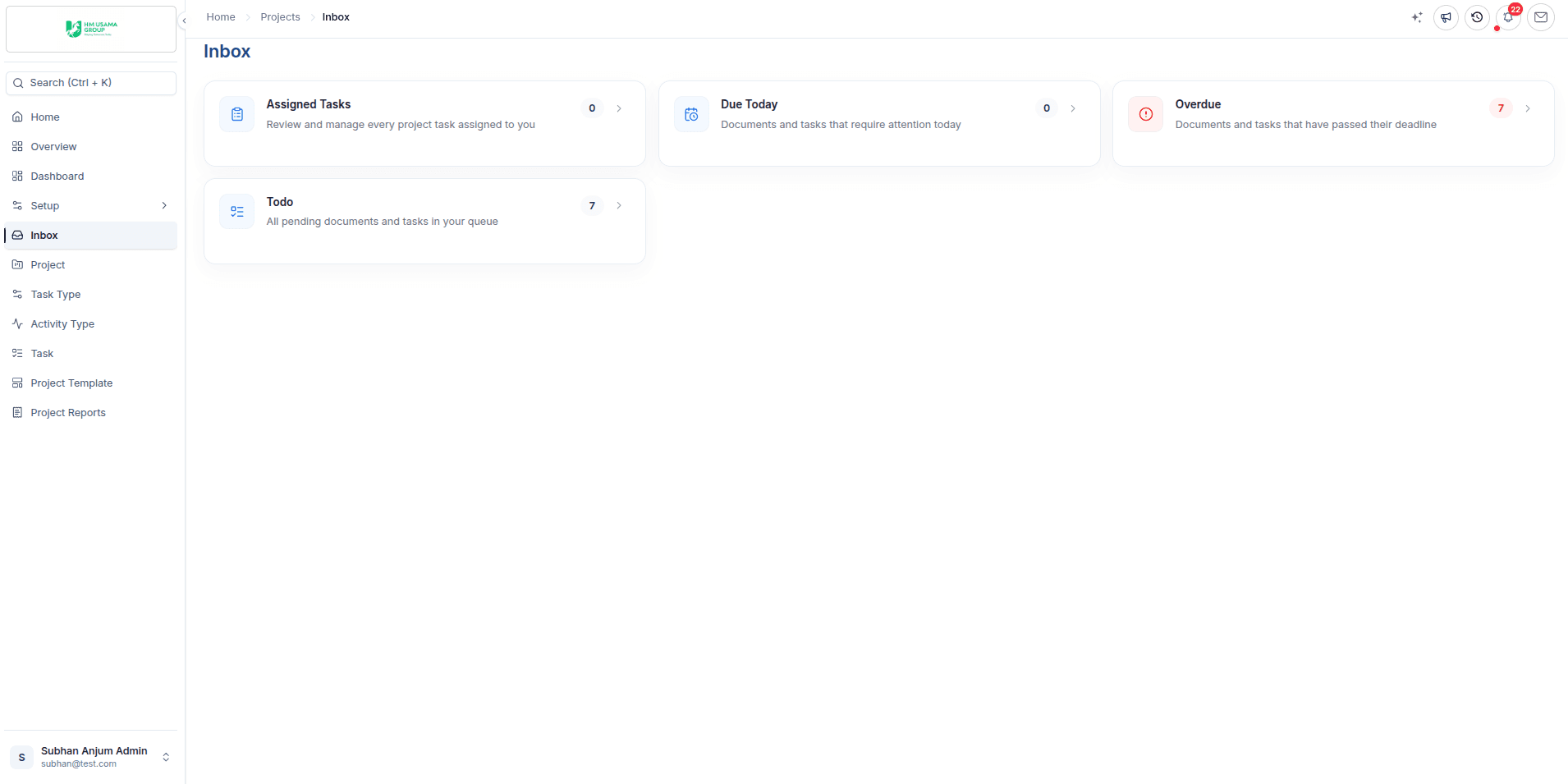
Task structure
Group tasks and dependent work within a project while keeping status, priority, ownership, and schedule fields in one operational view.
Explore this capability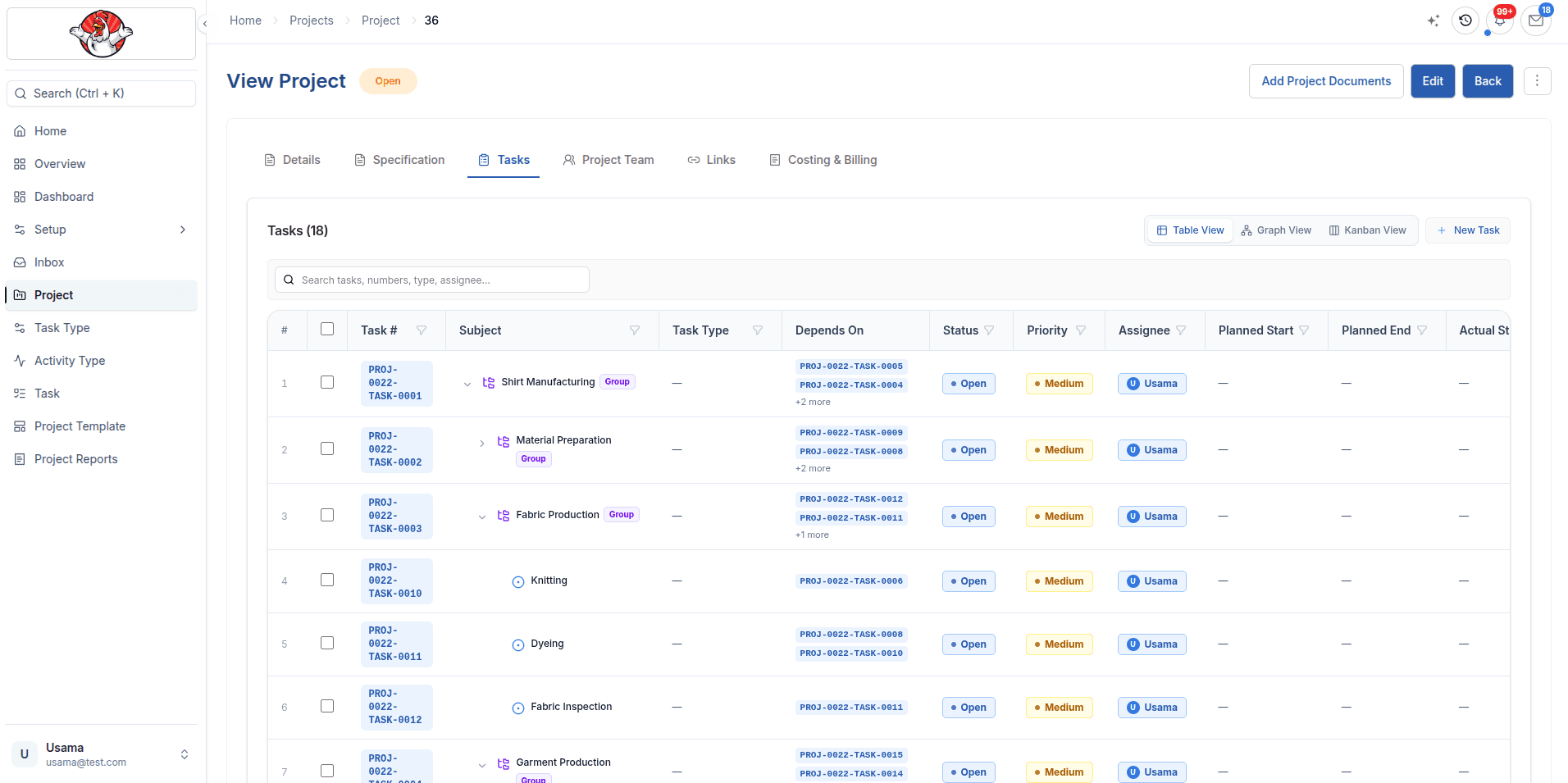
Schedule control
Compare planned dates with actual execution, follow dependent tasks, and review schedule variance in a shared timeline.
Explore this capability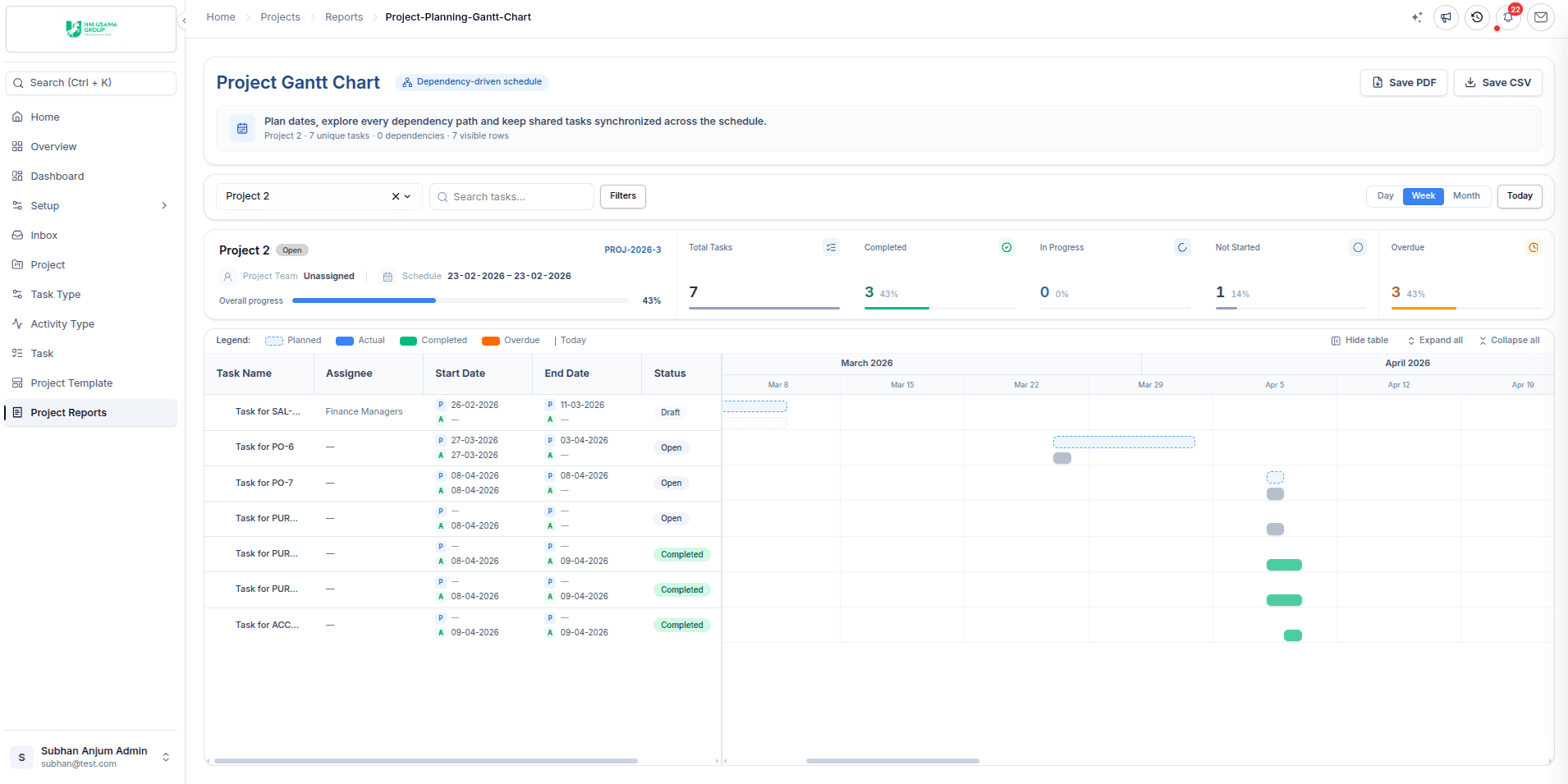
Project finance
Review estimated and actual cost, revenue, margin, cost composition, and billing context from the project record.
Explore this capability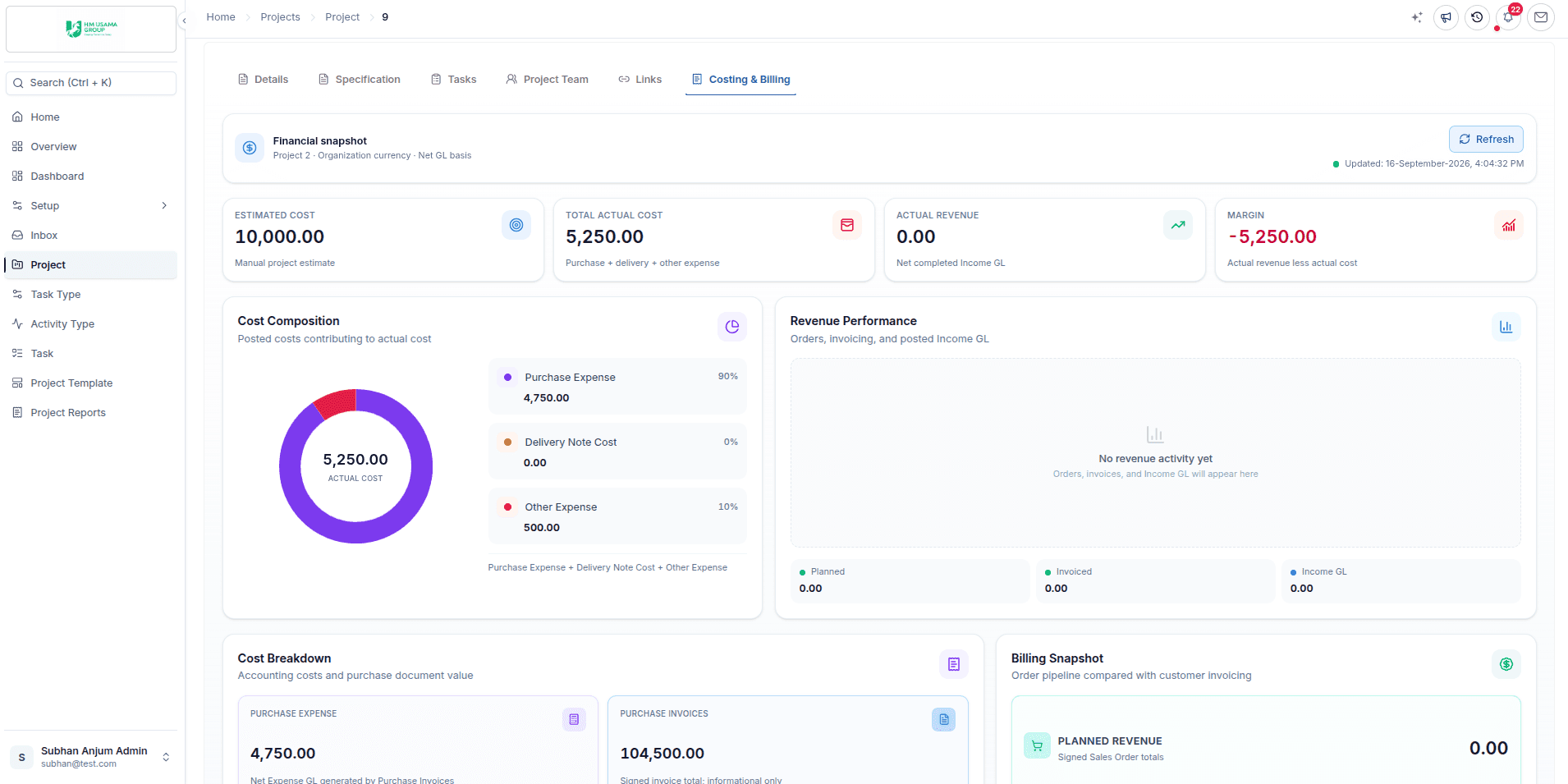
Project lifecycle
Stage 01
Define teams, task types, activities, and reusable templates.
Stage 02
Create the project, tasks, dependencies, owners, and dates.
Stage 03
Progress assigned tasks and record project-linked time.
Stage 04
Associate sales, purchasing, stock, production, and finance activity.
Stage 05
Use Gantt, activity, delay, workload, time, and cost reports.
Who it is for
ERPX Projects fits teams whose projects buy materials, use stock, record time and end in an invoice.
Deliver each machine, installation or system as a project, with materials, time and cost tracked against the order value.
Run customer orders as projects, so purchases, stock issues and production activity carry the project reference.
Plan engagements with tasks and teams, record time against each task, and compare effort with what was sold.
Follow a large export order from sales order to shipment and invoice, with its cost and margin in one place.
How the module works
Each work area has a distinct job, but the project record keeps delivery, time, schedule, and financial context connected.
Daily work
The Projects workspace brings portfolio indicators, assignments, and records needing attention into a consistent starting point. Dashboards support review, while the inbox helps users find work routed to them.
CapabilityRepeatable delivery
Create project records with dates, ownership, customer context, and classifications. Reusable templates provide a governed starting structure when teams deliver similar work repeatedly.
CapabilityExecution
Tasks carry types, activities, assignments, dates, status, and dependencies. That structure gives project tracking software a clearer operational basis than an isolated checklist.
CapabilityTime context
Timesheet software is most useful when worklogs retain their project, task, employee, activity, and approval context. ERPX keeps those relationships available for workload and project reporting.
CapabilitySchedule analysis
Three Gantt perspectives distinguish the plan from recorded execution and provide a planned-versus-actual view. This helps managers investigate timing without presenting an artificial single version of progress.
CapabilityCosting and billing
Supported records use Project as an accounting dimension. Planned revenue comes from linked Sales Orders, actual revenue from linked Sales Invoices, and supported expense records contribute to actual cost and margin.
CapabilityReview
Project activity, delayed task, timesheet, employee activity, assigned task, and Gantt reports cover progress, timing, ownership, time, and portfolio review without collapsing them into one misleading score.
CapabilityCategory comparison
How a connected project ERP differs from other kinds of project tools.
| Need | ERPX Projects | Standalone task category |
|---|---|---|
| Work structure | Projects, templates, teams, tasks, dependencies, and activities | Usually focuses on work items, boards, or schedules |
| Operational links | Sales, Purchase, Inventory, Manufacturing, HR, and Financials context | Operational and accounting records commonly remain in separate systems |
| Time and schedule | Project-linked timesheets plus planned, actual, and comparison Gantt views | Feature depth varies by tool and integration |
| Financial context | Supported planned revenue, actual revenue, actual cost, and margin links | Typically requires integrations or external reporting |
Operational fit
Product documentation
The documentation covers setup, fields, transactions, views, and reports in the live ERPX product.
Explore invoicing, journals, reconciliation, budgets, closing, and reports in ERPX Financials.
Explore ERPX Financials Explore employee timesheetsPlanned revenue starts with the sales order, cost comes from purchasing and stock, and export orders continue into shipping documents.
Buyer questions
ERPX Projects is the project management module of the ERPX cloud ERP. It covers projects and templates, project teams, tasks with dependencies, timesheets, three Gantt views and project reports. Because it runs inside the ERP, the same project can be referenced on sales orders, purchases, stock movements, expenses and invoices, which gives each project a cost and margin view.
Yes. Employees record timesheets and worklogs against a project, task and activity type. On the cost side, purchase invoices, material consumption and expenses that carry the project as their accounting dimension add to actual cost. The Costing & Billing tab on the project compares estimated cost with actual cost, revenue and margin.
Yes. The Project Gantt Chart shows each task on a timeline with its planned dates and dependencies. You can drag and resize tasks, and ERPX blocks changes that would break a dependency. Actual and planned-versus-actual views, which compare the plan with recorded task dates, are available as additional analysis views.
Yes. Planned revenue comes from sales orders linked to the project, and actual revenue from linked sales invoices. Purchase invoices, material consumption and expenses booked to the project add to actual cost. The Links tab on the project lists these connected documents, and each figure can be traced back to its source transaction.
It suits manufacturers that deliver each order as a project, such as engineering and equipment suppliers. The project holds the tasks, team, schedule and time, while purchases, stock issues and supported production activity carry the project reference. That gives a running cost against the sales order value for each order.
A standalone project tool is often the better choice for teams that only need task boards and collaboration. ERPX Projects is designed for businesses whose projects buy materials, use stock and send invoices. Because those records are already in the ERP, cost, revenue and margin come from real transactions rather than from imports or manual updates.
See ERPX Projects
Bring a recent project or order. We will show how its tasks, time, purchases and invoices come together in ERPX Projects.
Pick a workflow from