
Control
ERPX Financials
Financial management that stays connected to every order
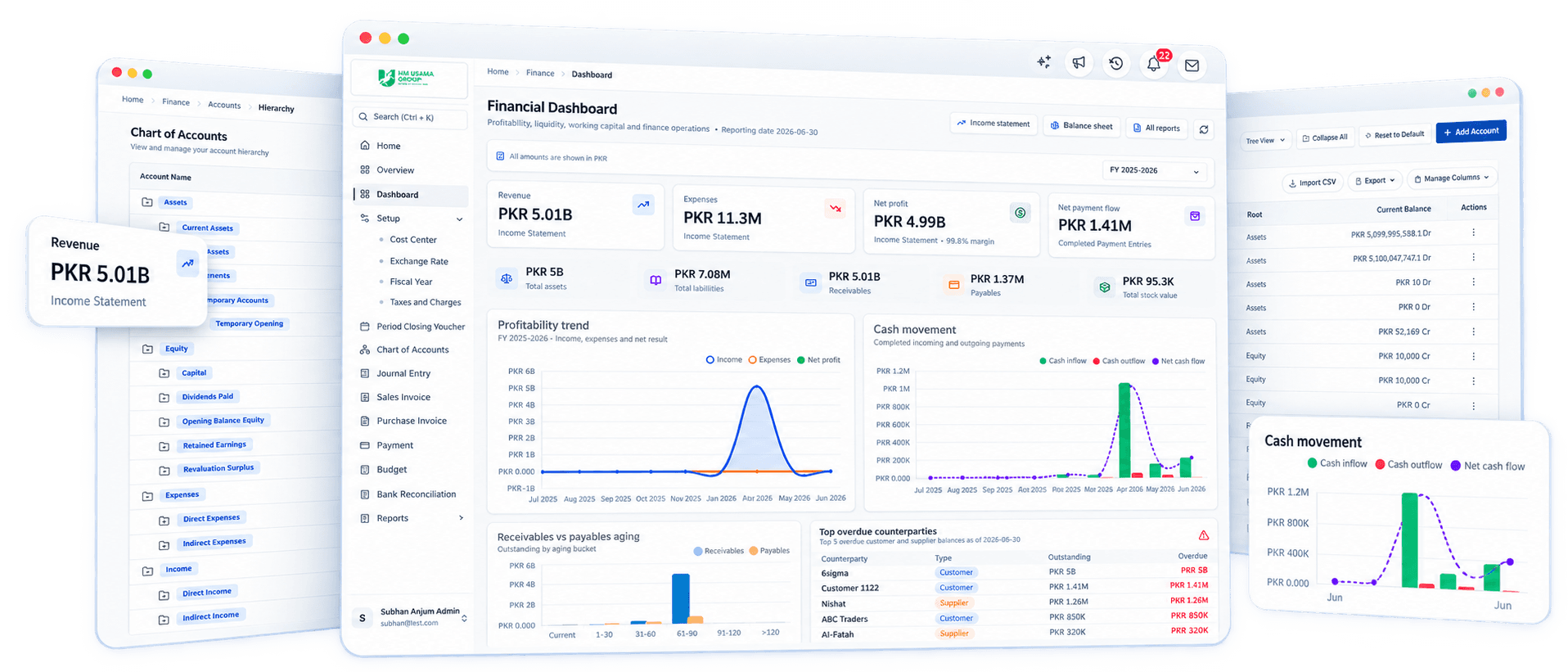
Keep the general ledger, receivables, payables and bank reconciliation connected to sales and inventory, so every balance has a source and month-end close takes less work.
Direct answer
What is ERPX Financials?
ERPX Financials is the accounting module of the ERPX cloud ERP. It keeps the general ledger, accounts receivable, accounts payable, payments, bank reconciliation, budgets, multi-currency records and period close in one system. Sales, purchase, stock and payroll transactions post to the ledger directly, so every balance can be traced to the order behind it.
Record
Invoices, journals, payments, and adjustments
Control
Reconciliation, budgets, and period closing
Explain
Statements, ledgers, ageing, and tax reports
Connected accounting
From operational record to controlled ledger
ERPX Financials is part of the ERP record, not a detached bookkeeping island. The posting flow shows how each owning module contributes context before finance controls and explains the resulting balances.
Operational source records
Activity begins where the work happens
Sales
Customer invoices, returns, receipts, and revenue context.
Purchase
Supplier invoices, returns, payments, and payable context.
Inventory
Stock transactions and valuation retain their operational source.
Manufacturing
Production activity carries cost context into connected records.
HR
Approved people transactions can retain financial dimensions.
Projects
Project dimensions retain planned revenue, actual revenue, cost, and margin context.
Connected accounting record
General ledger with the source trail intact
- Account
- Party
- Cost Center
- Project
- Currency
Explain
Statements with drill-back context
Financial statements, ledgers, ageing, tax, and operational reports remain connected to the transactions behind them.Built for trade
Orders post to the ledger as they move
For businesses that sell and ship goods, the ledger follows the order. A delivery note posts cost of goods sold, the sales invoice books the receivable, and the payment settles it. Finance reviews the entries instead of keying them in again.
- 01
Sales order or letter of credit
The commercial commitment: customer, items, prices, currency and terms. Export orders can carry a letter of credit.
Read the guide - 02
Delivery note
Records what left the warehouse. Stock goes out and cost of goods sold is posted at the valuation rate for the dispatch date.
Read the guide - 03
Sales invoice
Bills the customer in the invoice currency and books the receivable, revenue and configured taxes and charges.
Read the guide - 04
Payment and reconciliation
The payment entry settles the open invoice. Bank reconciliation then confirms the receipt against the statement.
Read the guide
Capability directory
A financial control register from setup through reporting
Capabilities are organized in the same operating sequence finance teams follow: establish the ledger, record activity, apply controls, and explain the result.
Foundation
Define the accounting structure before transactions post.
Fiscal years and setup
Define fiscal years, accounting dimensions, tax and charge rules, and transaction controls.
Chart of Accounts
Build account groups and posting accounts, establish opening balances, and organize the general ledger.
Transactions
Record invoices, journals, receipts, and payments.
Journal entries
Record standard, opening, tax, exchange-adjustment, reversal, accrual, and correction entries.
Sales and purchase invoices
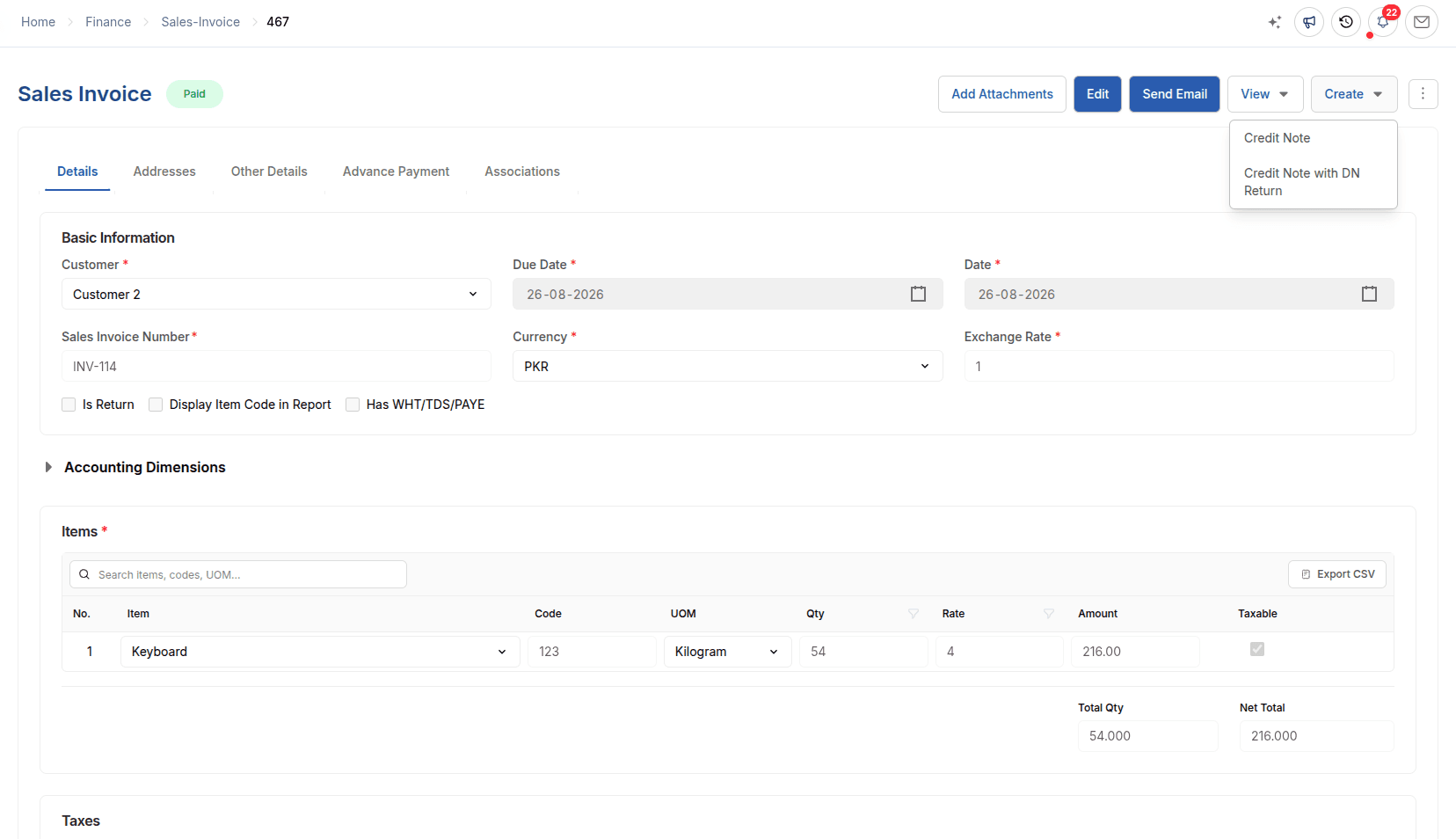
Connect billing, supplier invoices, returns, notes, taxes, dimensions, and settlement status.
Payments and reconciliation
Record receipts, payments, and transfers, then allocate them against open documents with retained history.
Control
Reconcile balances, govern budgets, and close periods.
Bank reconciliation
Compare book and bank balances, clear matching entries, and record legitimate missing transactions.
Project and Cost Center budgets
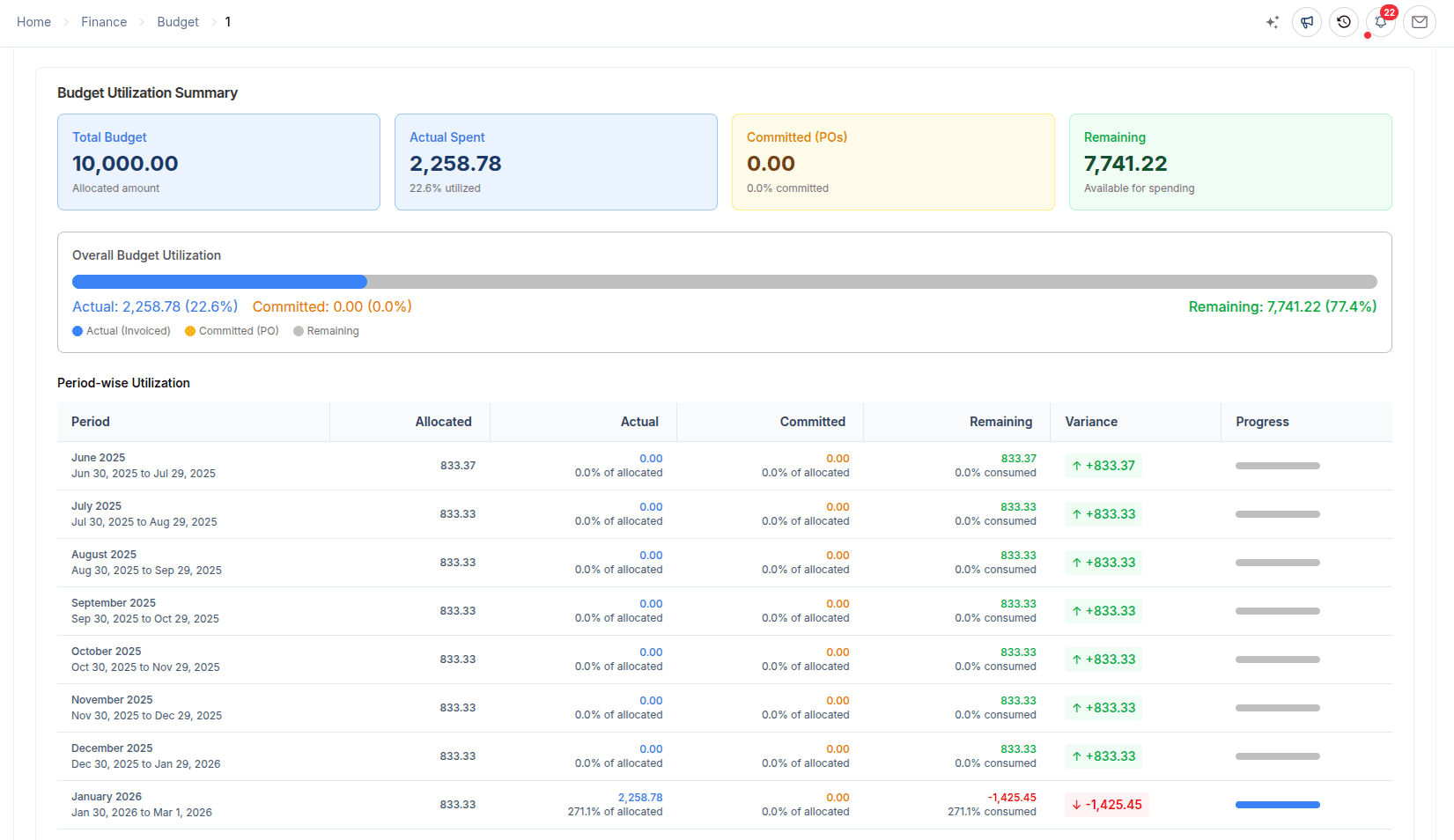
Allocate budgets by fiscal year and dimension, monitor utilization, and apply configured controls.
Period closing
Review open-work blockers, preview close effects, close a fiscal year, and retain a controlled reopening path.
Reporting
Explain balances through statements and detailed ledgers.
Financial and ledger reports
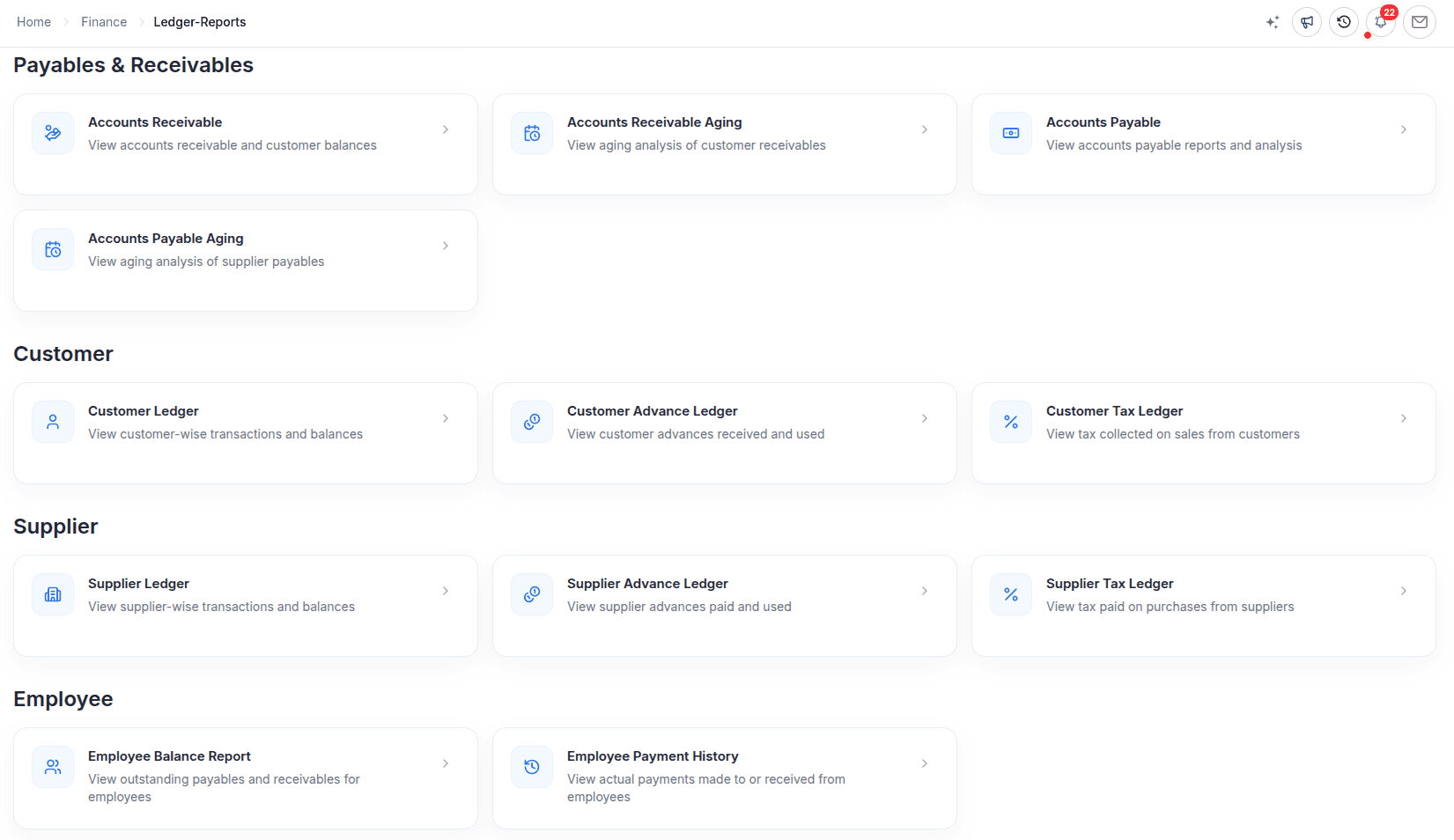
Use statements, registers, party ledgers, ageing, tax reports, and transaction analysis.
Inside ERPX Financials
From accounting structure to close and reporting
Each view supports a distinct finance responsibility while retaining the operational records behind the numbers.
Accounting foundation
Shape the ledger around the way the business is managed
Fiscal years, account groups, posting accounts, opening balances, Cost Centers, and Project dimensions provide the structure every connected financial transaction uses.
Chart of accounts guide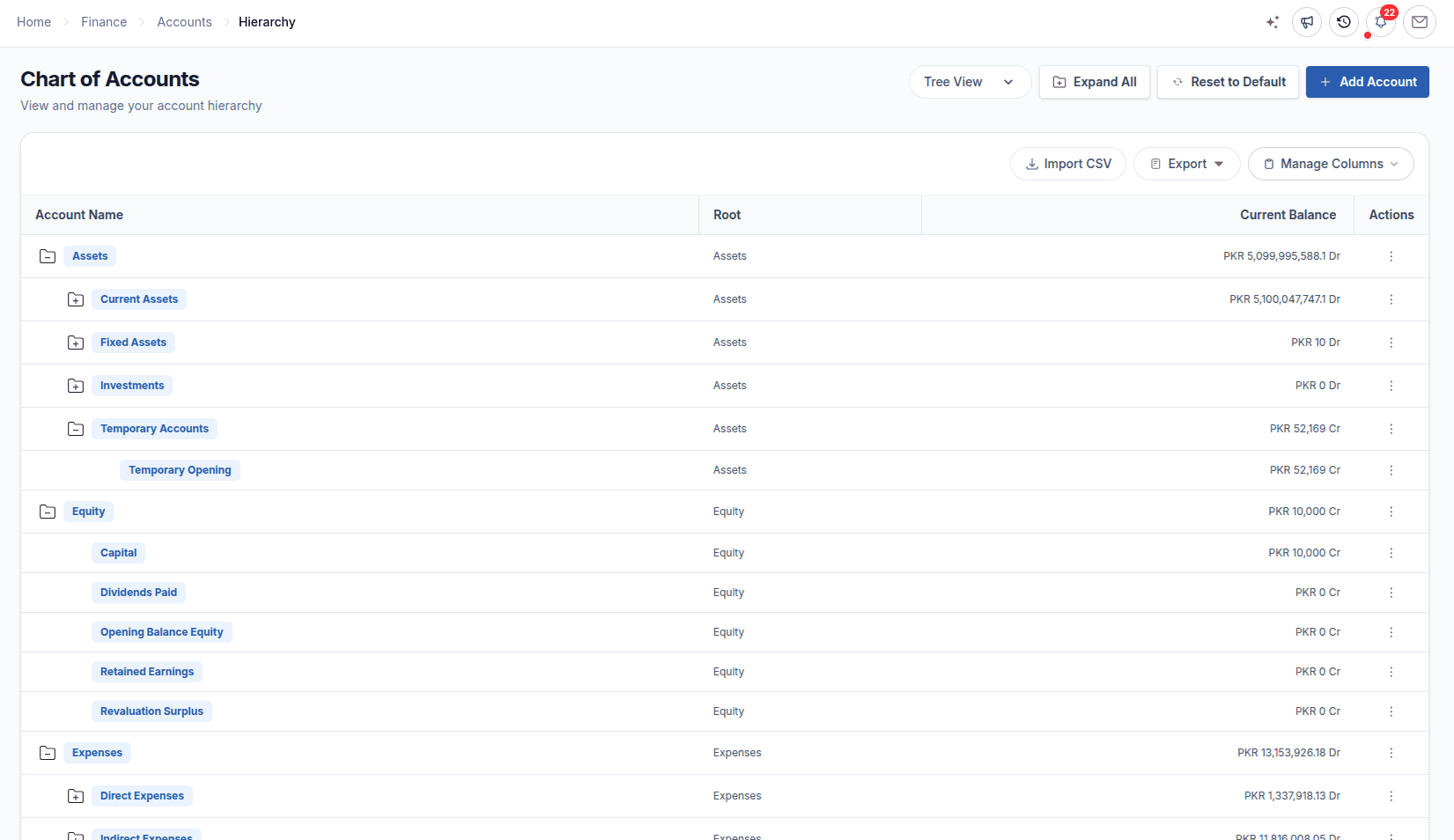
Record and invoice
Capture controlled entries without losing commercial context
Journal entries support routine, opening, correction, accrual, reversal, tax, and exchange work. Sales and purchase invoices retain party, item, tax, due-date, dimension, and settlement details from the transaction behind each bill.
Journal entries guide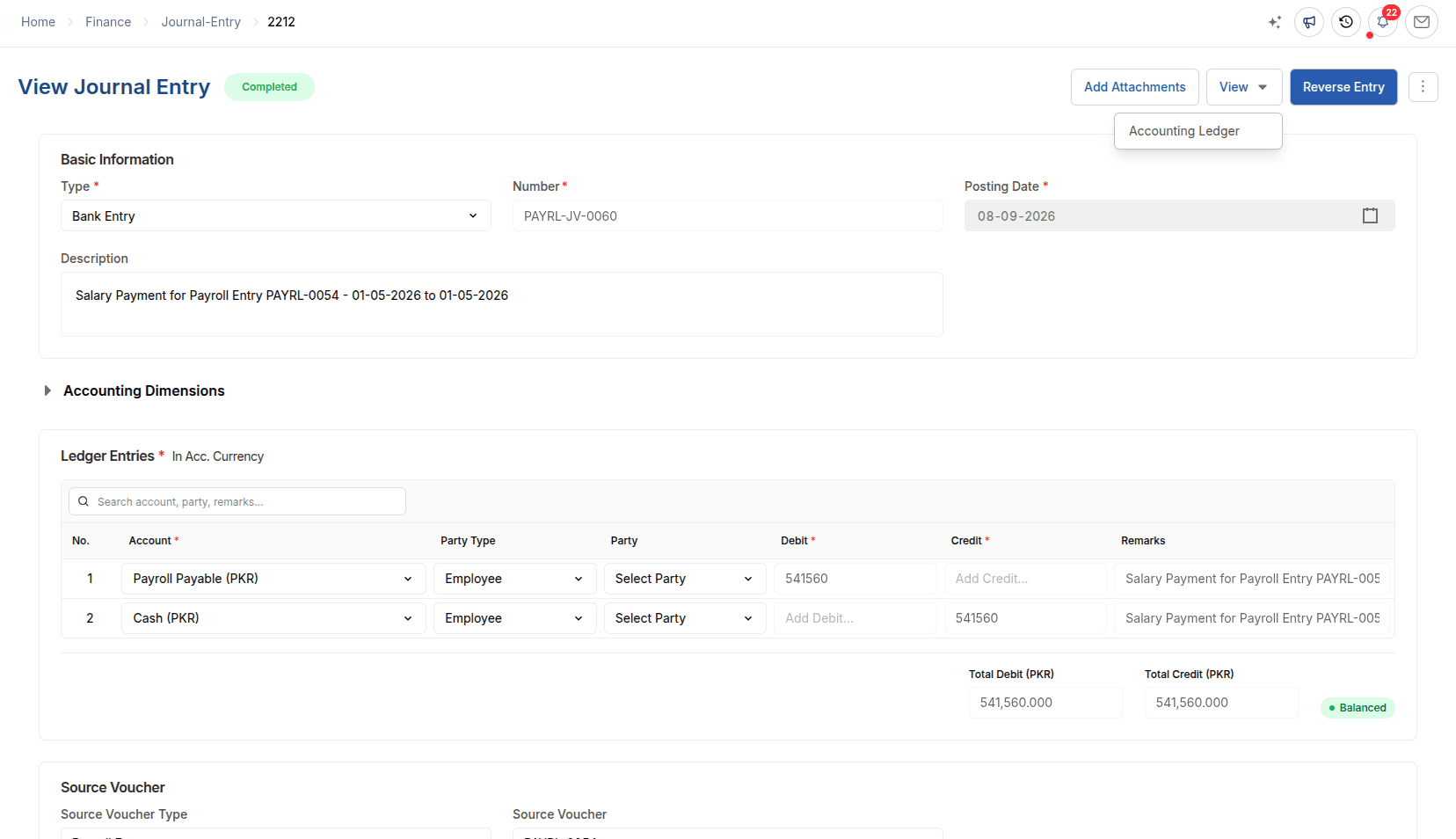
Reconcile and control
Know what cleared, what remains open, and where spending stands
Payment reconciliation allocates money against open documents, bank reconciliation compares book activity with bank records, and Project or Cost Center budgets monitor utilization. Multi-currency records retain transaction and company-currency context with supported exchange adjustments.
Bank reconciliation guide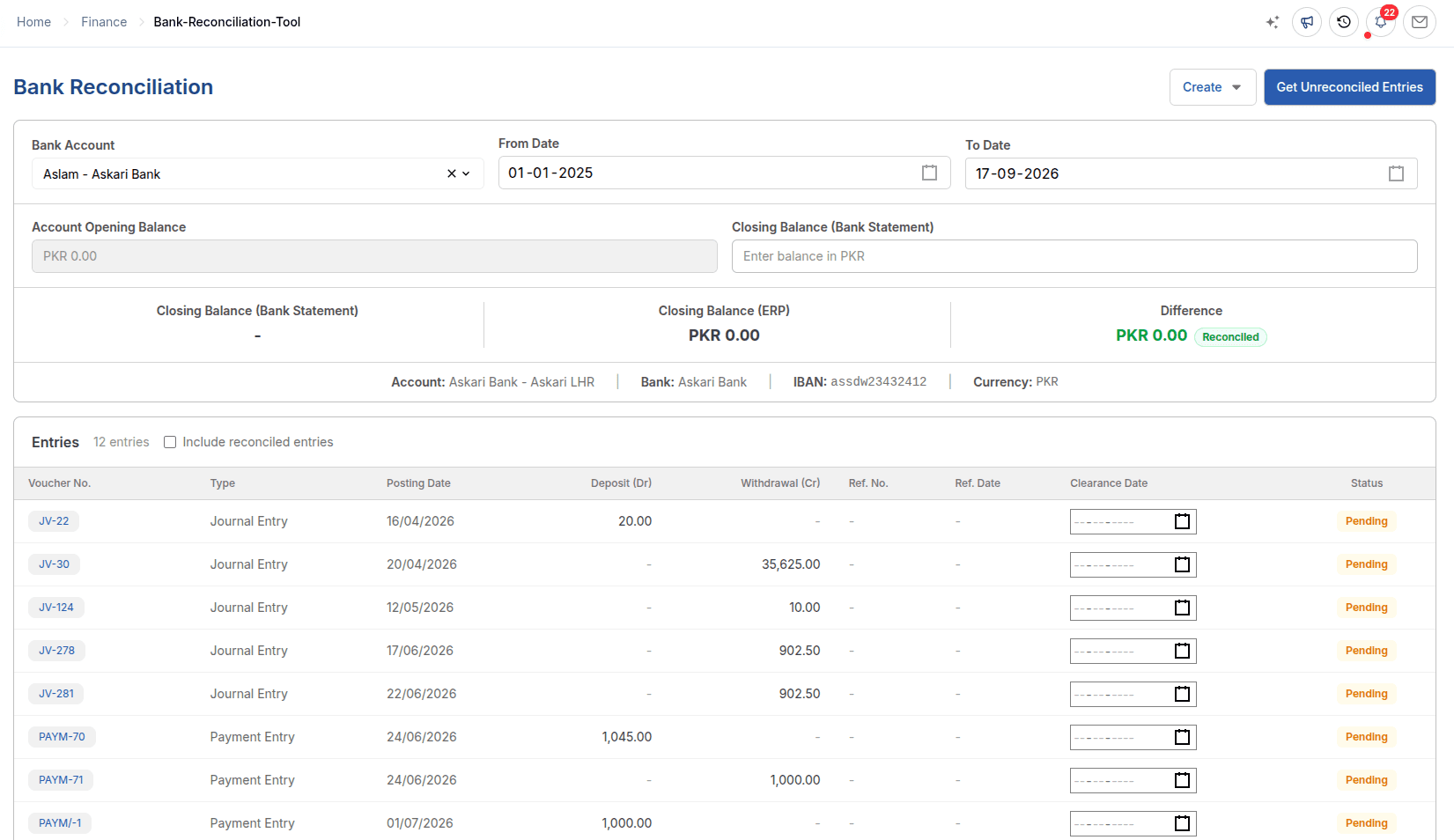
Close and explain
Move from period review to statements with the source trail available
Period closing helps finance teams review incomplete ledger-affecting work before close. Financial statements, ledgers, ageing, registers, tax reports, and operational analysis then explain the completed period without disconnecting summaries from source records.
Period closing guide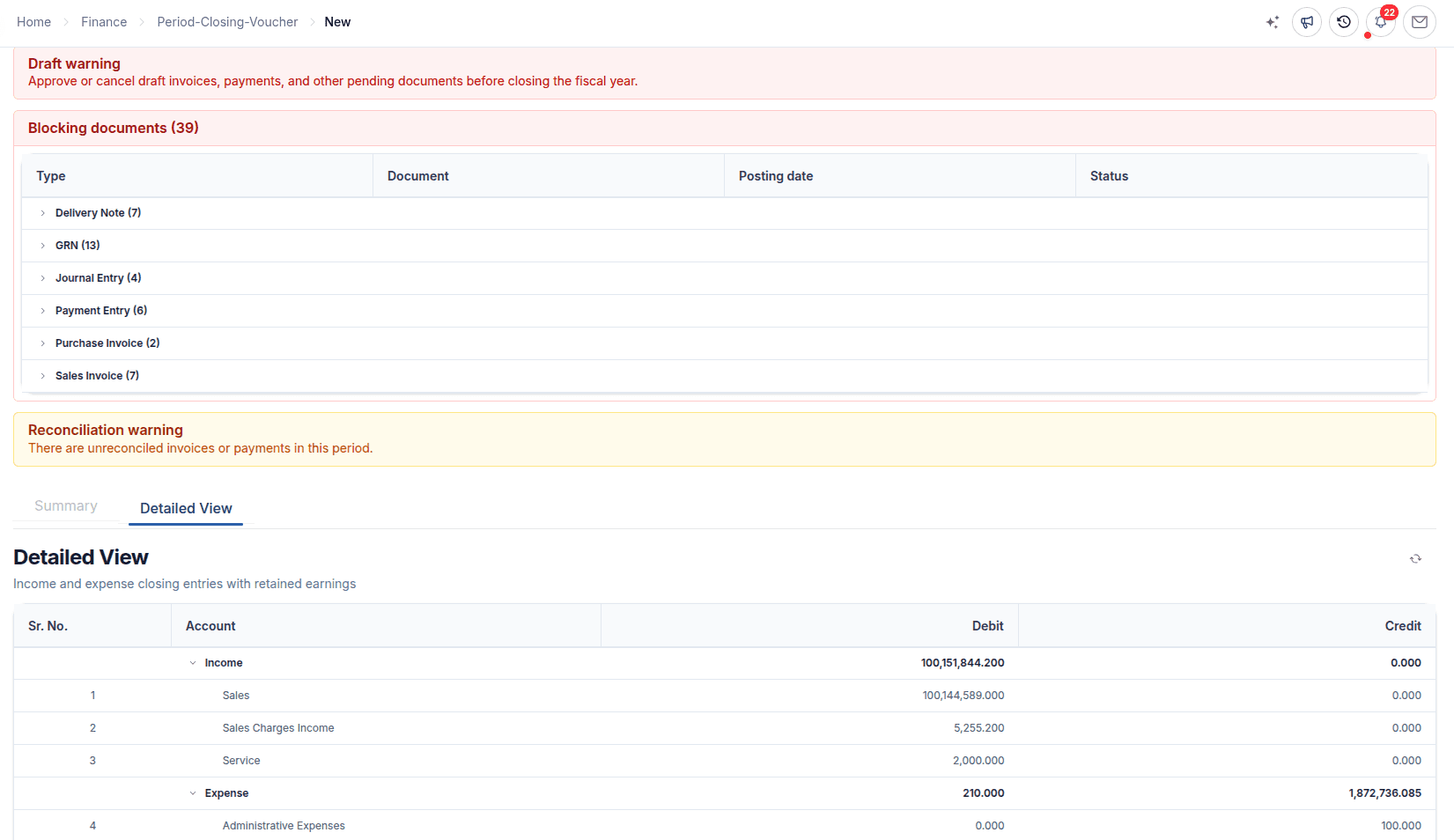
Working capital
Receivables and payables follow two sides of the same control cycle
ERPX keeps customer money and supplier money distinct while giving finance teams a consistent path from source document to settlement and ledger review.
| Control point | Accounts receivable | Accounts payable |
|---|---|---|
| Source | Sales invoices and customer adjustments | Purchase invoices and supplier adjustments |
| Settlement | Receipts allocated to open customer documents | Payments allocated to open supplier documents |
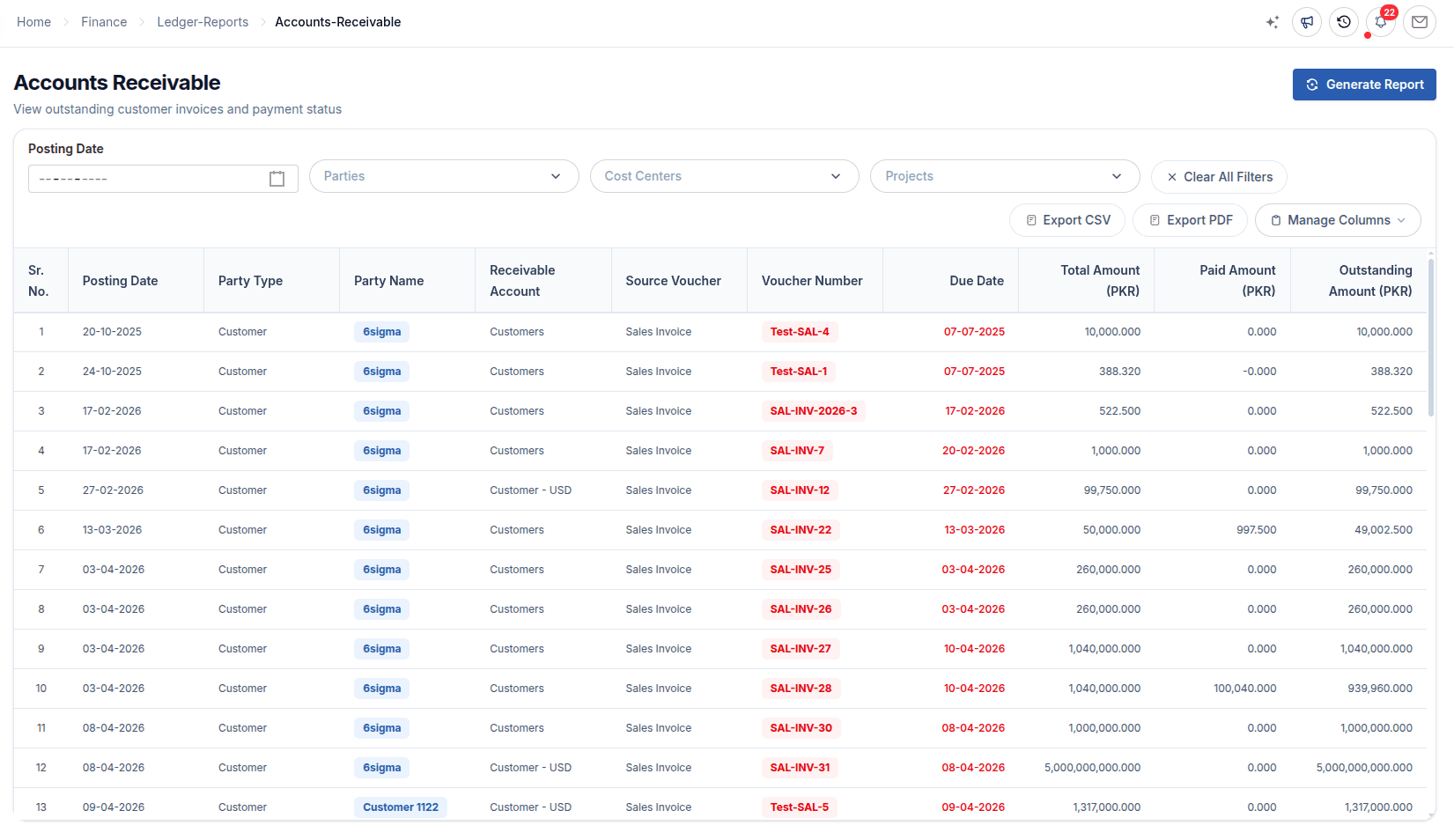
| Review | Customer ledger, outstanding, and ageing analysis | Supplier ledger, outstanding, and ageing analysis |
Reconciliation and currency
Know what cleared, what remains open, and which currency a value represents
Bank reconciliation compares ERP entries with bank activity and records cleared items. Payment reconciliation allocates money against open documents. When a customer in Europe pays an invoice in EUR and your company reports in USD, ERPX keeps both values and posts realized exchange differences as adjustment entries.
Transaction currency
The currency on the source document, such as EUR
Company currency
The reporting value the ledger keeps, such as USD
Operational fit
Connected accounting for finance teams ready to standardize control
Where ERPX Financials adds value
- Manufacturers, traders, distributors and exporters that want sales, purchasing and stock to post to one ledger
- Finance teams managing receivables, payables, bank activity and budgets across one or more currencies
- Businesses that need tax and charges configured per company and country, rather than a fixed set of rates
What helps teams get the most from it
- Teams replacing separate invoicing or bookkeeping tools with accounting connected to operations
- Finance teams prepared to define a chart of accounts, fiscal years, dimensions and who owns each control
- Organizations that pair the software with their own accounting policy and professional review
Control outcomes
A clearer financial operating rhythm
Traceable records
Review financial entries with the owning operational document close at hand.
Consistent control
Use fiscal periods, dimensions, reconciliation, budgets, and closing processes consistently.
Decision context
Bring statements, ledgers, ageing, taxes, and operational analysis into one reporting environment.
Product documentation
Continue from the buying case to task-level guidance
These guides explain configuration, controls, transactions, and reports in the live ERPX product.
Connect project delivery to finance
See how ERPX Projects links work, timesheets, planned and actual revenue, cost, and margin context.
Explore ERPX ProjectsEvaluating ERPX for your finance team?
Check who can post, approve and close, read the task guides, then bring a month of your own invoices to a demo.
Buyer questions
Financials questions from ERP buyers
What does ERPX Financials include?
ERPX Financials includes the chart of accounts, fiscal years, accounting dimensions, tax and charge templates, journal entries, sales and purchase invoices, payment entries, payment reconciliation, bank reconciliation, budgets, period closing, and financial, ledger and tax reports. It is part of the ERPX cloud ERP, so these records share data with Sales, Purchase, Inventory, Manufacturing, HR and Projects.
Does it connect to sales and inventory automatically?
Yes. When a delivery note is submitted, ERPX takes the stock out of the warehouse and posts cost of goods sold at the valuation rate for the dispatch date. When the sales invoice is submitted, it books the receivable and the revenue. On the purchase side, goods receipts and supplier invoices post stock and payables in the same way, so finance does not re-enter operational transactions.
Can I track receivables from export orders paid by letter of credit?
Yes. In ERPX a letter of credit is linked to the sales order. Delivery notes can pull their items from the letter of credit, the sales invoice books the receivable against the customer, and the payment entry settles it when funds arrive. Customer ledger, outstanding and ageing reports then show what is still open on each order.
Does it support multiple currencies?
Yes. Invoices, payment entries and journal entries keep the transaction currency, for example EUR or USD, alongside the value in your company currency. When the currencies of the paying and receiving accounts differ, the payment entry records both amounts. Realized exchange differences are posted as exchange adjustment journal entries.
How do bank reconciliation and period closing work?
Bank reconciliation compares the balance in your books with the bank statement. You clear the entries that match and record any genuine bank transactions that are missing. Period closing checks for incomplete work that affects the ledger, shows the effect of the close, and closes the fiscal year. Reopening a closed year follows a controlled path.
Can I set budgets and compare them with actuals?
Yes. You can allocate a budget to a project or cost center for each fiscal year. ERPX tracks how much of it has been used. Depending on the enforcement you configure, it can monitor spending, warn the user, or block a transaction that would exceed the budget.
Can my accountant export data or use the API?
Yes. Financial reports can be exported to CSV for analysis and to PDF for presentation, where the report offers it. For system integrations, ERPX provides a documented REST API. Access in both cases follows the roles and permissions set for each user.
See ERPX Financials
Bring your own chart of accounts.See posting, reconciliation and close in ERPX.
Bring your account structure and a month of real invoices. We will walk through posting, reconciliation and close with your data.
Pick a workflow from
- Finance
- Sales
- Inventory
- Projects